AWS STS (Security Token Service)
Overview
- AWS STS is a core AWS service used to create temporary, limited-privilege credentials for accessing AWS resources.
- These credentials are short-term and consist of:
- Access Key ID
- Secret Access Key
- Session Token (time-limited)
Purpose
- Provides temporary security credentials instead of long-term IAM user credentials.
- Commonly used when:
- Access must be limited in time or scope.
- Cross-account access is required.
- Federated users (from external identity systems) need AWS access.
- Applications or EC2 instances assume roles to access AWS services securely.
How It Works
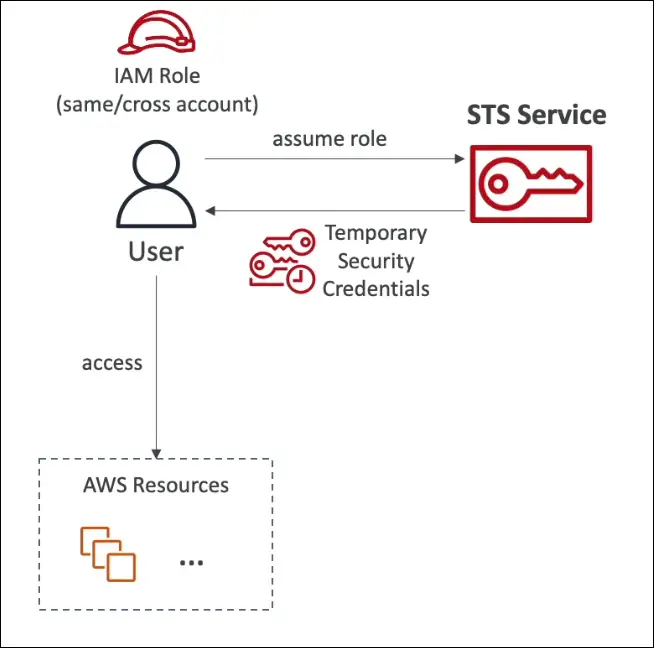
- A user or service assumes a role using an STS API call (for example,
AssumeRole). - STS returns temporary credentials (access key, secret key, session token).
- These credentials are used to access AWS resources as defined by the role’s permissions.
- Credentials expire automatically after a specified duration.
Key Use Cases
- Identity Federation
- Users managed in an external system (e.g., corporate directory, SSO provider) can obtain STS tokens to access AWS resources.
- Allows integration with systems like Active Directory, Google Workspace, or SAML providers.
- Cross-Account Role Access
- Allows an IAM user in one AWS account to assume a role in another account.
- Facilitates secure sharing of resources between AWS accounts.
- EC2 Instance Roles
- EC2 instances can assume IAM roles automatically.
- AWS refreshes credentials in the background using STS to maintain temporary access tokens.
Example
- An application running on an EC2 instance needs to access an S3 bucket.
- The instance assumes a role with permissions for S3.
- STS issues temporary credentials.
- The credentials are automatically rotated and expire after a short period.
Exam Tip
- Whenever you see a question about temporary, limited-privilege credentials, cross-account access, or federated identity, the correct answer often involves AWS STS.
Amazon Cognito
Overview
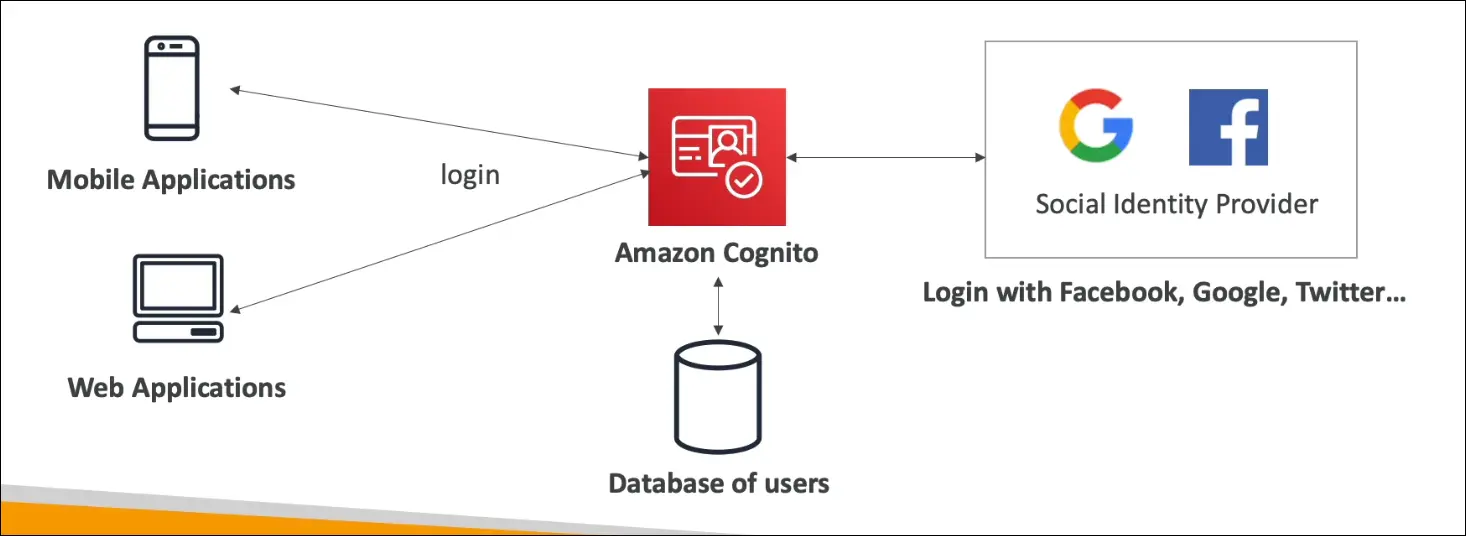
- Amazon Cognito provides user identity and authentication for web and mobile applications.
- It allows millions of application users to sign up, sign in, and access resources securely.
- Do not create IAM users for app users, since IAM is only for AWS administrators and employees who access AWS directly.
Key Features
User Management
- Cognito manages its own user database (called User Pools) that can store millions of users.
- It supports registration, authentication, and account recovery for application users.
Federated Identity
- Allows users to sign in with external identity providers such as:
- Apple
- Amazon
- SAML-based enterprise providers
- Users can log in via social sign-in (for example, “Login with Google”).
- Allows users to sign in with external identity providers such as:
Integration with Applications
- Web and mobile apps integrate directly with Cognito’s SDK or API.
- Handles token-based authentication (JWT) and temporary AWS credentials for resource access.
Core Components
- Cognito User Pools
- Provide user directory and authentication (sign-up/sign-in).
- Used to manage users directly within Cognito.
- Cognito Identity Pools (Federated Identities)
- Provide temporary AWS credentials to access AWS services after users authenticate.
- Work together with STS to assume roles securely.
Use Case
- When building a web or mobile app that requires user authentication and identity management.
- Example: An app allowing users to log in using email/password or social accounts via Cognito.
Exam Tip
- For user authentication and sign-in functionality in web/mobile apps, use Amazon Cognito.
- For temporary AWS credentials for users after login, Cognito uses STS behind the scenes.
- IAM users are for internal AWS users, not application end-users.
Microsoft Active Directory (AD)
Overview
- Microsoft Active Directory (AD) is a Windows-based directory service used for managing users, computers, printers, and permissions in a network.
- It provides Centralized Security Management within an organization’s network.
Core Concepts
- AD runs on Windows Server with Active Directory Domain Services (AD DS).
- Stores and manages objects, including:
- User accounts
- Computers
- Groups
- Printers
- File shares
- Uses a Domain Controller (DC) to authenticate users and devices.
- Example: A corporate laptop can log in using a single username and password across all company systems connected to the same domain.
Purpose
- Enables single sign-on (SSO) and centralized user management.
- Commonly used in on-premises (corporate) environments.
- AWS doesn’t include AD by default, but it provides ways to integrate or extend AD using AWS Directory Services.
AWS Directory Service
Purpose
- Extends or connects on-premises Active Directory to AWS Cloud.
Types of AWS Directory Services
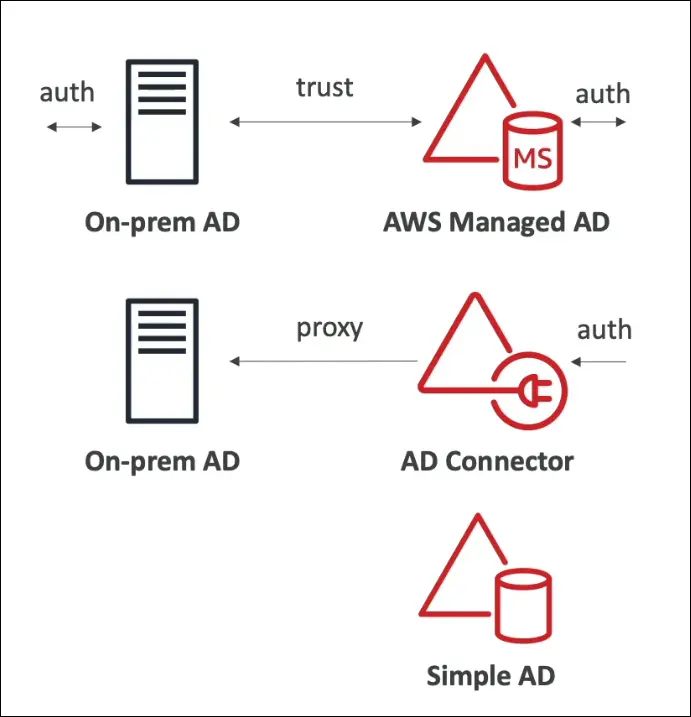
1. AWS Managed Microsoft AD
- Fully managed Microsoft Active Directory hosted on AWS.
- You can:
- Create and manage users and groups within AWS.
- Enable Multi-Factor Authentication (MFA).
- Establish trust relationships with existing on-premises AD.
- Suitable for organizations already using AD that want hybrid cloud integration.
2. AD Connector
- A proxy that redirects authentication requests from AWS to on-premises AD.
- Users and credentials remain on-premises (no data is copied to AWS).
- Supports MFA and provides seamless access for AWS services.
- Ideal when you want to use your existing AD without migration.
3. Simple AD
- A standalone directory that is Active Directory–compatible, but not Microsoft AD.
- Hosted and managed on AWS.
- Cannot be joined with an on-premises AD.
- Best for small organizations or test environments needing basic directory features.
Exam Tip
- In the AWS Certified Cloud Practitioner exam, you only need to know that:
- AWS Directory Service is used for Active Directory integration.
- It supports Microsoft Active Directory use cases in the cloud.
- You don’t need to memorize the details of each directory type.
Summary Table
| Directory Type | Description | Connects to On-Prem AD | Managed by AWS | Use Case |
|---|---|---|---|---|
| AWS Managed Microsoft AD | Full Microsoft AD hosted on AWS | Yes | Yes | Hybrid cloud integration |
| AD Connector | Proxy to on-premises AD | Yes | Partially | Use existing AD without migration |
| Simple AD | Lightweight AD-compatible directory | No | Yes | Small-scale or testing |
AWS IAM Identity Center (Successor to AWS Single Sign-On)
Overview
- IAM Identity Center (formerly AWS Single Sign-On) provides single sign-on (SSO) access for:
- Multiple AWS accounts (in an AWS Organization)
- Business cloud applications (e.g., Salesforce)
- SAML 2.0–enabled applications
- EC2 Windows instances
- Purpose: One login for all authorized AWS accounts and applications.
Key Features
Centralized User Access Management
- Users sign in once and gain access to all assigned accounts or apps.
- Reduces the need to manage separate IAM users for each AWS account.
- Simplifies multi-account management within AWS Organizations.
Identity Sources (Where User Data Lives)
- Built-in Identity Store (default in IAM Identity Center)
- External Identity Providers supported, such as:
- Microsoft Active Directory
- Okta
- OneLogin
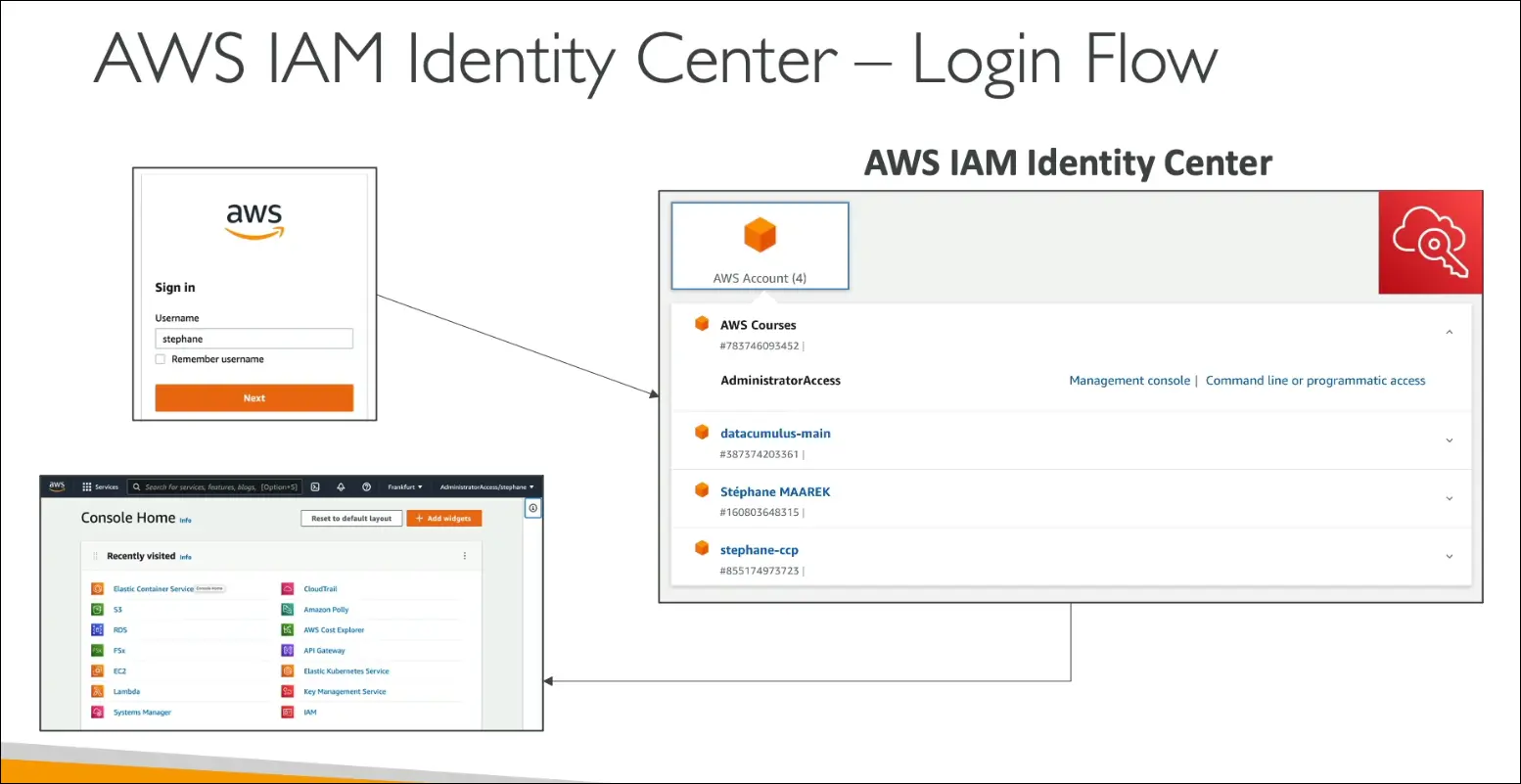
Access Portal
- Users log in through a single URL.
- After signing in, they see a dashboard listing all AWS accounts and roles they can access.
- They can launch the AWS Management Console for any account directly from the portal.
Benefits
- Simplified user management across multiple AWS accounts.
- Improved security using a centralized identity system.
- Supports SSO for third-party and internal business applications.
- Reduces password fatigue and administrative overhead.
Exam Tips
- If you see “one login for multiple AWS accounts” or “single access point for all AWS accounts or applications”, the correct answer is IAM Identity Center.
- Remember that it replaced AWS Single Sign-On (SSO).
- Focus on:
- Centralized login
- Integration with identity providers
- Access management for multiple accounts
Summary Table
| Feature | Description |
|---|---|
| Service Name | AWS IAM Identity Center (formerly AWS SSO) |
| Purpose | Centralized single sign-on for AWS accounts and apps |
| Identity Sources | Built-in store, Microsoft AD, Okta, OneLogin |
| Protocol Support | SAML 2.0 |
| User Access | One login for all AWS accounts and assigned apps |
| Exam Keyword | “One login for multiple AWS accounts” → IAM Identity Center |
AWS Advanced Identity
1. IAM (Identity and Access Management)
Used for identity and access management within a single AWS account.
You can create and manage users, groups, and permissions for people you trust in your organization.
2. AWS Organizations
Allows you to manage multiple AWS accounts centrally.
Useful for applying policies and permissions across many accounts.
3. AWS STS (Security Token Service)
Issues temporary, limited-privilege credentials for accessing AWS resources.
Commonly used for cross-account access or temporary user sessions.
4. Amazon Cognito
Helps you create a user database for web and mobile apps.
Manages user sign-up, sign-in, and authentication.
5. AWS Directory Service
Integrates Microsoft Active Directory with AWS resources.
Used when an organization wants to extend its on-premises AD into AWS.
6. AWS IAM Identity Center (formerly AWS SSO)
Provides a single login for accessing multiple AWS accounts and third-party applications.
Makes it easy to navigate across all accounts using one identity.
In short:
IAM handles identity within one account,
Organizations manage multiple accounts,
STS provides temporary credentials,
Cognito manages app users,
Directory Service connects Active Directory,
and IAM Identity Center offers one login for all accounts and apps.