AWS Databases & Analytics – Notes
What is a Database?
- Stores data in a structured way.
- Allows indexes for efficient querying/searching.
- Unlike raw storage (EBS, S3, EFS, EC2 Instance Store), databases provide structure and relationships between data.
Types of Databases
a. Relational Databases (SQL)
- Oldest and most common type.
- Data stored in tables (rows & columns) with relationships.
- Example: Students table linked to Departments table by
department_id. - Query language: SQL (Structured Query Language).
- Scaling: Vertical (scale up) is common, horizontal scaling is harder.
b. NoSQL Databases (Non-Relational)
- Stands for Non-SQL (not relational).
- Modern, built for specific purposes and flexible schema.
- Benefits:
- Flexible and schema-less.
- Scales horizontally (add distributed servers).
- High performance, optimized for specific models.
- Examples:
- Key-value stores.
- Document stores (JSON).
- Graph databases.
- In-memory databases.
- Search databases.
- JSON (JavaScript Object Notation) commonly used to store data.
- Supports nested fields, arrays, and evolving schemas.
AWS Shared Responsibility Model for Databases
- Managed Databases (AWS responsibility):
- Quick provisioning.
- Built-in High Availability (HA).
- Easy scaling (vertical + horizontal).
- Automated backups, restore, patching, upgrades.
- Integrated monitoring & alerting.
- AWS handles OS patching & maintenance.
- Self-Managed Databases (Your responsibility on EC2):
- You handle resiliency, patching, backups, HA, fault tolerance, scaling.
- Much more operational overhead.
Exam Tip
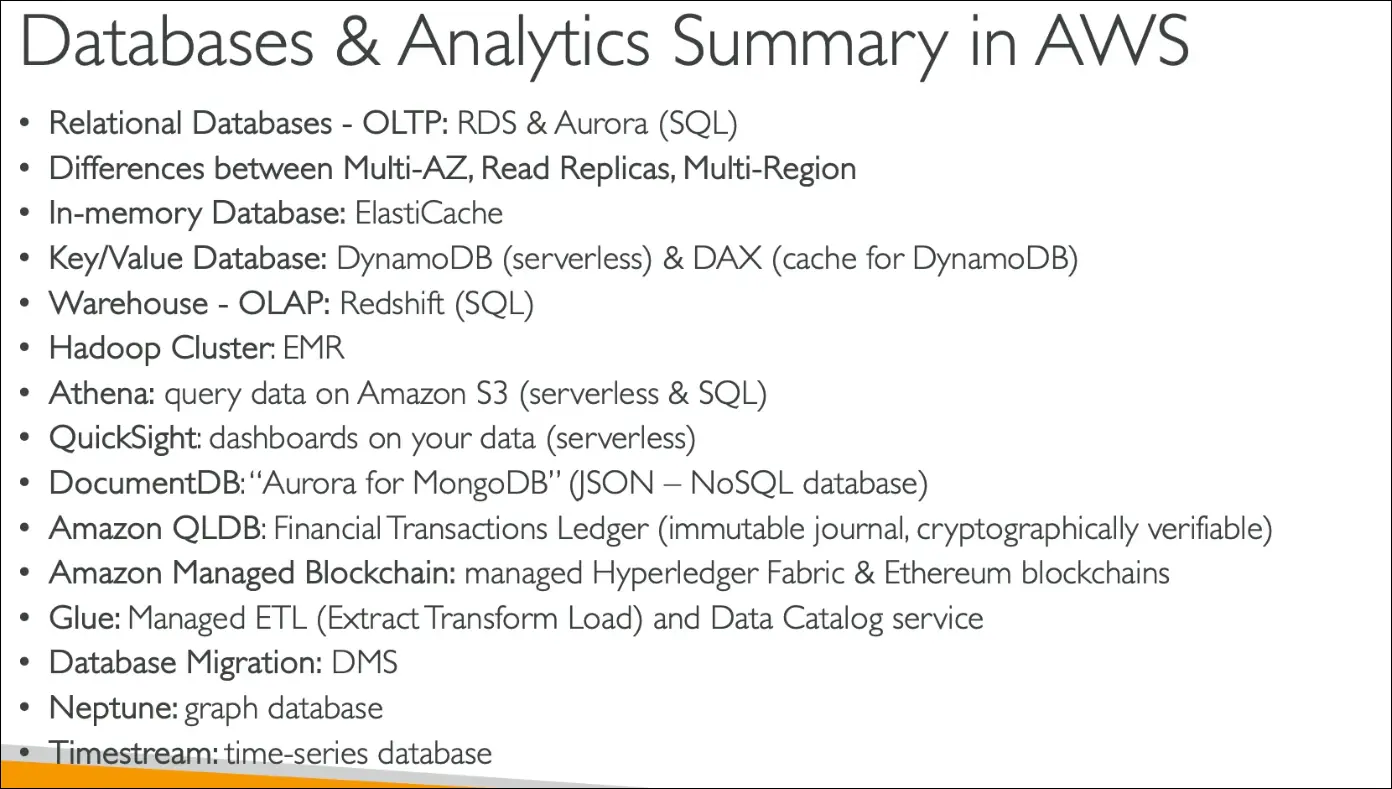
- For the CCP exam: Know which AWS managed database fits which use case.
- Example: RDS (Relational), DynamoDB (NoSQL key-value), Neptune (Graph), ElastiCache (In-memory), OpenSearch (Search).
Key takeaway: Use AWS managed databases unless explicitly required to run your own. Managed services simplify ops, scaling, backups, and patching.
AWS Relational Databases – RDS & Aurora
Amazon RDS (Relational Database Service)
- Fully managed SQL databases in AWS.
- Supports: PostgreSQL, MySQL, MariaDB, Oracle, SQL Server, IBM DB2, Aurora.
- Benefits:
- Automated provisioning, patching, backups (Point-in-Time Restore).
- Monitoring dashboards built-in.
- Read replicas for scaling read workloads.
- Multi-AZ deployments for disaster recovery.
- Maintenance windows for controlled upgrades.
- Vertical & horizontal scaling, storage backed by EBS.
- Limitations: You cannot SSH into the RDS instance.
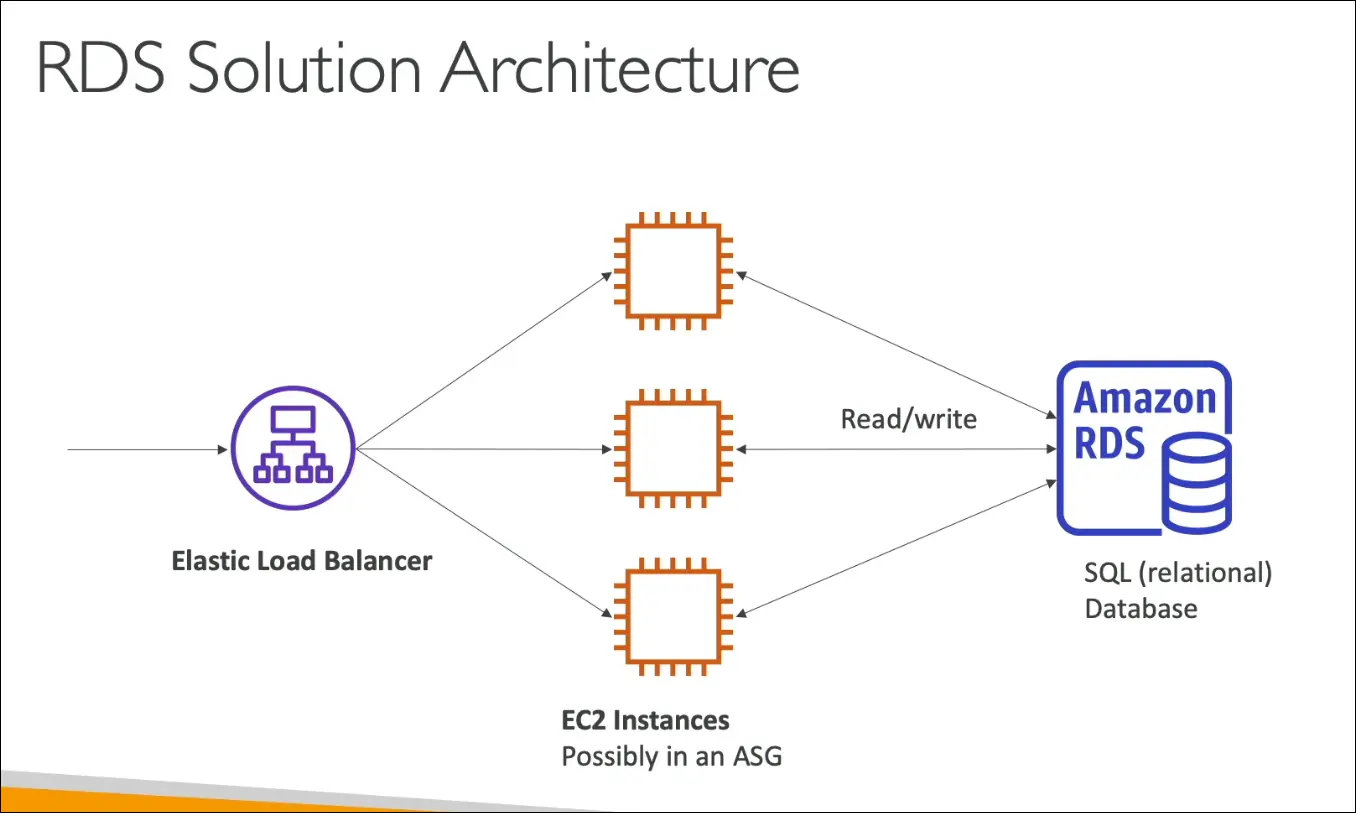
- Architecture fit:
- Load balancer → EC2 (app tier) → RDS (database tier).
- Classic 3-tier architecture.
Amazon Aurora
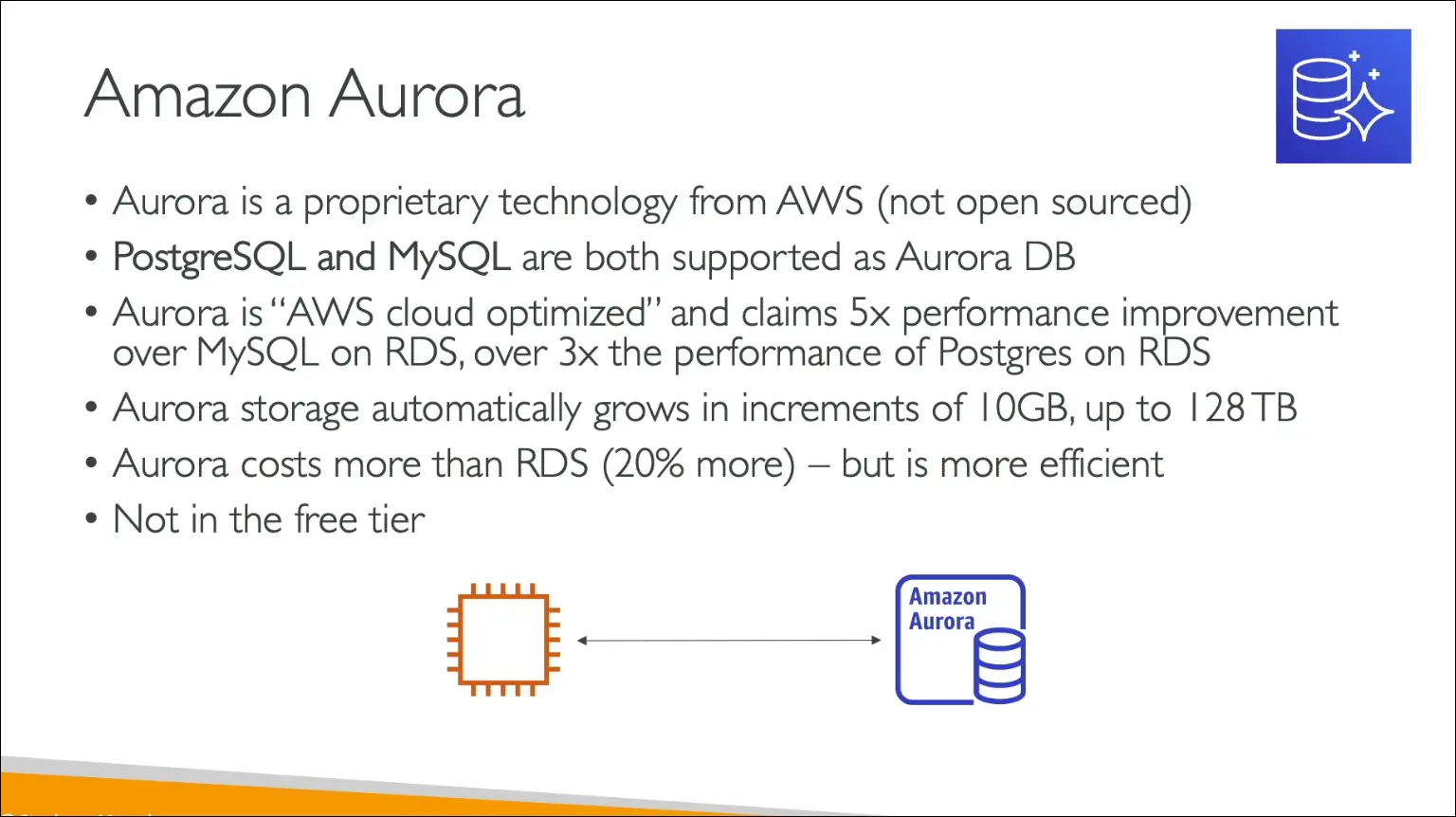
- AWS proprietary relational database (not open source).
- Compatible with PostgreSQL & MySQL.
- Benefits:
- Cloud optimized.
- Performance:
- 5x faster than MySQL on RDS.
- 3x faster than PostgreSQL on RDS.
- Auto-scaling storage (in 10 GB increments, up to 128 TB).
- 20% more expensive than RDS, but more efficient & cost-effective.
- Exam tip: RDS is in the Free Tier, Aurora is NOT.
Aurora Serverless
- Fully managed, auto-scaling Aurora.
- No capacity planning.
- Pay-per-second billing.
- Scales up/down based on usage (great for infrequent, intermittent, unpredictable workloads).
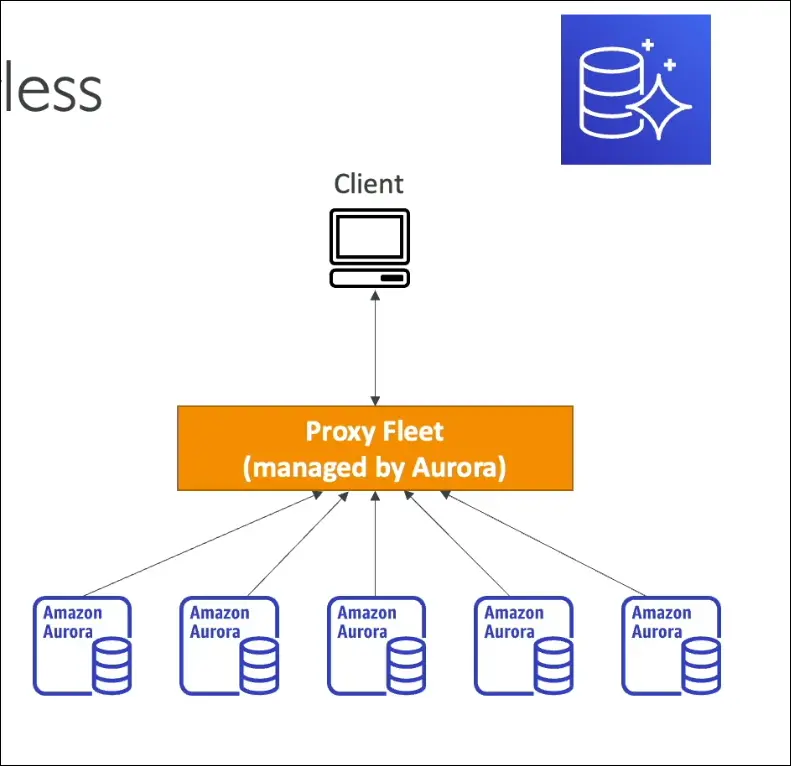
- Client connects to Aurora proxy fleet, which manages DB instances automatically.
- Exam keyword: “Aurora with no management overhead” = Aurora Serverless.
Exam perspective:
- For relational DBs in AWS: RDS & Aurora.
- RDS → managed, traditional engines (Postgres, MySQL, Oracle, SQL Server, MariaDB, DB2).
- Aurora → AWS-built, cloud-native, better performance, storage auto-scaling.
- Aurora Serverless → auto-scaling, pay-per-use, no management.
Amazon RDS – Deployment Options
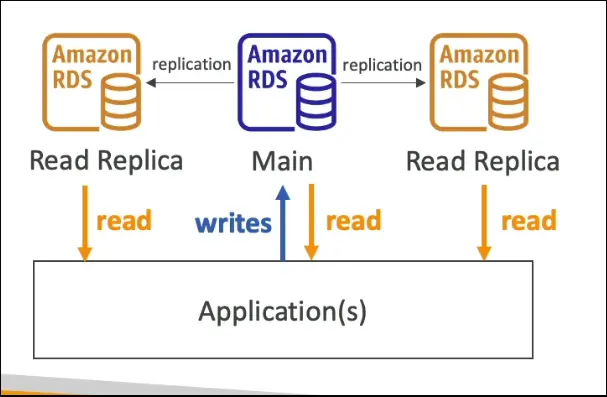
Read Replicas (Scale Reads)
- Used to scale read workloads.
- Up to 15 read replicas per RDS database.
- Applications can read from replicas, but writes always go to the main DB.
- ✅ Use Case: Scaling read-heavy workloads.
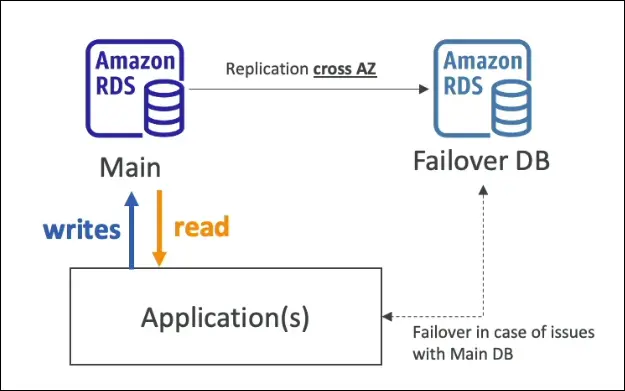
Multi-AZ (High Availability / Failover)
- Creates a synchronous standby copy of the DB in another Availability Zone.
- Standby DB is passive, not for reads/writes.
- If the main DB or AZ fails, automatic failover happens.
- Use Case: High Availability & Disaster Recovery within a region.
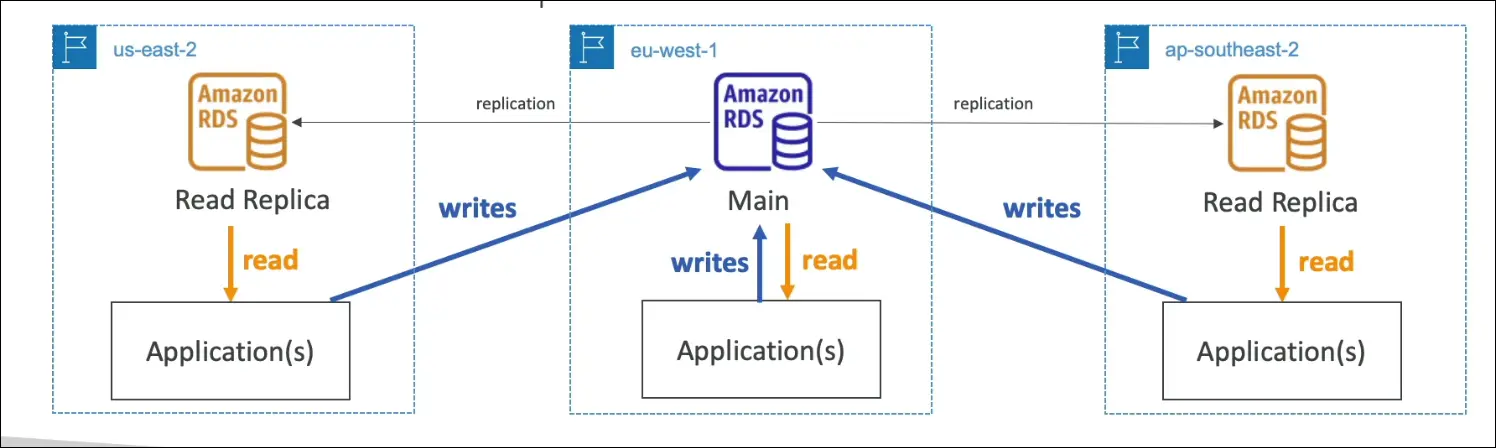
Multi-Region (Cross-Region Read Replicas)
- Deploys read replicas across AWS regions.
- Writes must still go to the main region DB.
- Benefits:
- Disaster recovery if a region goes down.
- Low latency for global applications (local reads).
- Extra cost for cross-region replication & data transfer.
- Use Cases: Global apps, regional DR, reduced latency for remote users.
Exam Tips
- Read Replicas = Scale reads (not HA).
- Multi-AZ = High availability (not for scaling).
- Multi-Region = Disaster recovery + lower latency for global apps.
Amazon ElastiCache
- AWS managed in-memory database.
- Supports Redis & Memcached engines.
- Provides high performance, low latency storage.
- Exam keyword: “in-memory database” → ElastiCache.
Why use ElastiCache?
- Offloads read-intensive workloads from RDS or other databases.
- Stores frequently accessed queries/results in memory for faster access.
- Example: Repeated queries on RDS → put results in ElastiCache → reduce RDS load.
Benefits (Managed Service)
AWS handles:
- OS maintenance & patching.
- Setup, configuration, monitoring.
- Optimizations.
- Failure recovery.
- Backups.
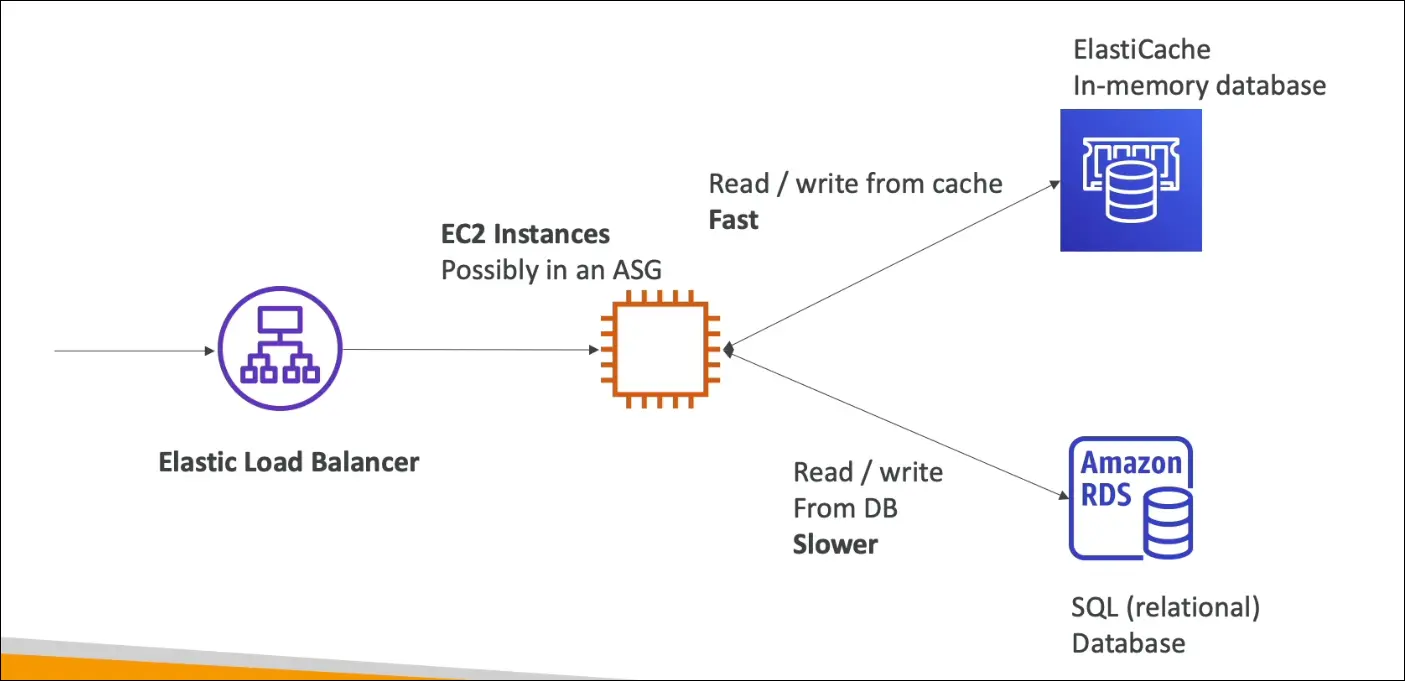
Typical Architecture
- Load Balancer → EC2 instances (ASG) → RDS.
- Add ElastiCache in between for caching queries.
- RDS = slower, disk-based.
- ElastiCache = very fast, memory-based.
- Reduces latency and pressure on RDS.
Exam Tips
- If you see in-memory, cache, low latency, Redis, Memcached → Answer is ElastiCache.
- Remember: ElastiCache is not a primary database, it’s a cache layer.
Amazon DynamoDB
Overview
- Fully managed NoSQL database (not relational).
- Highly available, replicates across 3 AZs.
- Serverless → no instance provisioning (AWS manages servers behind the scenes).
- Scales to millions of requests/sec, trillions of rows, hundreds of TBs.
- Performance: single-digit millisecond latency.
Key Features
- Low latency retrieval (exam keyword).
- Auto scaling + cost-effective pricing.
- Integrated with IAM (security, authorization, admin).
- Supports Standard & Infrequent Access (IA) table classes → cost savings.
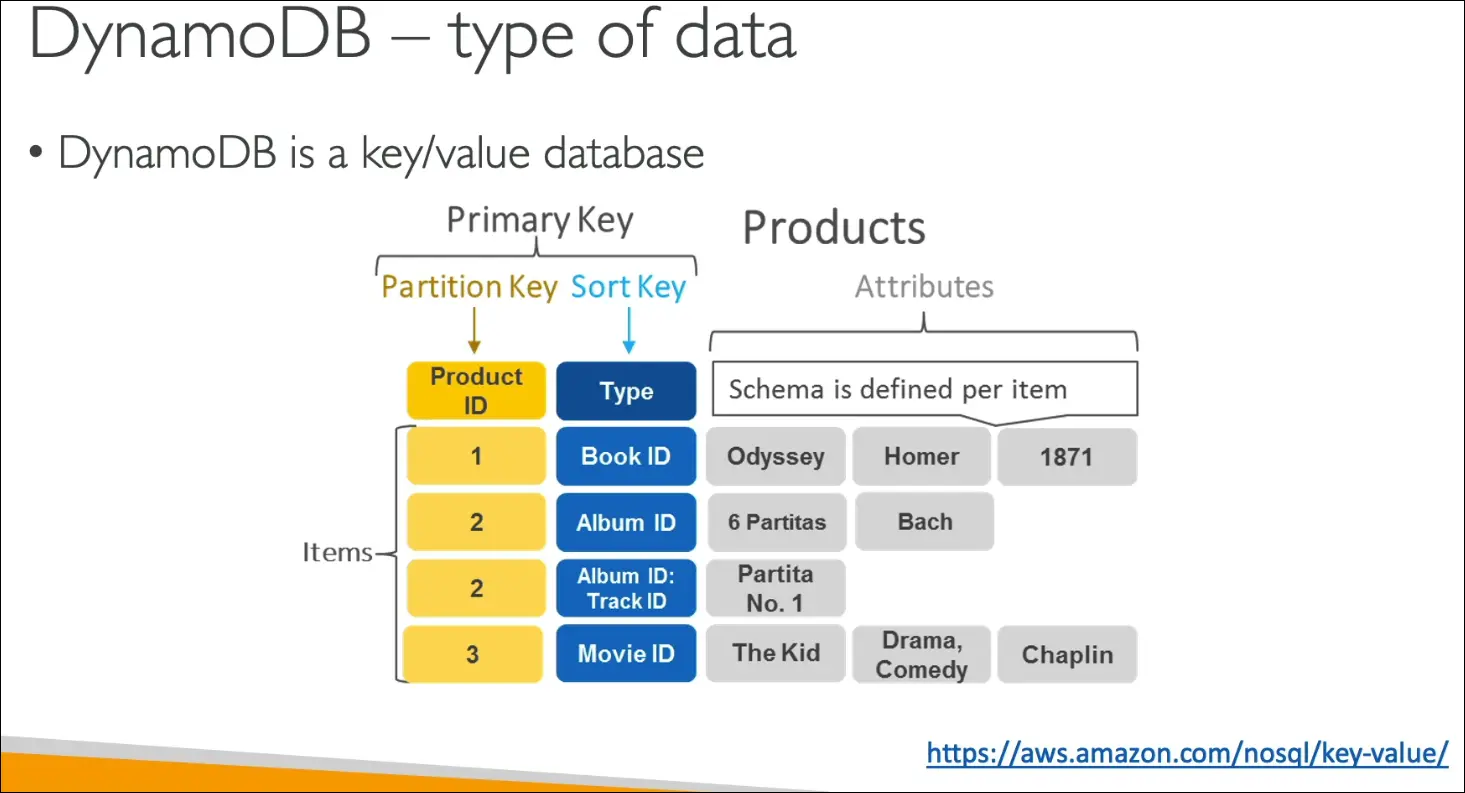
- Data model = Key-Value store:
- Primary Key = Partition Key OR Partition Key + Sort Key.
- Attributes = additional columns.
- Items stored row by row.
DynamoDB Accelerator (DAX)
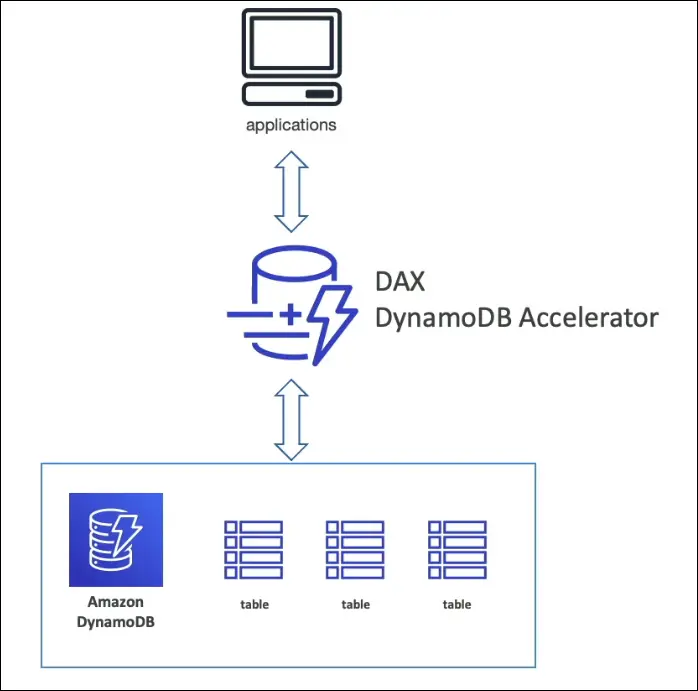
- Fully managed in-memory cache for DynamoDB.
- Purpose: Cache frequently read objects.
- Latency improvement:
- DynamoDB = ms latency.
- DAX = µs latency (10x faster).
- Only for DynamoDB (unlike ElastiCache, which works for many DBs).
- Use Case: If exam mentions cache for DynamoDB → Answer = DAX.
DynamoDB vs Other Services (Exam Traps)
- RDS = relational DB.
- ElastiCache = caching for many DBs, general purpose.
- DynamoDB = serverless, NoSQL, key-value.
- DAX = specific cache for DynamoDB.
Exam Keywords
- Serverless, NoSQL, low latency, single-digit ms latency, key-value store, partition key, sort key, DAX (µs latency).
DynamoDB Global Tables
What are Global Tables?
- A DynamoDB feature for multi-region, low-latency access.
- Makes a table accessible in multiple AWS regions.
- Designed for globally distributed applications.
How it works
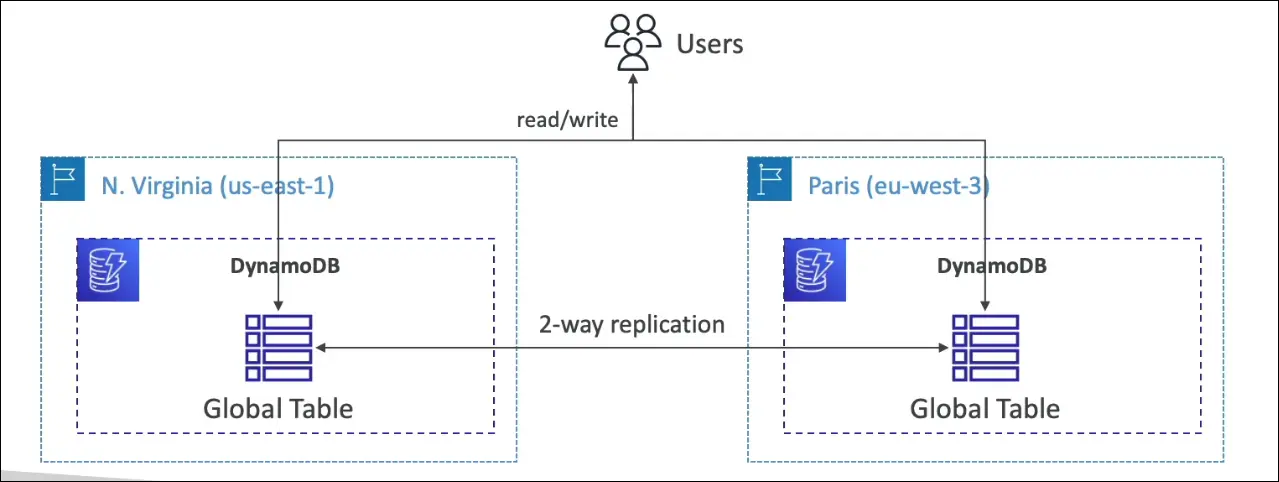
- You create a global table in one region (e.g.,
us-east-1). - Then replicate it automatically to other regions (e.g.,
eu-west-3). - Supports up to 10 regions.
- Data is two-way replicated between regions.
Key Properties
- Read/write in any region → not read-only.
- Data is synchronized across all regions.
- This is called Active-Active replication.
- Users near any region can read/write with low latency.
Exam Keywords
- “Global scale”, “multi-region”, “low latency”, “replication”, “active-active” → DynamoDB Global Tables.
- If the scenario asks for multi-region writes with automatic replication, the answer is Global Tables.
✅ One-liner for exam:
DynamoDB Global Tables = Multi-region, active-active, low latency access with automatic replication.
Amazon Redshift
- Database type: Based on PostgreSQL, but not OLTP (transactional).
- Purpose: OLAP (Online Analytical Processing) → Analytics & Data Warehousing.
- Exam keyword: If you see data warehouse, analytics, reporting, dashboards → Answer = Redshift.
Key Features
- Columnar storage (not row-based) → efficient for analytics.
- Massively Parallel Processing (MPP) engine → very fast computations.
- Performance: ~10x faster than traditional data warehouses.
- Scales to petabytes of data.
- Data loaded periodically (e.g., hourly), not continuously.
- SQL interface for queries.
- Integrated with BI tools → Amazon QuickSight, Tableau.
- Pricing: Pay as you go, based on provisioned instances.
Redshift Serverless
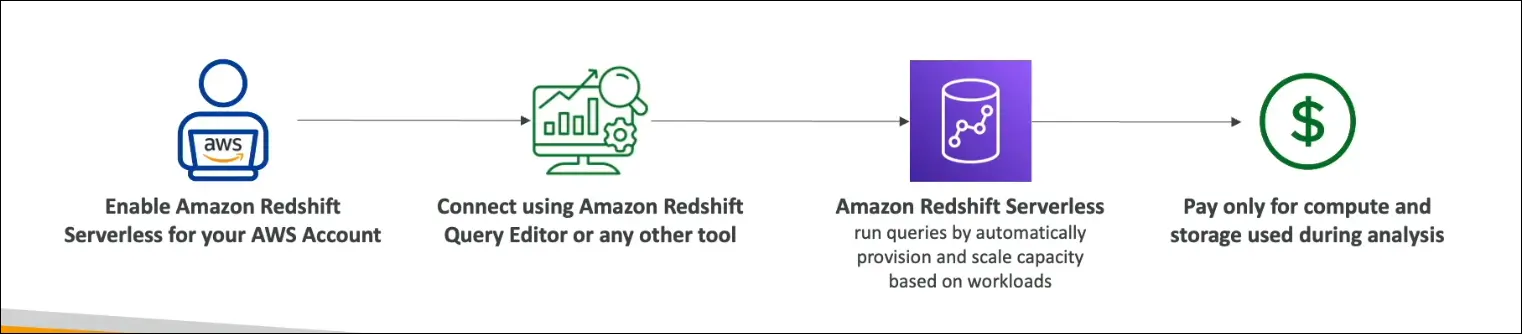
- No need to manage clusters or scaling → AWS handles infra.
- Run analytics workloads without managing infra.
- Pay only for compute + storage used.
- Auto-provisions and scales based on workload.
- Use cases: Reporting, dashboards, real-time analytics, cost-efficient ad-hoc queries.
Exam Keywords
- Redshift = OLAP, warehouse, analytics, columnar, MPP.
- Redshift Serverless = Run analytics without cluster management, pay per use.
✅ One-liner for exam: Amazon Redshift is a data warehouse service for analytics (OLAP) with columnar storage + MPP, and Redshift Serverless lets you run analytics without managing infra, paying only for what you use.
Amazon EMR (Elastic MapReduce)
- Definition:
Not exactly a database, but a service to create and manage Hadoop clusters for big data processing on AWS. - Hadoop Cluster:
- Used to analyze and process vast amounts of data.
- Runs across multiple EC2 instances that work together.
- Can scale to hundreds of EC2 instances.
- Ecosystem / Supported Frameworks:
- Apache Spark
- HBase
- Presto
- Flink
- Other tools in the Hadoop/Big Data ecosystem.
- EMR Responsibilities:
- Provisions and configures all EC2 instances in the cluster.
- Ensures they work together to analyze data.
- Supports auto-scaling.
- Integrated with Spot Instances for cost optimization.
- Use Cases:
- Big Data processing
- Machine Learning
- Web Indexing
- General Big Data workloads
- Exam Tip:
If you see “Hadoop cluster” in a question, the answer is Amazon EMR.
Amazon Athena – Notes
- Type: Serverless query service.
- Purpose: Run SQL queries directly on data in S3 (no loading required).
- Engine: Built on Presto.
Data Formats Supported
- CSV
- JSON
- ORC
- Avro
- Parquet
How It Works
- Store files in Amazon S3.
- Use Athena + SQL to query/analyze them.
- Can connect results to Amazon QuickSight for dashboards.
Pricing
$5 per TB of data scanned.
Cost savings if:
- Data is compressed.
- Data is columnar (e.g., Parquet, ORC) → scans less.
Use Cases
Business Intelligence & Reporting.
Analytics (ad-hoc queries).
Log Analysis:
- VPC Flow Logs
- ELB Logs
- CloudTrail Logs
- Other AWS service logs
Exam Tip
Keywords to match Athena:
- Serverless
- Analyze data in S3
- SQL queries
- Log analysis
✅ One-liner for exam: Amazon Athena is a serverless query service that lets you run SQL queries directly on S3 data, great for BI, reporting, and log analysis, and costs $5 per TB scanned.
Amazon QuickSight – Notes
- Type: Serverless, ML-powered Business Intelligence (BI) service.
- Purpose: Create interactive dashboards and visualize data for business insights.
Key Features
- Dashboards & Visualizations → charts, graphs, reports.
- Serverless → no infra management.
- Scalable → handles small to large datasets.
- Embeddable → integrate dashboards into apps.
- Pricing: Per-session model (pay only when users access).
Use Cases
- Business analytics.
- Building visualizations.
- Ad-hoc analysis.
- Generating insights for decision-making.
Integrations
QuickSight can run on top of:
- RDS
- Aurora
- Athena
- Redshift
- Amazon S3
- (and more AWS data sources)
Exam Tip
- Keywords to match QuickSight:
- Business Intelligence
- Interactive dashboards
- Visualization
- Insights for business users
✅ One-liner for exam:
Amazon QuickSight is a serverless BI service to build interactive dashboards and visualize data from sources like RDS, Redshift, Athena, and S3, with per-session pricing.
Amazon DocumentDB – Notes
- Type: NoSQL database.
- Purpose: AWS-managed, MongoDB-compatible database.
- Analogy: Just like Aurora is for MySQL/PostgreSQL, DocumentDB is for MongoDB.
Key Features
- Fully managed → AWS handles infra, backups, scaling.
- Highly available → Data replicated across 3 Availability Zones (AZs).
- Auto-scaling storage → grows in 10 GB increments.
- High performance → engineered to handle millions of requests per second.
- Document model → stores, queries, and indexes JSON-like documents.
- MongoDB compatibility → supports MongoDB APIs, tools, and drivers.
Use Cases
- Applications needing a document-oriented database.
- JSON data storage and querying.
- Workloads requiring horizontal scaling & high throughput.
Exam Tips
- MongoDB keyword → always maps to DocumentDB.
- NoSQL exam keyword → think DocumentDB or DynamoDB.
- If question involves replication, scalability, managed service, JSON documents → answer is DocumentDB.
✅ One-liner for exam:
Amazon DocumentDB is a fully managed, MongoDB-compatible NoSQL database for storing and querying JSON data, with multi-AZ replication, auto-scaling storage, and high throughput.
Amazon Neptune (Graph Database)
- Type: Fully managed graph database.
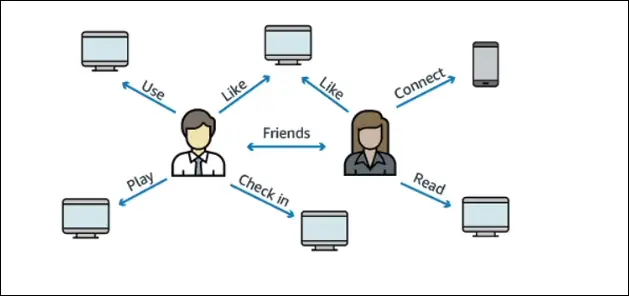
- Use case: Handles highly connected datasets (e.g., social networks).
- Example: Users have friends, posts, comments, likes, and shares — all form a graph of relationships.
Features
- Replication across 3 Availability Zones (AZs).
- Supports up to 15 read replicas.
- Stores billions of relationships.
- Query performance: millisecond latency for complex graph queries.
- Optimized for queries that are complex and hard on graph datasets.
- Highly available with multi-AZ replication.
Common Use Cases
- Social networks (friendships, posts, likes, comments).
- Knowledge graphs (e.g., Wikipedia, where articles are interconnected).
- Fraud detection.
- Recommendation engines.
- Graph-based applications in general.
Exam Tips
- If the exam mentions graph databases, always think of Amazon Neptune.
Amazon Timestream (Time Series Database)
- Type: Fully managed, fast, scalable, serverless time series database.
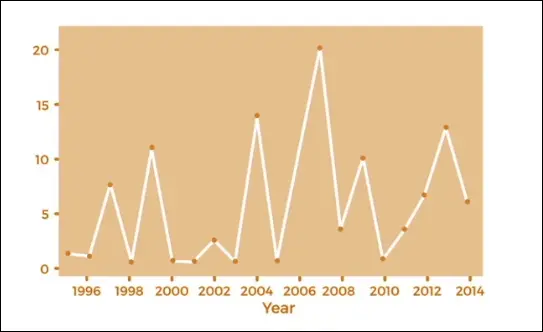
- Purpose: Specifically designed for time series data (data evolving over time).
- Example: Numbers (y-axis) changing over years/dates (x-axis).
Features
- Automatic scaling (up and down) based on compute and capacity needs.
- Can store and analyze trillions of events per day.
- Performance: ~1000x faster and ~1/10th cost of relational databases.
- Built-in time series analytics functions to detect patterns in real time.
Exam Tips
- Anytime you see time series data, think of Amazon Timestream.
Amazon QLDB (Quantum Ledger Database)
- Type: Fully managed, serverless, ledger database.
- Use case: Designed for financial transactions and applications requiring a ledger of changes.
Features
- Replicates data across 3 Availability Zones.
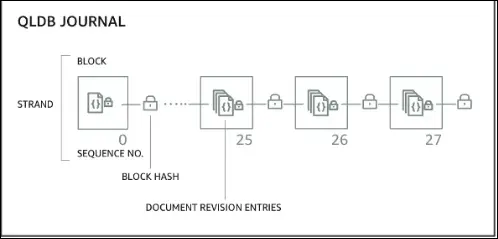
- Immutable system: once data is written, it cannot be removed or modified.
- Cryptographic verification: every modification has a cryptographic hash ensuring nothing has been tampered with.
- Journal-based system: sequence of modifications stored, ensuring transparency.
- SQL-like query support.
- Performance: 2–3x faster than common ledger blockchain frameworks.
Difference from Managed Blockchain
QLDB:
- Centralized authority (AWS owns and manages).
- Great for financial regulations where central oversight is needed.
- Best for ledger use cases.
Managed Blockchain:
- Decentralized system.
- Peer-to-peer, no central authority.
- Suitable for consortium or multi-party use cases.
Exam Tips
- If you see financial transactions + ledger + central authority, answer QLDB.
- If you see blockchain + decentralization, answer Managed Blockchain.
Amazon Managed Blockchain
- What is Blockchain?
- Allows multiple parties to execute transactions without a trusted central authority.
- Core feature: decentralization.
Amazon Managed Blockchain
- Fully managed AWS service for blockchain.
- Lets you:
- Join public blockchain networks.
- Create private blockchain networks within AWS.
- Supported frameworks:
- Hyperledger Fabric
- Ethereum
Key Points
- Decentralized system (unlike QLDB, which is centralized).
- Scalable and fully managed.
- Exam trigger words:
- Blockchain
- Decentralization
- Hyperledger Fabric
- Ethereum
✅ Exam tip:
- Financial ledger + central authority → QLDB
- Blockchain + decentralization + Hyperledger/Ethereum → Managed Blockchain
AWS Glue
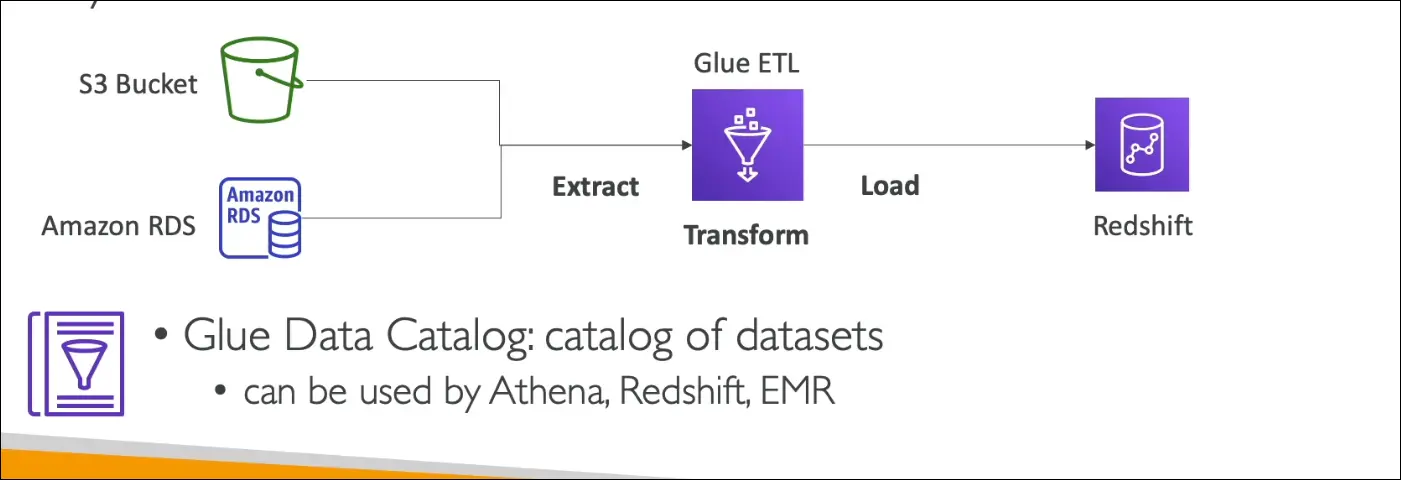
- Type: Managed ETL (Extract, Transform, Load) service.
- Serverless: No infrastructure to manage, focus only on data transformation.
- Purpose: Prepares and transforms raw data into the right format for analytics.
How it works
- Extract → Pull data from multiple sources (e.g., S3, RDS).
- Transform → Use Glue ETL scripts to clean, normalize, and restructure data.
- Load → Store data in destinations such as Redshift for analytics.
Glue Data Catalog
- Central metadata repository of datasets in AWS.
- Stores: table names, columns, data types, schema references.
- Can be queried by:
- Athena
- Redshift
- EMR
- Helps these services discover datasets and use proper schema automatically.
✅ Exam tip:
- If you see ETL / serverless data preparation → AWS Glue
- If you see schema discovery, metadata catalog → Glue Data Catalog
AWS Database Migration Service (DMS)
- Purpose: Migrate data from a source database to a target database.
- How it works:
- Run DMS software on an EC2 instance.
- Extract data from the source DB.
- Insert data into the target DB.
Key Features
- Quick and secure migration into AWS.
- Resilient and self-healing.
- Source database remains available during migration (no downtime).
Types of Migrations
- Homogeneous migration
- Source and target are the same technology.
- Example: Oracle → Oracle.
- Heterogeneous migration
- Source and target are different technologies.
- Example: SQL Server → Aurora.
- DMS automatically converts data formats between systems.
✅ Exam Tip:
- If you see database migration (homogeneous or heterogeneous) → Answer = DMS.
- If the question emphasizes no downtime migration → Also DMS.
Summary