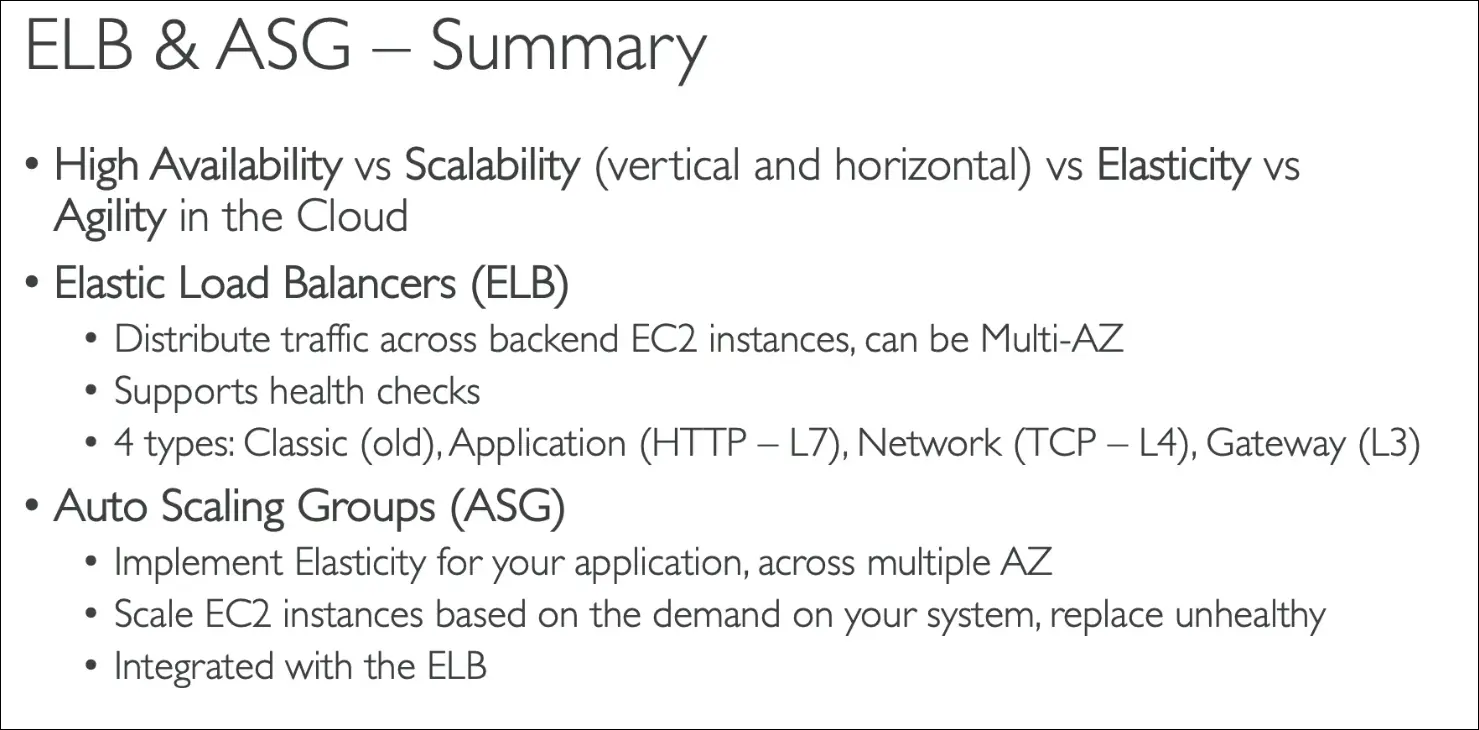
Scalability & High Availability
Scalability
Definition: Ability of a system to handle greater loads by adapting.
Vertical Scalability (Scaling Up/Down)
- Increase size of instance (t2.micro → t2.large).
- Example: upgrading a junior operator to senior operator in a call center.
- Common in non-distributed systems (like databases).
- Limited by hardware capacity.
Horizontal Scalability (Scaling Out/In, Elasticity)
- Add more instances instead of increasing size.
- Example: adding more operators in a call center.
- Requires distributed systems.
- Very common for web applications on AWS.
- AWS makes this easy with EC2 + Auto Scaling Groups (ASG).
High Availability (HA)
Definition: Running application in multiple Availability Zones (AZs).
- Example: Call centers in New York and San Francisco. If one goes down, the other continues.
- Goal: Survive data center loss or disaster (power outage, earthquake, etc).
- Achieved by running instances in Multi-AZ with ASG + Load Balancer.
Key AWS Scaling Terms
- Vertical Scaling = change instance size (Scale Up/Down).
- Horizontal Scaling = change number of instances (Scale Out/In).
- Elasticity = Auto Scaling adjusts resources automatically based on demand.
- Agility = Not scaling-related. Means new resources can be provisioned quickly (minutes instead of weeks).
Exam Tips
- Vertical Scaling → Bigger/Smaller instance size.
- Horizontal Scaling → More/Fewer instances.
- Elasticity → Automatic scaling with demand, cost-optimized.
- High Availability → Multi-AZ deployment.
- Agility → Speed of provisioning IT resources, not scaling.
Remember:
- Databases = often vertically scaled.
- Web apps = often horizontally scaled.
- HA(High Availability) = always across multiple AZs.
- Elasticity = scaling automation (pay-per-use).
- Agility = exam distractor in scaling questions.
Elastic Load Balancing (ELB)
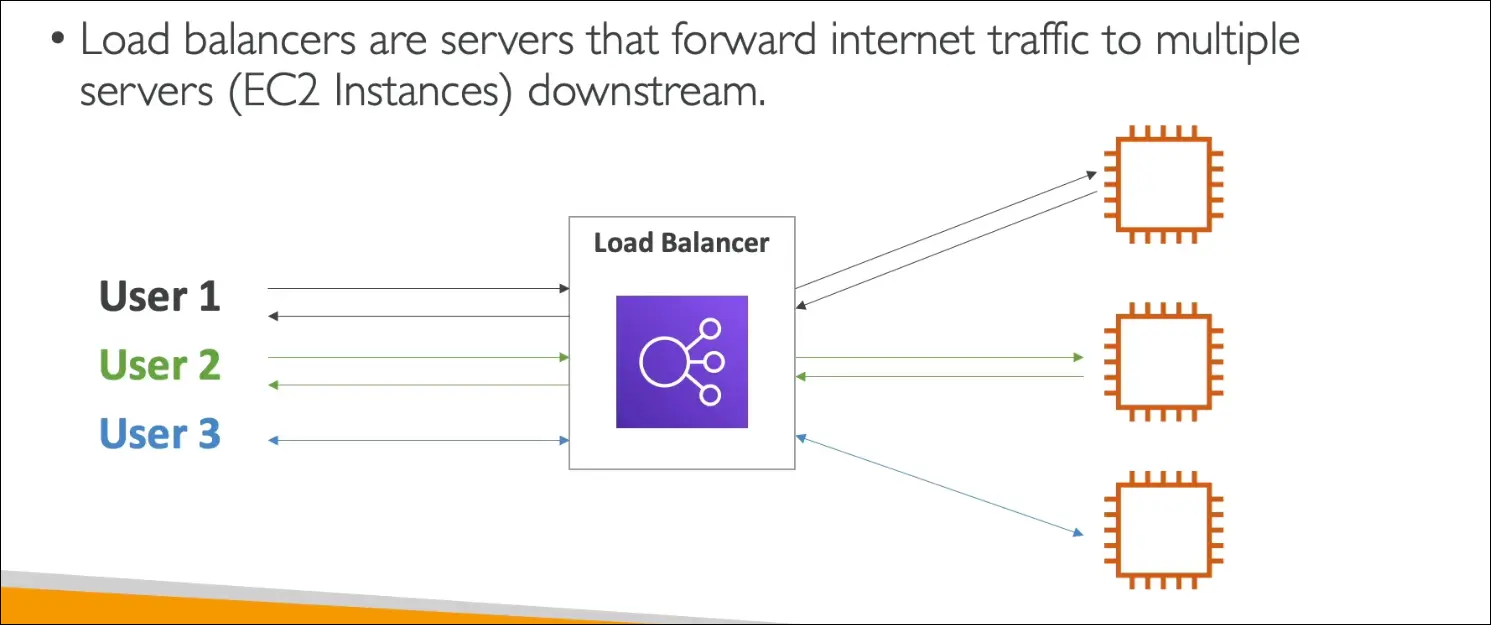
- A Load Balancer is a server that distributes incoming internet traffic across multiple backend servers (EC2 instances).
- Ensures no single instance is overwhelmed.
- Provides scalability, fault tolerance, and high availability.
Elastic Load Balancing (ELB)
- A managed AWS service for load balancing.
- AWS manages infrastructure, upgrades, maintenance, and availability.
- You only configure its behavior.
- Replaces the need to manually set up and maintain your own load balancer on EC2.
Key Features:
- Single Access Point – exposes one DNS hostname for users.
- Distributes Traffic – spreads load across multiple EC2 instances.
- Health Checks – continuously checks instance health, routes only to healthy instances.
- Failure Handling – hides instance failures from users.
- SSL Termination – easily provides HTTPS for applications.
- Multi-AZ Support – works across Availability Zones → increases high availability.
Types of Load Balancers in AWS
Application Load Balancer (ALB)
- Layer 7 (Application Layer).
- Supports HTTP, HTTPS, gRPC.
- Best for web apps with routing needs.
- Features:
- Advanced routing (host-based, path-based).
- Good for microservices, containerized apps.
- Provides a DNS hostname (not IP).
Exam keyword: HTTP/HTTPS → ALB.
Network Load Balancer (NLB)
- Layer 4 (Transport Layer).
- Supports TCP and UDP.
- Ultra-high performance – millions of requests per second.
- Provides a static IP address (via Elastic IPs).
- Use cases:
- Real-time apps, gaming, IoT, VoIP, financial apps.
- Where you need low latency and static IP.
Exam keyword: TCP/UDP, millions of req/sec, static IP → NLB.
Gateway Load Balancer (GWLB)
- Layer 3 (Network Layer).
- Uses GENEVE protocol.
- Routes traffic to third-party security appliances on EC2:
- Firewalls
- Intrusion Detection Systems (IDS)
- Deep Packet Inspection (DPI)
- Balances load not for applications, but for security appliances.
Exam keyword: Firewalls, packet inspection → GWLB.
Classic Load Balancer (CLB) [Legacy]
- Supported both Layer 4 and Layer 7.
- Older generation, being retired.
- Replaced by ALB and NLB.
- Not likely on the exam anymore.
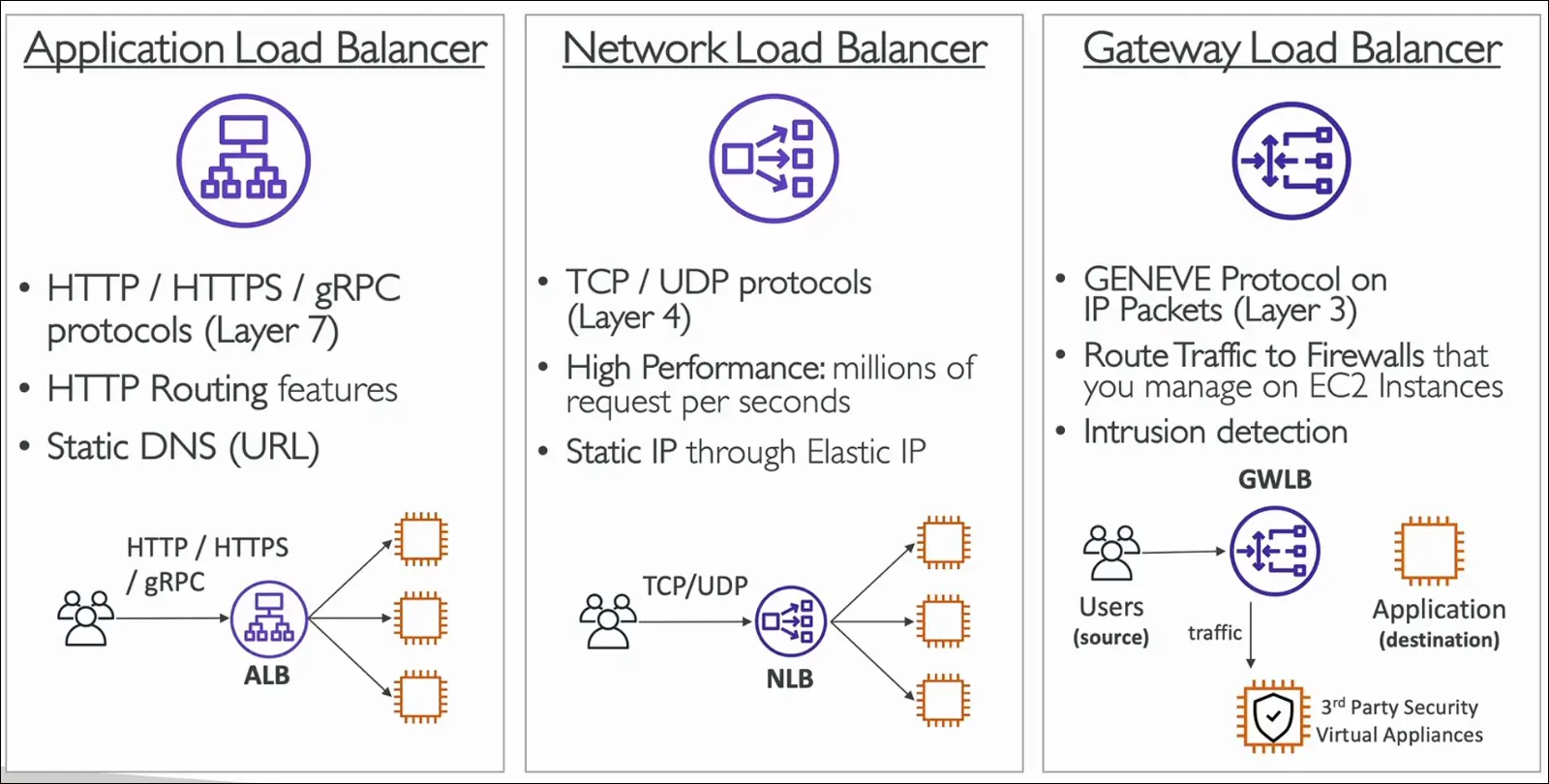
ELB Exam Summary
- ALB → Layer 7, HTTP/HTTPS, advanced routing.
- NLB → Layer 4, TCP/UDP, high performance, static IP.
- GWLB → Layer 3, GENEVE, for security appliances.
- CLB → Old, replaced by ALB & NLB.
Note: If you see keywords in the exam:
- HTTP/HTTPS/gRPC → ALB.
- Millions of requests, TCP/UDP, static IP → NLB.
- Firewall, packet inspection → GWLB.
AWS Application Load Balancer (ALB) with EC2 – Notes
Launch EC2 Instances
- Launch 2 EC2 instances using Amazon Linux 2.
- Instance type: t2.micro.
- No key pair (EC2 Instance Connect can be used if needed).
- Security group: use Launch Wizard 1 (allows HTTP + SSH).
- Add User Data script (to auto-configure and serve a “Hello World” page).
- Result: Both instances return Hello World when accessed by IPv4.
Load Balancer Types
- Application Load Balancer (ALB):
- Works at Layer 7 (HTTP/HTTPS).
- Best for web applications, path-based routing, host-based routing.
- Network Load Balancer (NLB):
- Works at Layer 4 (TCP, UDP, TLS).
- Handles millions of requests per second with ultra-low latency.
- Gateway Load Balancer (GWLB):
- Used for security appliances (IDS, IPS, firewalls).
- Analyzes and inspects network traffic.
- Classic Load Balancer (CLB): Deprecated, being phased out.
Create an Application Load Balancer (ALB)
- Name: DemoALB.
- Scheme: Internet-facing, IPv4.
- Deploy across multiple Availability Zones.
Security Group for ALB
- Create new SG: demo-sg-load-balancer.
- Inbound: Allow HTTP (port 80) from anywhere.
- Outbound: Default (all allowed).
Listeners & Target Group
- Listener: Port 80 (HTTP).
- Target Group:
- Name: demo-tg-alb.
- Target type: Instances.
- Protocol: HTTP, Port: 80.
- Health checks enabled (default).
- Register both EC2 instances.
Test Load Balancer
- ALB provides a DNS name (e.g.,
DemoALB-123456.us-east-1.elb.amazonaws.com). - Access via browser → returns “Hello World”.
- Refreshing the page alternates between both instances.
- Proof of load balancing:
- Requests are distributed across both healthy targets.
AWS Auto Scaling Groups (ASG)
- Website traffic/load changes over time.
- Example: More users during the day, fewer at night.
- Cloud allows us to add/remove servers quickly.
- ASG automatically adjusts capacity:
- Scale Out = Add EC2 instances when demand increases.
- Scale In = Remove EC2 instances when demand decreases.
Benefits of Auto Scaling Groups
- Maintain Minimum and Maximum number of instances.
- Instances automatically:
- Registered/Deregistered with Load Balancer.
- Replaced if unhealthy (terminated and relaunched).
- Cost savings: only pay for optimal capacity.
- Supports elasticity, a core AWS principle.
Key ASG Settings
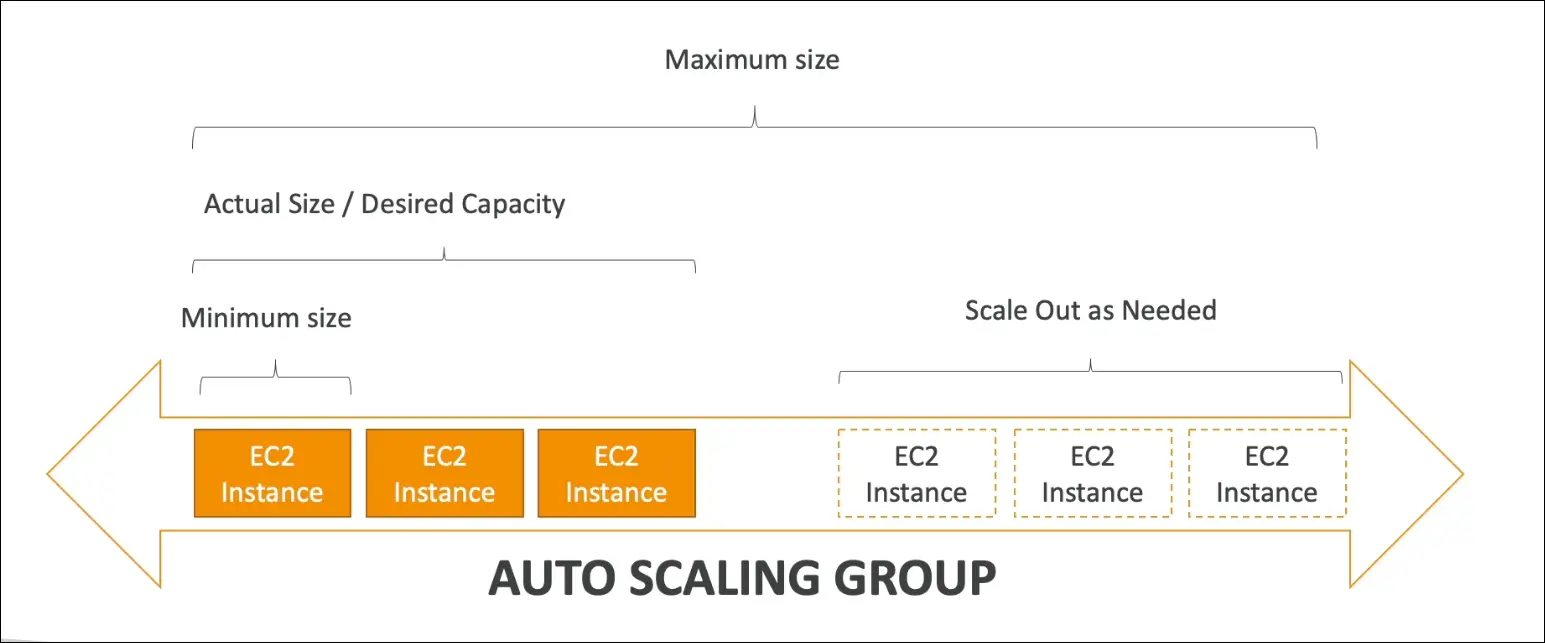
- Minimum Size = The fewest EC2 instances running (e.g., 1).
- Desired Capacity = The actual target number of instances.
- Maximum Size = The most EC2 instances allowed.
- ASG scales between min and max automatically.
ASG + Load Balancer Integration
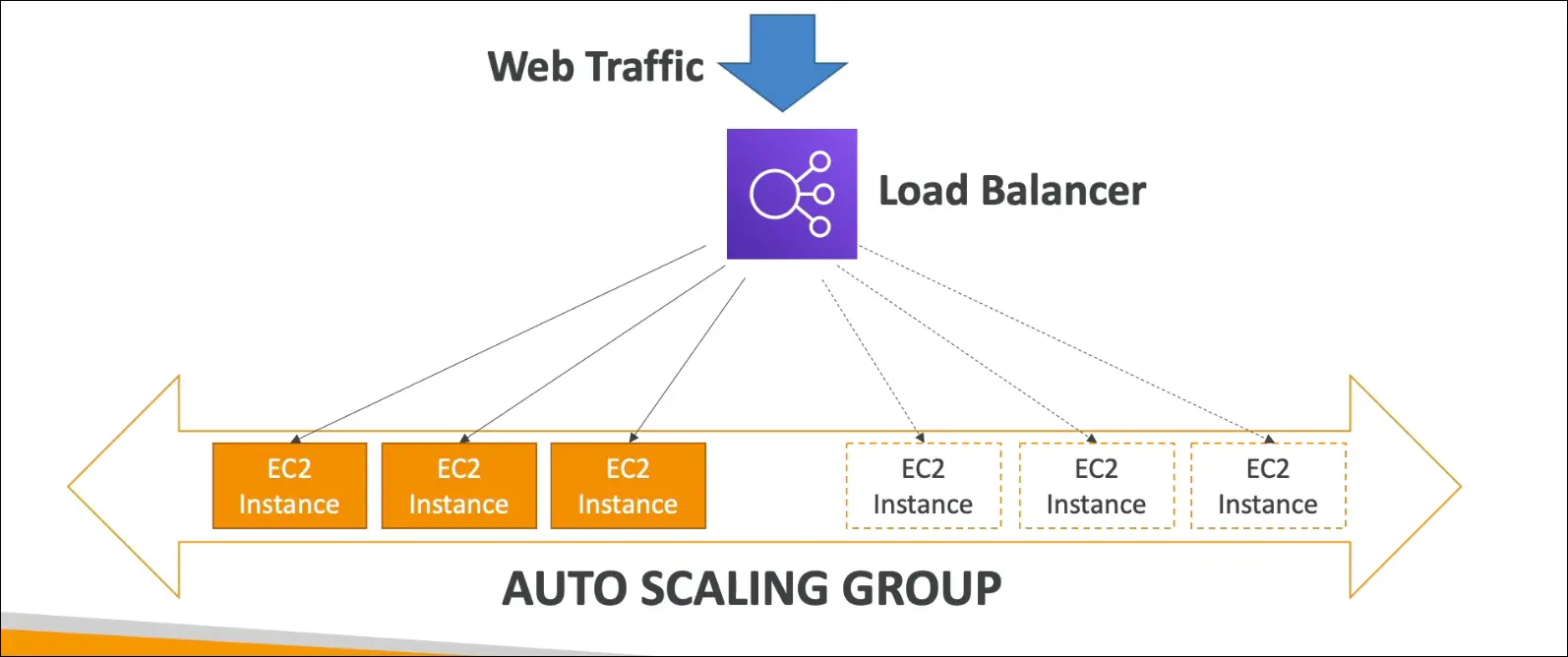
- Web traffic first goes to the Load Balancer (LB).
- LB forwards traffic only to healthy instances in the ASG.
- When ASG scales out → New EC2 instances are added to LB target group.
- When ASG scales in → EC2 instances are deregistered and removed.
- Ensures even traffic distribution and resilience.
5. Example Flow
- Start with 1 EC2 instance (minimum).
- Traffic increases → ASG launches more EC2s.
- LB automatically includes them in rotation.
- Traffic decreases → ASG terminates extra EC2s.
- LB stops sending traffic to terminated instances.
Key Takeaways for Exam
- Elasticity = scaling with demand (cost-efficient).
- HA (High Availability) = ASG across multiple AZs + LB.
- Self-healing = unhealthy instances replaced automatically.
- Cost optimization = never run more than needed.
Auto Scaling Group (ASG) Hands-On
Create an Auto Scaling Group
- Go to Auto Scaling Groups in the EC2 console.
- Create new ASG → name it, e.g.
DemoASG.
Launch Template
- Create a Launch Template (required for ASG).
- Example name:
DemoLaunchTemplate. - Defines how EC2 instances will be created (AMI, instance type, security groups, etc.).
- Similar setup to launching EC2 manually.
- Example settings:
- AMI: Amazon Linux 2
- Instance Type:
t2.micro - Key Pair: optional (can omit)
- Security Group: select existing, e.g.
launch-wizard-1 - Storage (EBS): default
- User Data: add script if needed
- Example name:
Configure ASG
- Instance type: inherits from launch template (e.g.
t2.micro). - VPC & Subnets: select multiple Availability Zones for high availability.
- AZ Distribution: use “balanced best effort” (default).
Load Balancing & Health Checks
- Attach ASG to an existing Load Balancer (e.g.
demo-tg-alb). - Turn on ELB Health Checks in addition to EC2 health checks.
- Ensures unhealthy instances are replaced automatically.
Group Size & Scaling
- Define Desired, Minimum, and Maximum Capacity:
- Example: Desired = 2, Min = 1, Max = 4.
- Auto scaling policies can be added later.
Additional Settings
- Instance maintenance policy → keep default (No Policy).
- Additional capacity settings → default.
- Notifications, tags → optional.
Creation
- Review configuration.
- Click Create Auto Scaling Group.
Verification
- ASG will launch instances to match desired capacity.
- Check under Activity tab → see new EC2 instances launching.
- Check Instance Management → instances in pending/running state.
- Check Target Group → new instances appear as targets.
Health Check Optimization
- To speed up instance health checks:
- Healthy threshold = 2
- Interval = 5 sec
- Timeout = 2 sec
- Saves time waiting for “unhealthy → healthy” status.
Testing
- Once healthy, go to Load Balancer DNS name.
- Should return
Hello Worldfrom the EC2 instances created by the ASG.
Key Benefit: The Auto Scaling Group automatically manages EC2 instances, integrates with the Load Balancer, and ensures high availability with health checks.
Auto Scaling Group (ASG) – Scaling Strategies
1. Manual Scaling
- Update ASG size manually.
- Example: Change capacity from 1 → 2 instances, or back down.
2. Dynamic Scaling
Automatically responds to changing demand using CloudWatch alarms.
- Simple Scaling
- Define one CloudWatch alarm → trigger one scaling action.
- Example:
- CPU > 70% for 5 min → add 2 instances.
- CPU < 30% for 10 min → remove 1 instance.
- Step Scaling
- Similar to simple scaling, but allows different actions for different thresholds.
- Example:
- CPU > 70% → add 2 instances.
- CPU > 90% → add 4 instances.
3. Target Tracking Scaling
- Easiest option.
- Define a target metric, ASG scales automatically to stay around that value.
- Example:
- Keep average CPU = 40%.
- ASG adds/removes instances to maintain ~40%.
4. Scheduled Scaling
- Scale based on a known future event or pattern.
- Example:
- On Friday at 5 PM, increase minimum capacity to 10 instances before a big traffic surge (e.g., sports betting site).
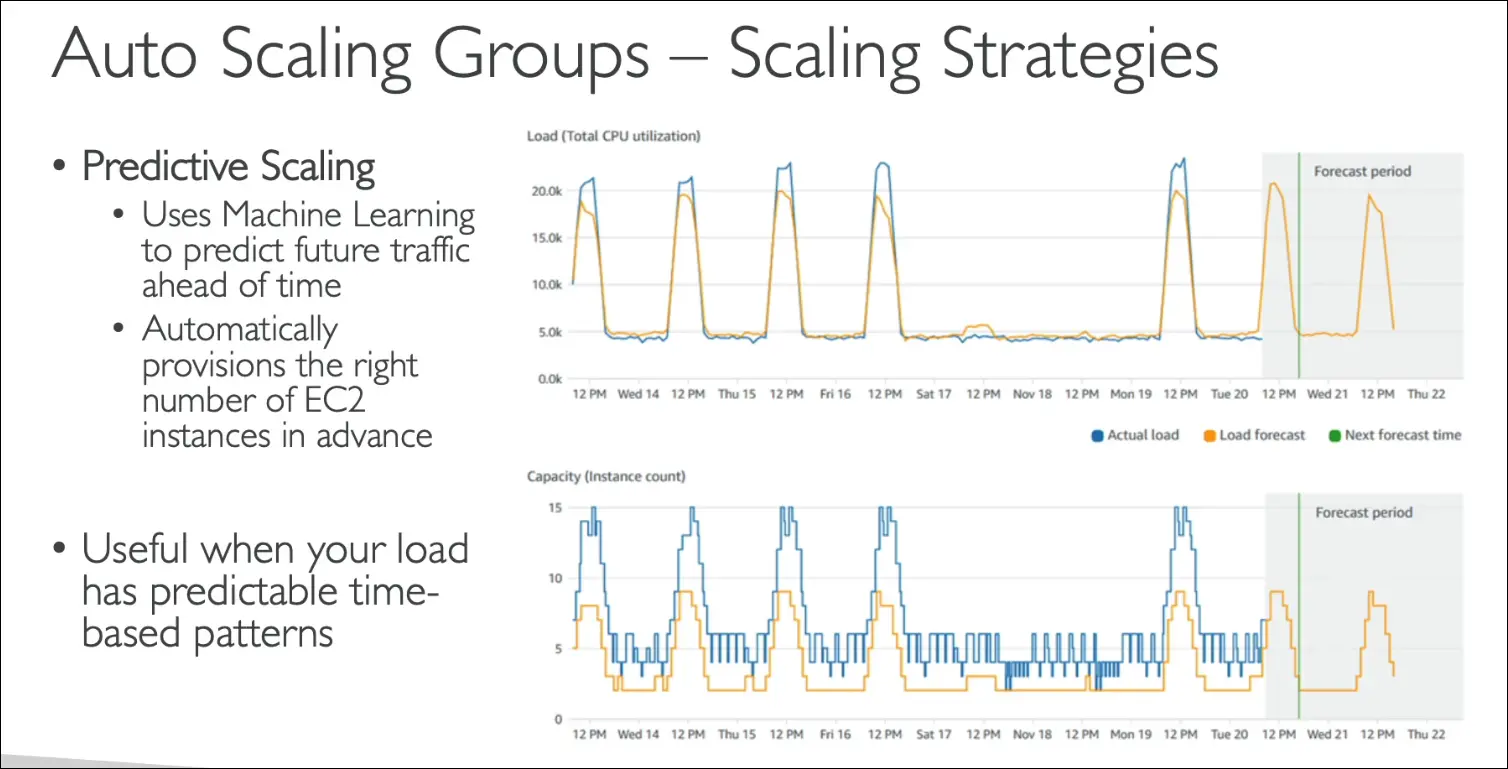
5. Predictive Scaling
- Uses Machine Learning to analyze past traffic patterns.
- Forecasts future demand and provisions instances ahead of time.
- Example:
- Traffic spikes daily from 6–9 PM → ASG launches extra instances before that window.
Exam Tip:
- Manual Scaling = human intervention.
- Dynamic Scaling (Simple/Step) = CloudWatch alarms + rules.
- Target Tracking = maintain a metric (like thermostat).
- Scheduled Scaling = predictable time-based scaling.
- Predictive Scaling = ML-based traffic forecasting.
Summary