AWS Global Infrastructure
Why Build a Global Application?
Reduced Latency
- Latency = Time for a network packet to reach a server.
- Deploying in multiple AWS Regions or Edge Locations reduces lag by placing servers closer to users.
- Example: Users in India get faster response if an Asia region hosts the app instead of only US.
Disaster Recovery (DR)
- Do not rely on a single Region.
- In case of disasters (earthquake, storm, power failure, politics), failover to another Region ensures high availability.
Security & Attack Resistance
- Spreading applications across multiple Regions makes it harder for attackers to take everything down at once.
AWS Global Infrastructure Components
Regions
- Geographic areas where AWS has data centers.
- Each Region contains multiple Availability Zones (AZs).
Availability Zones (AZs)
- Multiple isolated data centers within a Region.
- Designed to be physically separate but connected with high-speed private networks.
- Provide resilience: if one AZ fails, others remain operational.
- Example: Northern Virginia has 6 AZs, Paris has 3 AZs.
Edge Locations (Points of Presence)
- Locations closer to end-users for content delivery.
- Cannot host apps directly but support Amazon CloudFront (CDN) and caching.
- Improve speed for users even outside AWS Regions.
AWS Global Network
- Private AWS backbone connecting Regions, AZs, and Edge Locations.
- Includes undersea fiber cables for stable and high-speed interconnectivity.
AWS Global Services (to learn in this section)
Amazon Route 53 (Global DNS)
- Routes users to the closest deployment with the lowest latency.
- Supports disaster recovery and global load balancing.
Amazon CloudFront (CDN)
- Distributes and caches content at Edge Locations.
- Reduces latency and improves user experience.
Amazon S3 Transfer Acceleration
- Speeds up global uploads/downloads to S3 buckets using AWS Edge infrastructure.
AWS Global Accelerator
- Improves global application availability and performance.
- Uses AWS global network to route traffic optimally.
✅ Exam Tip:
- Regions = geographic locations.
- AZs = multiple isolated data centers per Region.
- Edge Locations = global points for caching/content delivery.
- Key global services: Route 53, CloudFront, S3 Transfer Acceleration, Global Accelerator.
Amazon Route 53
What is Route 53?
- Managed DNS (Domain Name System) service by AWS.
- Works like a phone book for the internet: maps domain names (e.g.,
myapp.com) to IP addresses or AWS resources.
DNS Record Types in Route 53
- A Record → Maps domain name to IPv4 address.
- AAAA Record → Maps domain name to IPv6 address.
- CNAME Record → Maps domain name to another domain name.
- Alias Record (AWS-specific) → Maps domain name to AWS resources such as:
- ELB (Elastic Load Balancer)
- CloudFront Distribution
- S3 Website bucket
- RDS instance
Exam Tip: Alias records are AWS-only and preferred over CNAME when pointing to AWS resources.
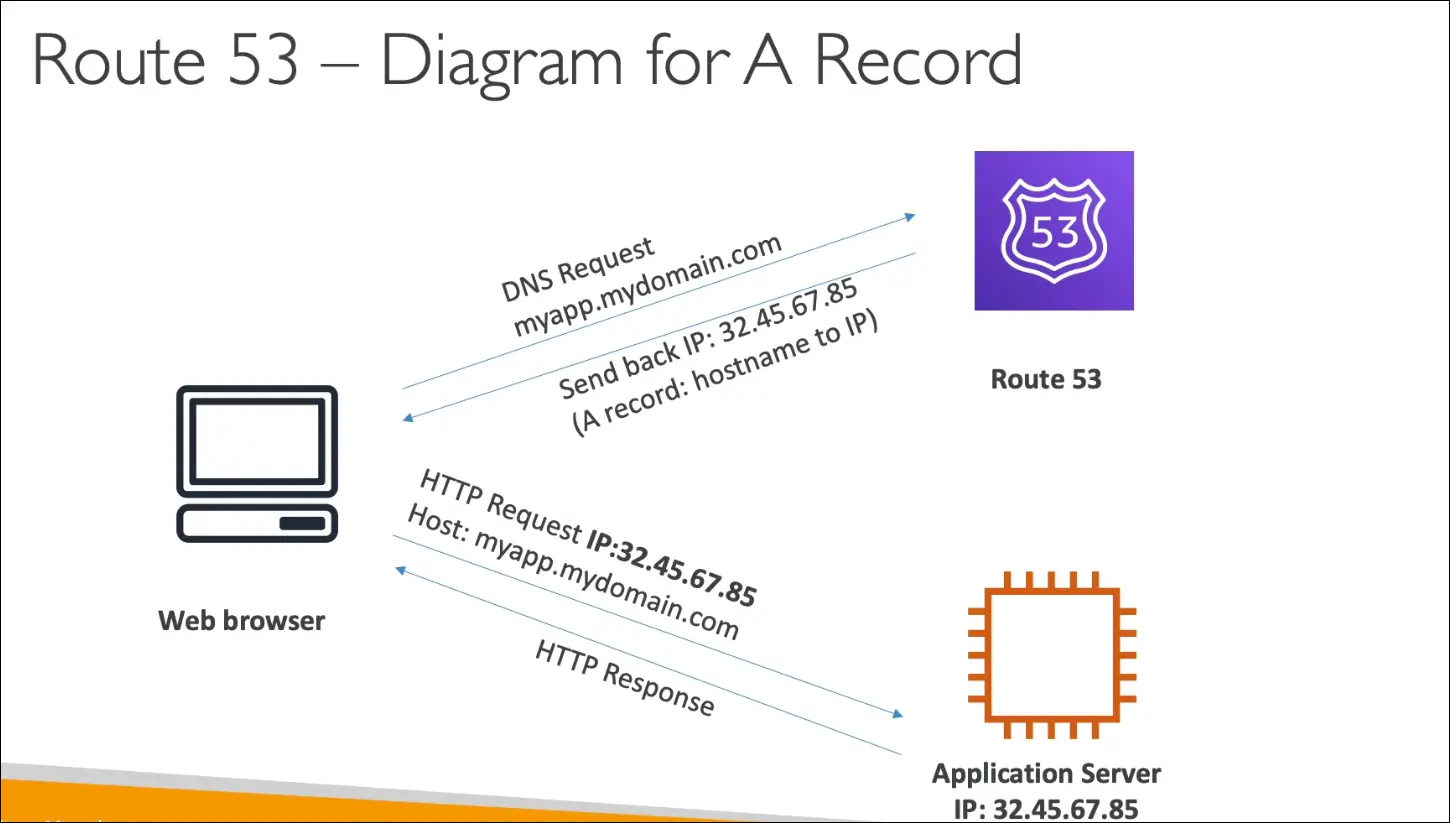
How DNS Resolution Works (simplified flow)
- User enters
myapp.mydomain.comin browser. - Browser queries Route 53.
- Route 53 returns the mapped IP (from an A/AAAA record).
- Browser connects to server at that IP.
Route 53 Routing Policies (high-level exam focus)
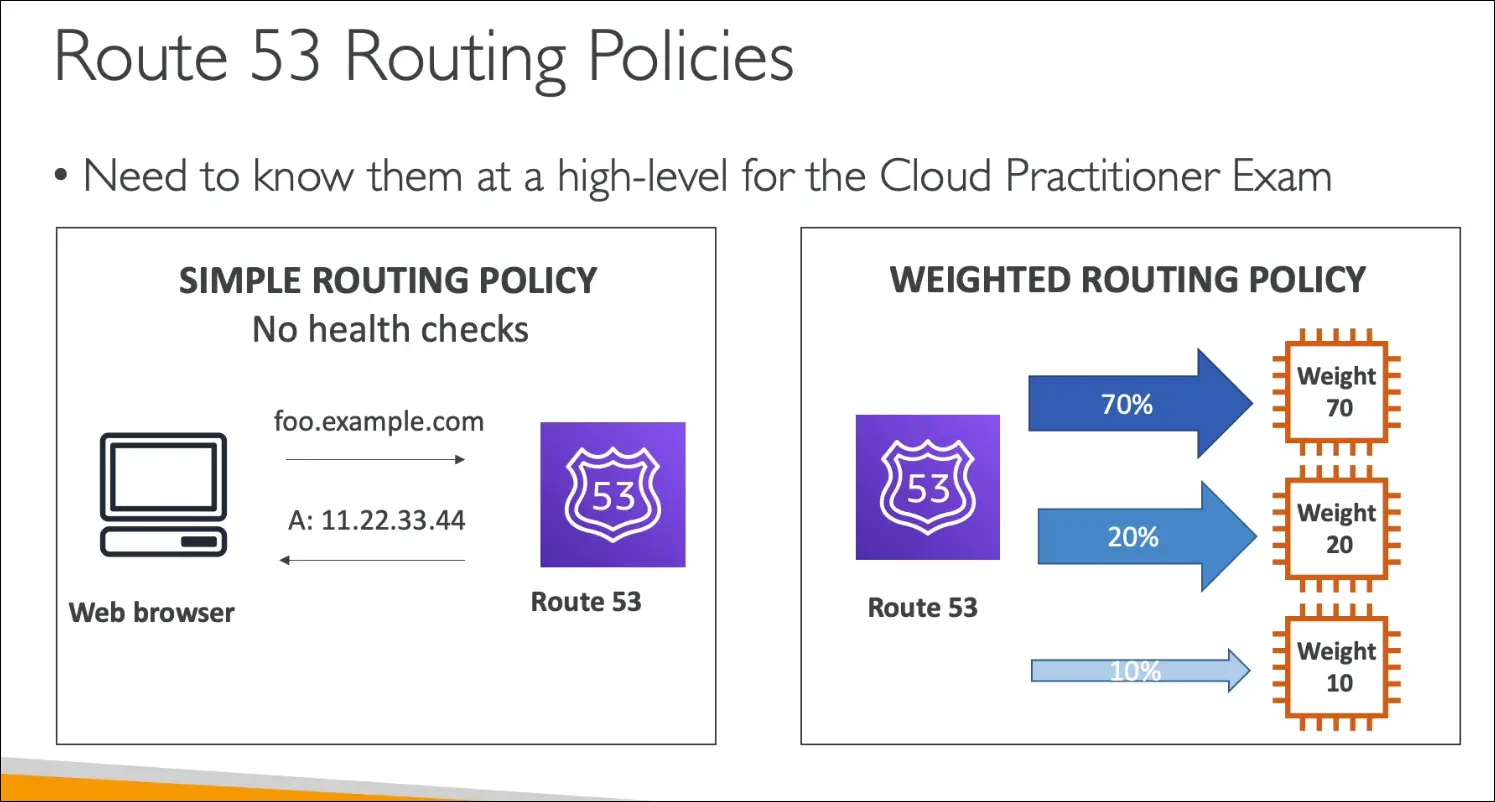
- Simple Routing Policy
- Default policy.
- Maps domain to a single resource (one IP or instance).
- No health checks.
- Weighted Routing Policy
- Distributes traffic across multiple resources.
- Example: 70% → Server A, 20% → Server B, 10% → Server C.
- Supports health checks (only sends traffic to healthy resources).
- Used for load balancing, A/B testing.
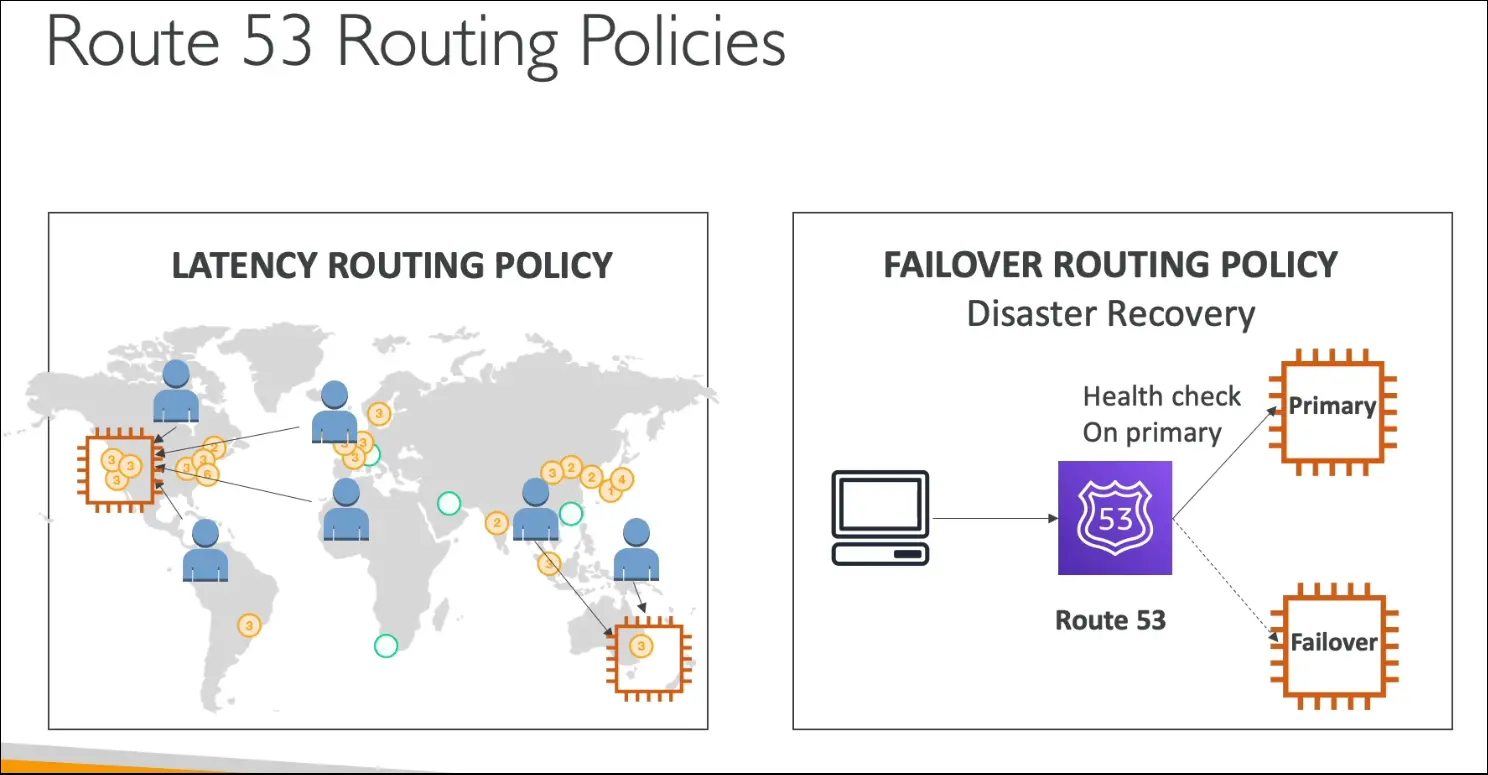
- Latency Routing Policy
- Routes traffic to the resource with the lowest latency (closest AWS Region).
- Example: User in Asia → Asia Region, User in US → US Region.
- Improves performance globally.
- Failover Routing Policy
- Primary and secondary setup.
- Route 53 checks health of primary.
- If primary fails, traffic is sent to secondary.
- Supports Disaster Recovery scenarios.
Key Exam Takeaways
- Route 53 = Managed DNS by AWS.
- Alias records = special AWS integration.
- Simple = no health checks.
- Weighted = traffic split.
- Latency = best performance.
- Failover = disaster recovery.
Amazon CloudFront – Exam Notes
What is CloudFront?
- AWS’s Content Delivery Network (CDN).
- Improves read performance by caching content at Edge Locations.
- Anytime you see CDN in the exam, think CloudFront.
Key Benefits
- Low Latency
- Content cached at ~216+ Points of Presence (Edge Locations).
- Users get data from nearest Edge instead of origin → better performance.
- Global Distribution
- Content available worldwide without setting up multiple servers.
- DDoS Protection
- Spreading content globally protects against large-scale attacks.
- Integrated with AWS Shield and WAF (Web Application Firewall).
How CloudFront Works
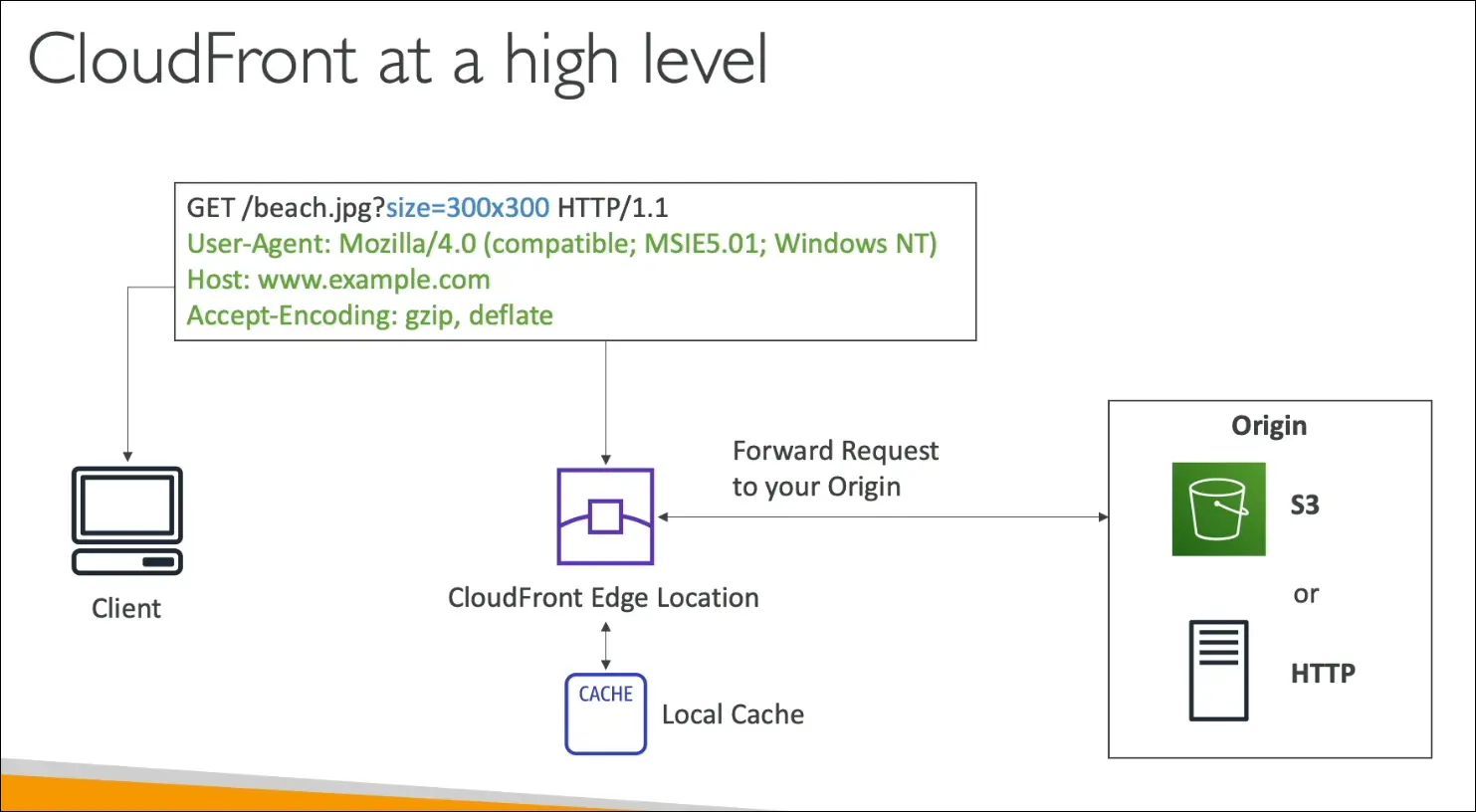
- User request goes to nearest Edge Location.
- If content is cached → served immediately.
- If not cached → CloudFront fetches from Origin, caches it, then serves.
S3 as an Orgin
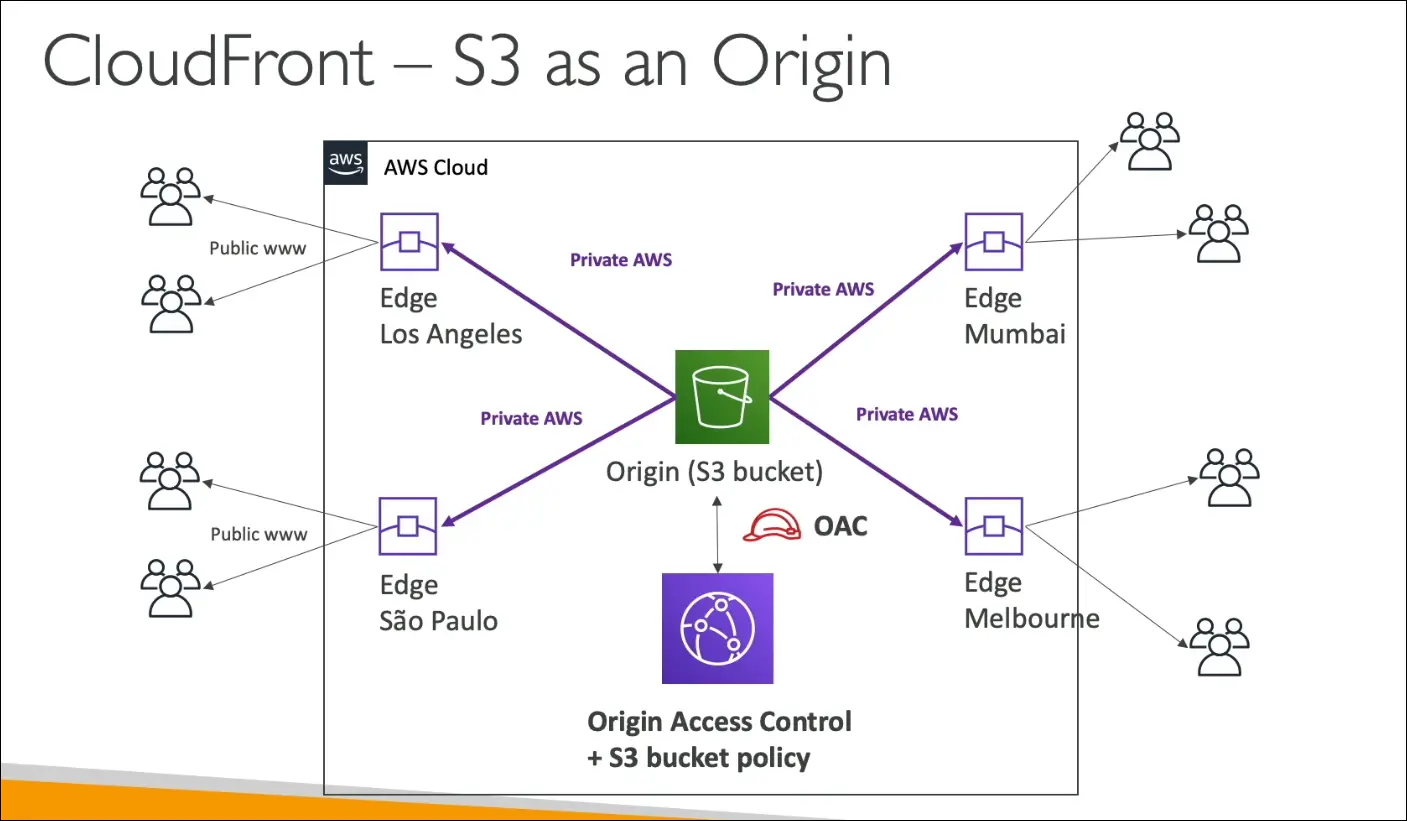
Origins Supported by CloudFront
- Amazon S3
- For static files.
- Secured via OAC (Origin Access Control) and bucket policy.
- VPC Origins
- Example: Application Load Balancer, Network Load Balancer, or EC2 in private subnet.
- CloudFront can connect privately.
- Custom Origins
- Any HTTP backend (inside or outside AWS).
- Example: S3 static website hosting, on-premise HTTP server.
CloudFront vs S3 Cross-Region Replication
| Feature | CloudFront (CDN) | S3 Cross-Region Replication (CRR) |
|---|---|---|
| Purpose | Cache content at global Edge Locations | Replicate full S3 bucket to another Region |
| Coverage | 216+ Edge Locations worldwide | Only Regions you configure |
| Updates | Cached for a short TTL (e.g., 1 day) | Near real-time replication |
| Best For | Static content, global distribution | Dynamic content, redundancy across Regions |
| Caching | Yes | No |
Exam Tips
- CloudFront = CDN, caching at Edges.
- OAC used to secure S3 origin.
- Works with S3, ALB/NLB, EC2, or any HTTP server.
- CloudFront ≠ S3 replication, they solve different problems.
S3 Transfer Acceleration
Problem
- S3 Buckets are regional (linked to one Region).
- Uploading files from distant locations (e.g., USA → S3 bucket in Australia) can be slow.
What is S3 Transfer Acceleration?
- A feature that speeds up uploads and downloads to S3 buckets across large distances.
- Uses Amazon CloudFront Edge Locations as entry points.
- Data travels through AWS’s internal optimized network instead of the public internet.
How it Works
- User uploads file to nearest Edge Location.
- File is routed through AWS private backbone network.
- Delivered to the destination S3 bucket in another Region.
- Works for both uploads and downloads.
Key Points
- Best when bucket is far from users.
- Performance improvement depends on distance and internet quality.
- Typical gains range from 10% to much higher, depending on Region and location.
- AWS provides a test tool to compare standard vs accelerated transfer speeds.
- Use when you have a global application that needs to centralize uploads/downloads to one bucket.
Example
- Uploading from USA → S3 in Australia:
- Without acceleration → slow, unreliable.
- With acceleration → user uploads to US Edge → transferred internally to Australia.
Exam Tips
- Transfer Acceleration ≠ Cross-Region Replication.
- Transfer Acceleration = speed up data movement into/out of S3.
- CRR = copy data between buckets in different Regions.
- Often tested with scenario like: “Users worldwide upload to a single bucket in Region X, how to speed it up?” → Answer: Enable S3 Transfer Acceleration.
AWS Global Accelerator
Purpose
- Improves global application availability and performance.
- Uses the AWS global private network instead of the unpredictable public internet.
- Optimizes request routing, giving up to 60% faster performance.
How It Works
- Users connect to the nearest AWS Edge Location.
- From there, traffic is routed over the AWS private backbone network to the target region/application.
- This reduces latency and improves reliability compared to normal internet routing.
Benefits
- Faster performance (shorter internet hops, then private AWS backbone).
- High availability with automatic rerouting.
- DDoS protection integrated with AWS Shield.
- Two static Anycast IPs (fixed entry points for your app, instead of changing regional endpoints).
- Global failover: if one region is down, traffic automatically routes to another.
Example Scenario
- App is hosted in India.
- Users in US, Europe, and Australia access it.
- Without Global Accelerator: traffic crosses many internet hops (high latency, possible failures).
- With Global Accelerator:
- User connects to the nearest edge location (US, Europe, Australia).
- Traffic flows via AWS private network to India.
- Result: lower latency, more reliable connections.
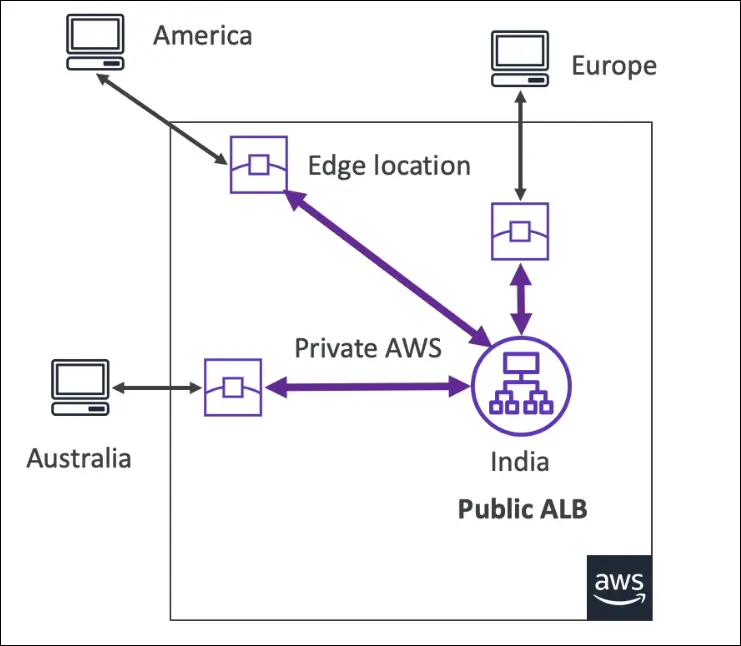
Key Difference: Global Accelerator vs CloudFront
| Feature | Global Accelerator | CloudFront |
|---|---|---|
| Use case | Improves speed and reliability of all application traffic (TCP/UDP) | Content delivery network (CDN) – caches static content at edge |
| Caching | No caching, traffic goes back to origin | Caches content at edge for faster delivery |
| Protocols | Supports TCP & UDP (HTTP, gaming, VoIP, APIs) | Mainly HTTP/HTTPS |
| IP Address | Provides 2 static Anycast IPs for global access | Uses dynamic CloudFront URLs or custom domain |
| Failover | Fast regional failover for high availability | Focused on cached content, not failover |
| Best for | Global apps needing low latency, static IPs, fast failover | Serving static/dynamic cached content like images, video, websites |
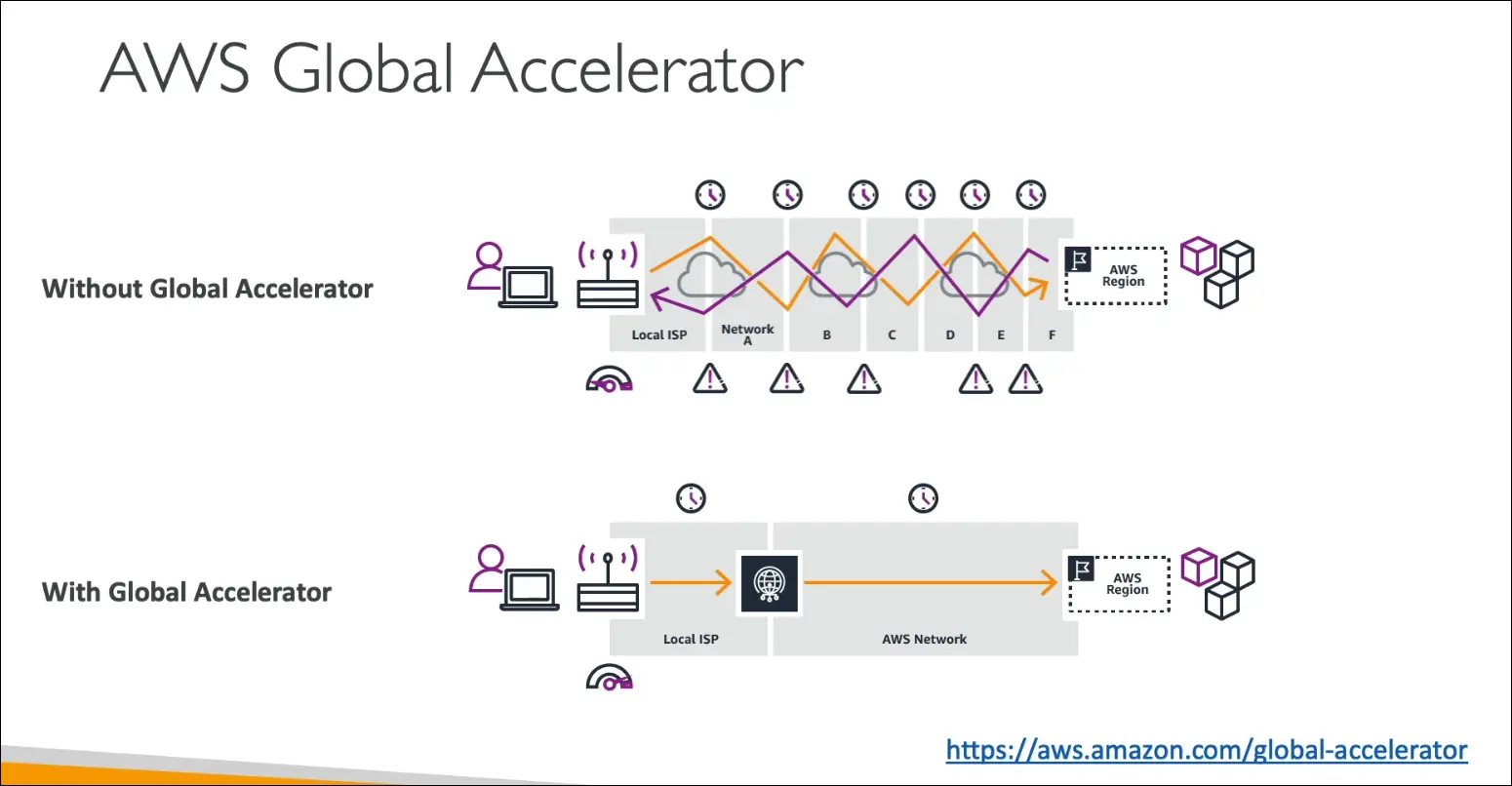
Real Performance Test (from transcript)
- Northern Virginia: 23% faster.
- Oregon: 31% faster.
- Singapore: 34% faster.
- Sydney: 53% faster.
- Ireland/Frankfurt (close regions): same performance (no real gain, since internet already short).
Exam Tips
- Use Global Accelerator when:
- You need static IPs for global clients.
- You want low latency and high availability for global users.
- You need regional failover for disaster recovery.
- Use CloudFront when:
- You want to cache content at the edge.
- Optimizing for static/dynamic content delivery like media files and websites.
Key takeaway: Global Accelerator = faster routing & failover via AWS global network.
CloudFront = caching content at the edge (CDN).
AWS Outposts
What is Hybrid Cloud?
- Hybrid Cloud = Using both on-premises infrastructure and cloud infrastructure together.
- This means managing two environments:
- Cloud (AWS console, CLI, APIs)
- On-premises (local servers, physical infrastructure)
- Leads to different skillsets, different APIs, and added complexity.
AWS Outposts Overview
- AWS Outposts is a fully managed service that brings AWS infrastructure, services, APIs, and tools on-premises.
- In simple words, AWS installs server racks (Outposts racks) inside your data center.
- These racks run the same AWS hardware and software as used in AWS data centers.
- You manage them through the same AWS Console, CLI, or APIs—no difference.
How It Works
- AWS delivers and installs Outposts racks at your site.
- The racks are owned and managed by AWS, but physically located in your data center.
- You can then launch AWS services locally on those racks.
- You still manage everything using AWS tools (Console, CLI, SDKs, etc.).
Services Supported on Outposts
You can run the following AWS services locally:
- Amazon EC2 (compute instances)
- Amazon EBS (block storage)
- Amazon S3 (object storage)
- Amazon RDS (databases)
- Amazon EKS and ECS (containers)
- Amazon EMR (big data processing)

Benefits
| Benefit | Description |
|---|---|
| Low Latency | Applications can access on-premises systems with very low latency. |
| Local Data Processing | Data can be processed locally without sending it to AWS Cloud. |
| Data Residency | Data stays within your data center, which helps with compliance/regulations. |
| Simplified Migration | You can move workloads gradually: on-premises → Outposts → Cloud. |
| Consistency | Same AWS APIs, tools, and services on-premises and in the cloud. |
| Fully Managed | AWS handles delivery, installation, updates, and maintenance. |
Responsibility
- AWS manages hardware and software updates, monitoring, and scaling.
- You (the customer) are responsible for physical security of the racks since they are located in your facility.
Use Cases
- Applications requiring low-latency access to on-premises systems.
- Data residency requirements (legal or compliance).
- Industries like finance, healthcare, or manufacturing that need local processing.
- Gradual cloud migration (step-by-step move to AWS).
Exam Tip
- Outposts = AWS Cloud inside your data center.
- Fully managed, same APIs and services as AWS Cloud.
- Used when you need low latency, local data processing, or data residency.
- You are responsible for physical security of Outposts racks.
Summary Table
| Feature | AWS Outposts |
|---|---|
| Type | Hybrid cloud solution |
| Managed by | AWS (hardware & software) |
| Location | Customer’s on-premises data center |
| APIs/Tools | Same as AWS Cloud |
| Latency | Very low (local access) |
| Data Residency | Data stays on-premises |
| Customer Responsibility | Physical security |
| Use Cases | Low latency apps, local processing, compliance, gradual migration |
Key takeaway: AWS Outposts brings AWS services, APIs, and infrastructure directly into your on-premises data center, providing the same experience as the AWS Cloud but with local control and low latency.
AWS Wavelength
What is AWS Wavelength?
- AWS Wavelength Zones are AWS infrastructure deployments embedded inside telecommunication providers’ data centers at the edge of 5G networks.
- Purpose: To bring AWS services closer to end-users and provide ultra-low latency for 5G applications.
How it Works
- You can deploy AWS resources (EC2, EBS, VPC, etc.) directly into Wavelength Zones.
- These zones are connected to 5G networks via carrier gateways.
- End-users on 5G access applications with extremely low latency because the compute resources are physically near the users.
- The traffic often stays within the telecom provider’s network (CSP) and does not reach the AWS region unless needed.
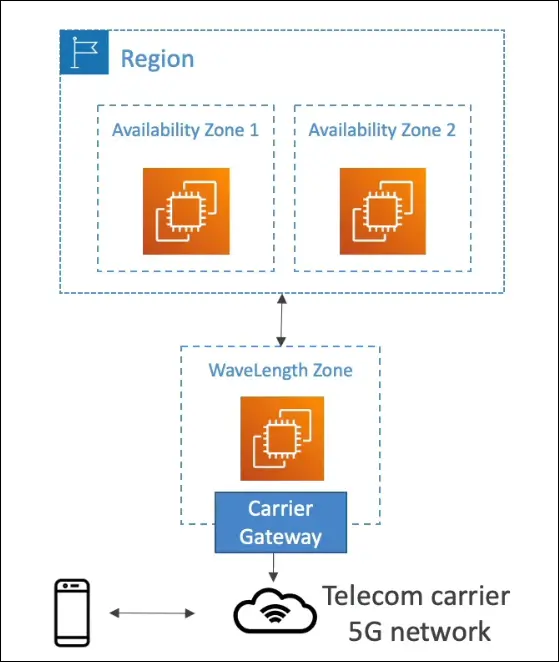
Connectivity
- Wavelength Zones are connected to their parent AWS Region.
- Example: EC2 in Wavelength Zone can access RDS or DynamoDB in the parent region.
- No extra charges or agreements are required to use Wavelength.
Benefits
- Ultra-low latency for 5G apps.
- Edge computing capabilities with AWS tools.
- Local data processing without sending traffic to AWS cloud.
- Seamless integration with AWS regions when needed.
Use Cases
- Smart cities
- Machine Learning-assisted diagnostics
- Connected vehicles
- Interactive live video streaming
- Augmented Reality (AR) / Virtual Reality (VR)
- Real-time gaming
Exam Tip
Whenever the question mentions “5G” or “ultra-low latency edge computing”, the correct answer is AWS Wavelength.
AWS Local Zones
What is AWS Local Zones?
- Local Zones extend AWS Regions closer to end users to run latency-sensitive applications.
- They place compute, storage, database, and other AWS services physically near large population or industrial centers.
- Think of them as mini extensions of an AWS Region located in different cities.
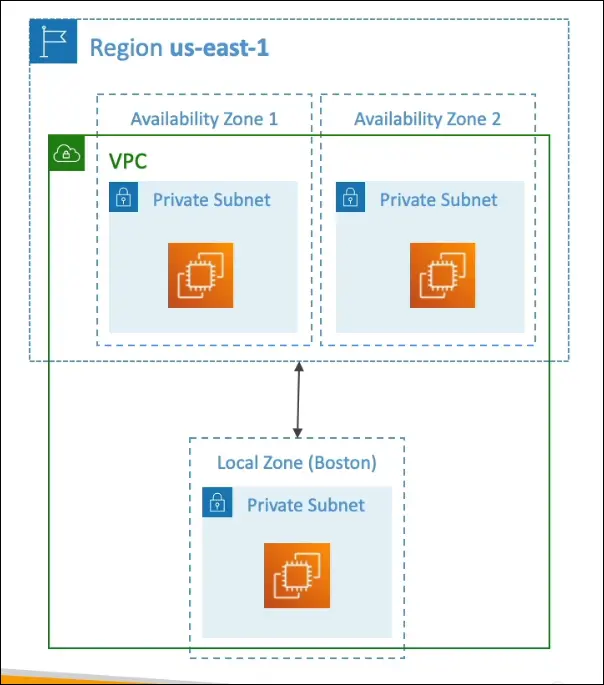
How It Works
- Each Local Zone is an extension of a specific AWS Region.
- You can extend your VPC from the region into one or more Local Zones.
- You can then launch AWS resources (like EC2, RDS, ECS, EBS, etc.) directly in the Local Zone.
- Example:
- Region: us-east-1 (Northern Virginia)
- Local Zones: Boston, Chicago, Dallas, Miami, Houston, etc.
- These local zones are connected to their parent region through high-bandwidth private AWS network links.
Key Features
| Feature | Description |
|---|---|
| Purpose | Run apps that need single-digit millisecond latency near end-users. |
| Parent Region | Each local zone is tied to one AWS Region. |
| Supported Services | EC2, EBS, RDS, ECS, ElastiCache, Direct Connect, etc. |
| Networking | Extend VPC to Local Zone; create subnets in those zones. |
| Management | Local Zones must be enabled manually in the AWS console. |
| Name Format | Example: us-east-1-bos-1a (Boston Local Zone). |
Example from Hands-On
- Go to EC2 Console → pick a region (e.g.,
us-east-1). - Under Settings → Zones, enable a Local Zone (like Boston).
- Create a subnet for that Local Zone (e.g.,
Boston Subnet). - Launch an EC2 instance and select the Boston Local Zone subnet.
- This places compute physically closer to users in Boston.
Benefits
- Lower latency for users far from AWS Regions.
- Improved performance for real-time applications.
- No need to build your own edge infrastructure.
- Integrated with AWS ecosystem (VPC, IAM, CloudWatch, etc.).
Exam Tip
If the question says:
- “Run applications with ultra-low latency for users in a specific city.”
- “Need AWS services close to end-users, but not inside a 5G network.”
The answer is AWS Local Zones.
(If the question mentions 5G or telecom edge, that’s AWS Wavelength instead.)
Global Application Architectures in AWS
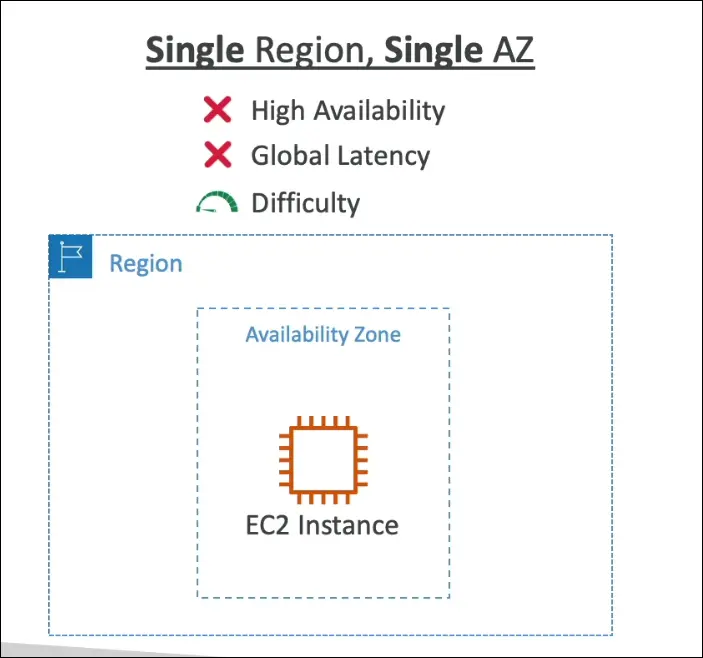
Single Region, Single Availability Zone (AZ)
| Aspect | Description |
|---|---|
| Setup | One EC2 instance in one AZ in one region |
| High Availability (HA) | ❌ No — single point of failure |
| Global Reach | ❌ Poor — users far from the region face high latency |
| Difficulty Level | ⭐ Very simple |
| Use Case | Testing, development, or non-critical workloads |
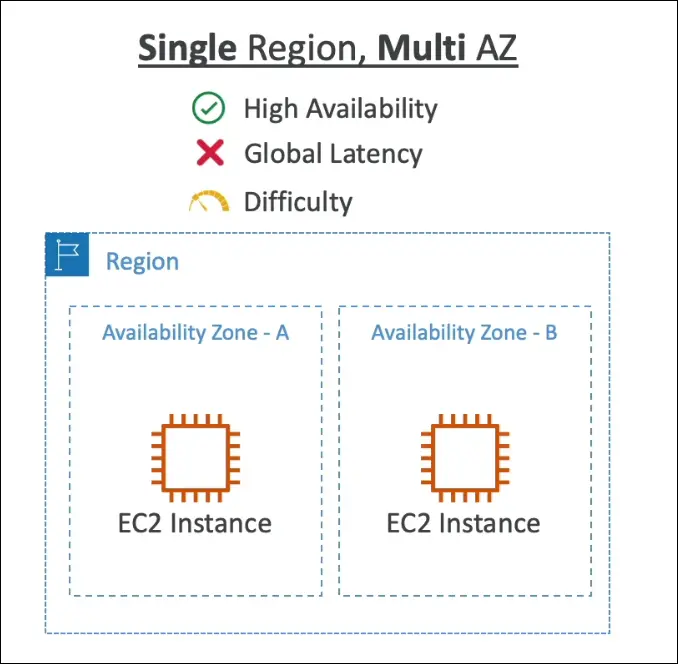
Single Region, Multi-AZ
| Aspect | Description |
|---|---|
| Setup | EC2 instances (and other resources) in multiple AZs within the same region |
| High Availability (HA) | ✅ Yes — because of redundancy across AZs |
| Global Reach | ❌ No — still serves users from one region only |
| Difficulty Level | ⭐⭐ Slightly increased |
| Use Case | Production workloads needing fault tolerance within one region |
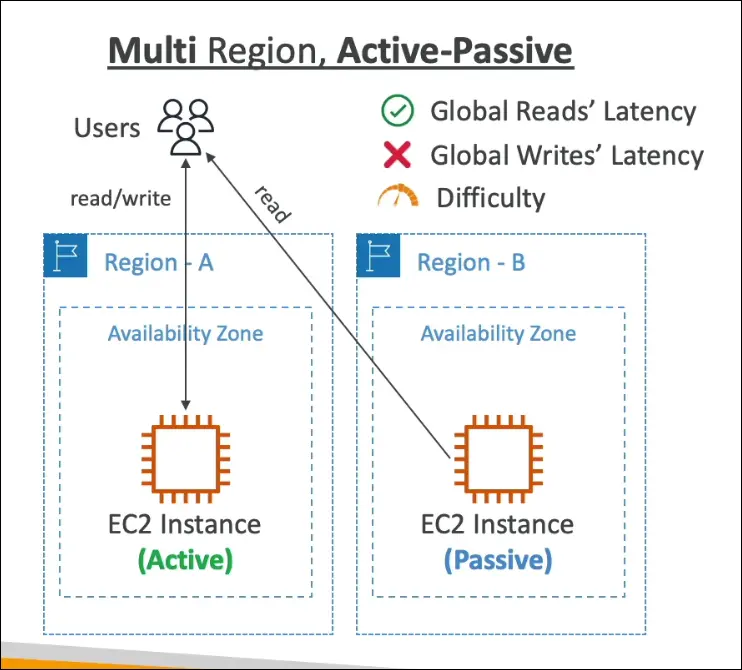
Multi-Region, Active–Passive
| Aspect | Description |
|---|---|
| Setup | Two or more regions, one is active, others are passive |
| Data Replication | ✅ Data replicated from active → passive regions |
| Reads/Writes | Reads may happen from passive, but writes only allowed in active region |
| Latency | ✅ Better read latency (data closer to users), ❌ Writes still go to one region |
| Difficulty Level | ⭐⭐⭐ Moderate — requires replication and failover setup |
| Example | Backup/DR setups, S3 cross-region replication, RDS read replicas |
| Failover Behavior | If active region fails → passive becomes active |
| Use Case | Disaster Recovery (DR) or read-heavy global workloads |
Multi-Region, Active–Active
| Aspect | Description |
|---|---|
| Setup | Multiple regions, each region is fully active |
| Data Replication | ✅ Bidirectional — data synchronized across all regions |
| Reads/Writes | ✅ Both reads and writes in all regions |
| Latency | ✅ Lowest for both reads and writes globally |
| Difficulty Level | ⭐⭐⭐⭐ High — complex synchronization logic needed |
| Example | DynamoDB Global Tables, Route 53 latency-based routing, global web apps |
| Use Case | Mission-critical applications needing global low-latency and no single point of failure |
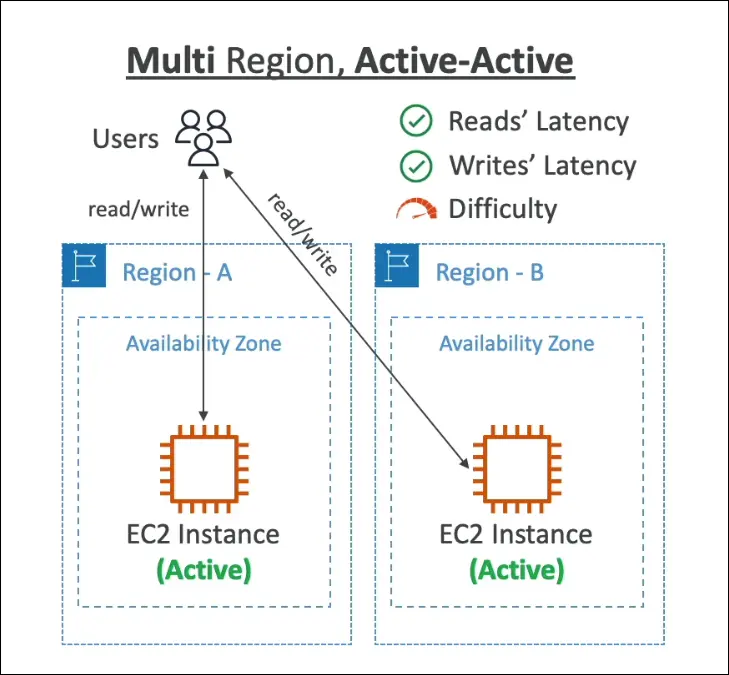
Summary Table
| Architecture Type | Regions Used | Availability | Read Latency | Write Latency | Difficulty | Example Use Case |
|---|---|---|---|---|---|---|
| Single Region, Single AZ | 1 | ❌ Low | ❌ High for global | ❌ High | ⭐ | Dev/Test |
| Single Region, Multi-AZ | 1 | ✅ High | ❌ High for global | ❌ High | ⭐⭐ | Production app (one region) |
| Multi-Region Active–Passive | 2+ | ✅ Very High | ✅ Improved | ❌ Centralized | ⭐⭐⭐ | Disaster Recovery |
| Multi-Region Active–Active | 2+ | ✅✅ Excellent | ✅✅ Global | ✅✅ Global | ⭐⭐⭐⭐ | Global scale apps |
AWS Example Services
| Example | Type |
|---|---|
| S3 Cross-Region Replication | Active–Passive |
| RDS Read Replicas | Active–Passive |
| DynamoDB Global Tables | Active–Active |
| Route 53 Latency Routing | Helps Active–Active setups |
Exam Tip
If the question says:
- “Users across the world should have low latency for both reads and writes.” → ✅ Active–Active
- “Disaster recovery setup, passive region acts as backup.” → ✅ Active–Passive
- “Single region fault tolerance only.” → ✅ Single Region Multi-AZ
AWS Global Applications – Summary Notes
Route 53 (Global DNS)
- Routes users to nearest deployment for lowest latency.
- Helps in disaster recovery (DR) setups.
- Can map hostnames → IPs.
- Supports routing policies like latency-based, geolocation, failover, etc.
Amazon CloudFront (CDN)
- A Content Delivery Network that delivers content with low latency and high transfer speed.
- Connected to S3 in the example (to serve static content).
- Uses AWS Edge Locations to cache and deliver content near users.
- Reduces latency and improves user experience.
S3 Transfer Acceleration
- Speeds up global uploads/downloads to S3.
- Uses Edge Locations to route data through AWS’s global network backbone.
- Ideal for users uploading data from far away regions.
AWS Global Accelerator
- Improves global application performance and availability.
- Uses AWS Edge Network to route user traffic via optimal AWS backbone paths.
- Reduces latency and avoids internet congestion.
AWS Outposts
- Extends AWS on-premises.
- AWS installs Outposts Racks in your data center.
- You can run AWS services locally while connecting seamlessly to the AWS Cloud.
- Ideal for workloads needing low latency to on-prem systems or local data processing.
AWS Wavelength
- Brings AWS services to the 5G edge (telecom provider networks).
- Enables ultra-low latency applications like IoT, AR/VR, real-time gaming.
- Integrates with 5G networks for milliseconds-level latency.
AWS Local Zones
- Extend AWS infrastructure to specific metro areas (like Boston, Dallas, Miami, Chicago).
- Bring compute, database, and storage closer to end users.
- Great for latency-sensitive apps (e.g., media, gaming, finance).
- Currently focused on the US, expanding globally.
Summary Table
| AWS Global Service | Purpose | Key Benefit |
|---|---|---|
| Route 53 | Global DNS routing | Routes users to nearest/healthiest region |
| CloudFront | CDN | Caches content close to users, reduces latency |
| S3 Transfer Acceleration | Faster S3 data transfer | Uses Edge network for speed |
| Global Accelerator | Improves app performance | Routes via AWS global network backbone |
| Outposts | AWS on-premises extension | Hybrid cloud, consistent AWS experience locally |
| Wavelength | 5G edge computing | Ultra-low latency with telecom networks |
| Local Zones | Regional extension | Brings AWS resources closer to local users |
Key Takeaway:
- AWS provides multiple global services to improve latency, performance, and availability for worldwide users.
- Each service addresses a different part of global infrastructure — DNS, content delivery, data transfer, networking, or edge computing.