AWS Security & Compliance
Shared Responsibility Model
Definition:
The framework that defines which security tasks are handled by AWS and which are managed by the customer.
Key Idea:
- AWS is responsible for security of the cloud.
- Customer is responsible for security in the cloud.
AWS Responsibility (Security of the Cloud)
AWS manages and secures:
- Infrastructure: Hardware, software, networking, facilities.
- Managed Services: Full responsibility for services like S3, DynamoDB, RDS.
- Global Infrastructure: Regions, Availability Zones (AZs), and Edge Locations.
- Compute, Storage, Database, and Networking layers of their services.
- Service Software: Ensuring AWS services are updated, secure, and operational.
Example:
For RDS, AWS handles:
- OS and DB patching.
- Disabling SSH access.
- Maintaining uptime and reliability of the underlying instance.
Customer Responsibility (Security in the Cloud)
Customers secure and manage:
- Data & Applications.
- Identity & Access Management (IAM).
- Operating Systems (EC2, etc.): Patching, updating, configuring firewalls (Security Groups, NACLs).
- Encryption: Enabling data encryption (client-side, server-side, in-transit).
- Network configuration: Setting up firewall rules, ports, and IPs.
- User permissions: Creating and managing database or IAM users correctly.
- Compliance: Ensuring configurations meet security standards.
Example:
- For EC2, the customer must:
- Patch OS and apps.
- Configure security groups and IAM roles.
- Encrypt application data.
- For S3, the customer must:
- Manage bucket policies and access control.
- Enable encryption as needed.
- Use IAM users/roles properly.
Shared Controls
Some controls are shared between AWS and the customer.
| Shared Control | AWS Responsibility | Customer Responsibility |
|---|---|---|
| Patch Management | AWS patches managed services (e.g., RDS). | Customer patches self-managed instances (e.g., EC2). |
| Configuration Management | Provides secure configurations for services. | Configures services properly based on usage. |
| Awareness & Training | Trains AWS staff to follow security practices. | Trains employees to securely use AWS services. |
Example Responsibilities
RDS Example
| AWS Handles | Customer Handles |
|---|---|
| Underlying EC2 instance & OS patching. | Port and IP rules (security groups). |
| DB patching automation. | Database user creation and permissions. |
| Disk reliability and performance. | Choosing public/private DB access. |
| Disabling SSH access. | Enabling encryption inside the DB (if desired). |
S3 Example
| AWS Handles | Customer Handles |
|---|---|
| Unlimited storage capacity. | Configuring bucket policies. |
| Physical data separation between customers. | Managing IAM roles and permissions. |
| Data encryption feature availability. | Enabling and choosing encryption options. |
| Ensuring AWS employees cannot access customer data. | Setting access control lists (ACLs). |
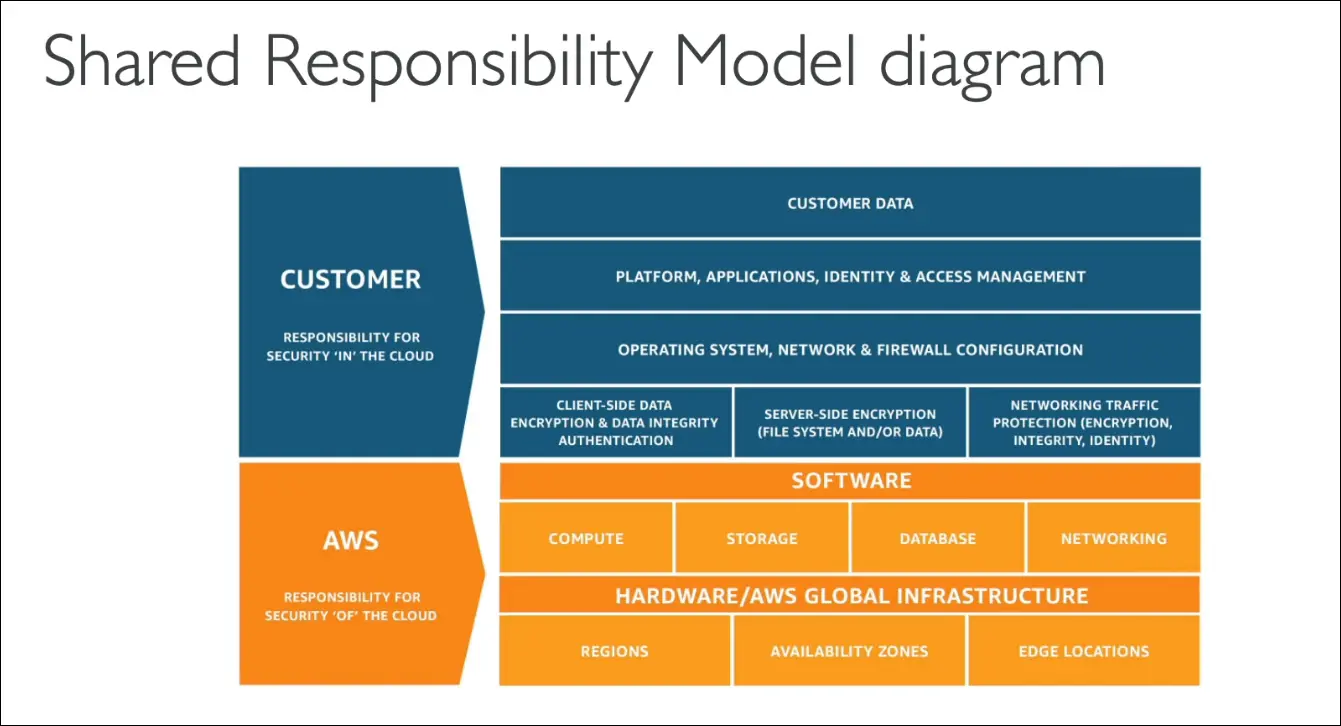
Summary: Shared Responsibility Diagram
Customer (Security in the Cloud):
- Data, applications, identity & access management.
- OS, network, and firewall configurations.
- Encryption (client-side and server-side).
- Network traffic protection.
AWS (Security of the Cloud):
- Software, compute, storage, databases, networking.
- Hardware and physical infrastructure.
- Global infrastructure (Regions, AZs, Edge Locations).
Exam Tip
- Expect 2–3 exam questions on the Shared Responsibility Model.
- Focus on identifying whether a responsibility belongs to AWS, Customer, or is Shared.
AWS DDoS Protection & Security Services
What is a DDoS Attack?
DDoS (Distributed Denial of Service)
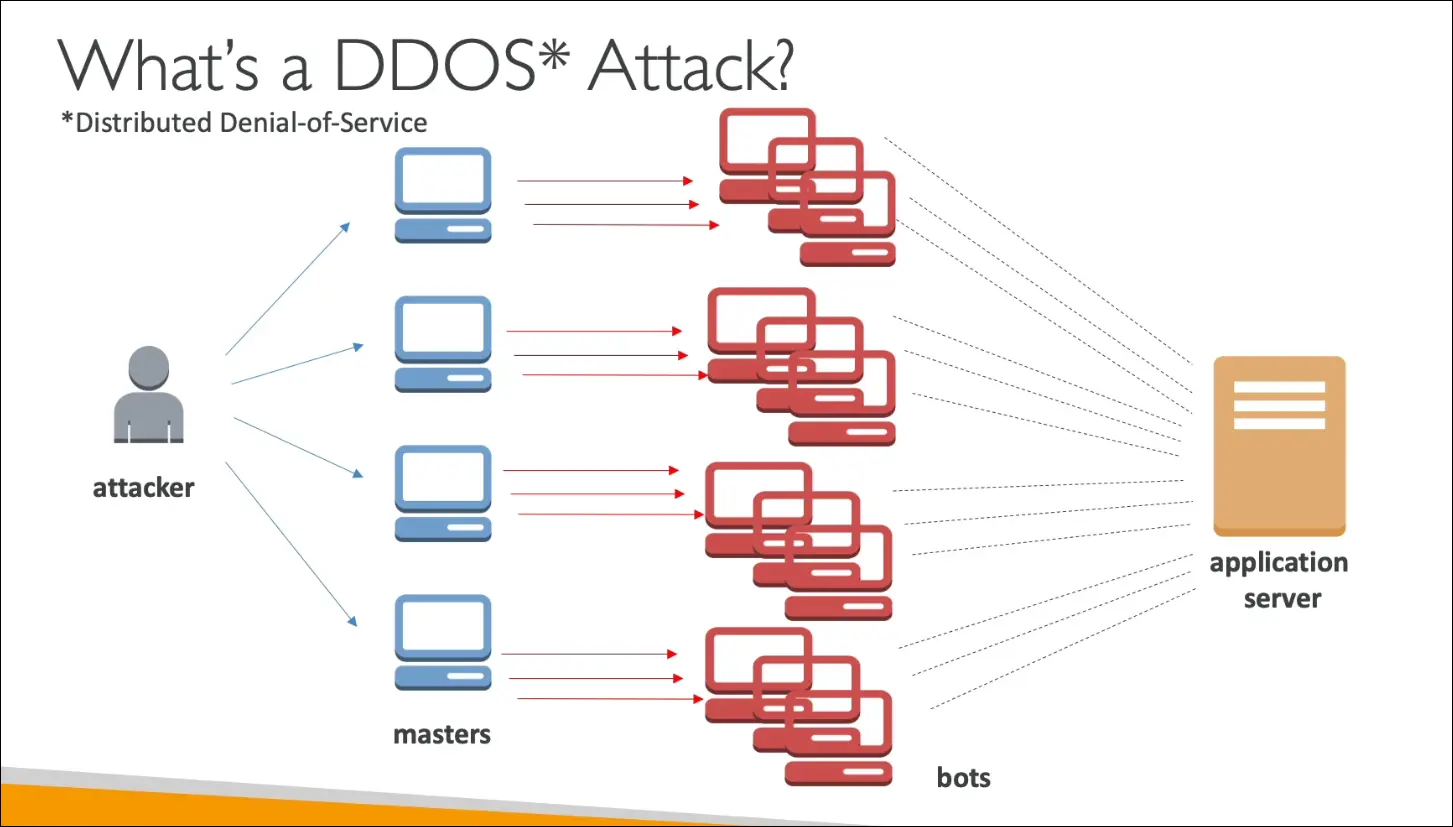
- Attack where many compromised systems (bots) flood your server with requests.
- Goal: Overwhelm the application so it becomes unresponsive to legitimate users.
- Results in downtime or denied access for real users.
Example Flow:
- Attacker controls many master servers.
- Each master launches thousands of bots.
- Bots send excessive requests to your application server.
- The server becomes overloaded and crashes.
AWS Services that Protect Against DDoS
AWS provides multiple layers of protection against DDoS attacks.
(a) AWS Shield
| Feature | Shield Standard | Shield Advanced |
|---|---|---|
| Cost | Free, enabled by default for all AWS customers | ~$3,000/month per organization |
| Protection Level | Protects against common Layer 3 & 4 attacks (e.g., SYN/UDP floods, reflection attacks) | Protects against advanced & large-scale attacks on EC2, ELB, CloudFront, Route 53, Global Accelerator |
| 24/7 DDoS Response Team (DRT) | Not included | Included |
| Cost Protection | No cost refund | AWS covers additional costs during attack |
| Activation | Automatic | Must be manually enabled |
Exam Tip:
- Shield Standard = Default, free, common attacks.
- Shield Advanced = Premium, includes DRT + cost protection.
AWS WAF (Web Application Firewall)
Protects web applications (Layer 7) from common web exploits.
Deployed On:
- Application Load Balancer (ALB)
- CloudFront
- API Gateway (out of scope for CCP exam)
Functions:
- Filters requests using Web ACLs (Access Control Lists).
- Rules can filter by:
- IP address
- HTTP headers or body
- Strings or patterns
- Geo-location (block countries)
- Request size limits
Protects Against:
- SQL Injection
- Cross-Site Scripting (XSS)
- HTTP flood (Layer 7 DDoS) using Rate-Based Rules
→ e.g., limit 5 requests per second per IP.
(c) AWS CloudFront
- A Content Delivery Network (CDN) with edge locations worldwide.
- Caches content to reduce load on origin servers.
- When combined with Shield, attacks are mitigated at edge locations (before reaching your application).
(d) Amazon Route 53
- DNS service that is also protected by AWS Shield.
- Prevents DNS-based DDoS attacks (e.g., DNS flood attacks).
(e) Auto Scaling
- Helps mitigate large-scale attacks by automatically adding more instances to handle increased traffic.
- Not a direct defense but improves availability under heavy load.
AWS DDoS Protection Architecture (Recommended Setup)
Flow Diagram (Conceptually):
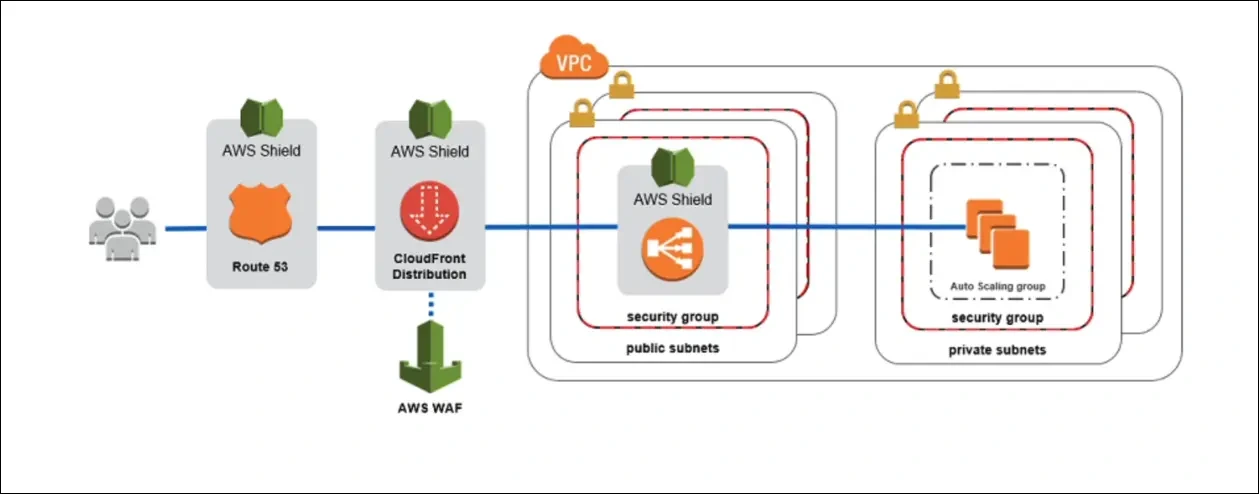
Benefits:
- Attacks mitigated early at the edge (CloudFront + Shield).
- WAF blocks malicious requests based on rules.
- Load Balancer + Auto Scaling handle valid but high-traffic spikes.
- Route 53 + Shield keep DNS available.
Key Exam Takeaways
| Concept | Definition / Purpose |
|---|---|
| DDoS Attack | Distributed traffic flood causing downtime. |
| Shield Standard | Default protection, free, common attacks. |
| Shield Advanced | Paid, stronger defense, includes DRT and cost protection. |
| WAF | Filters HTTP requests (Layer 7) using rules and ACLs. |
| Rate-Based Rule | Limits number of requests from a single IP. |
| CloudFront + Route 53 | Global edge protection, mitigates traffic near users. |
| Auto Scaling | Automatically adds capacity during attack. |
Exam Tip Summary
- Free default protection? → Shield Standard
- Paid DDoS protection ($3k/month)? → Shield Advanced
- Layer 7 filtering? → WAF
- DNS protection? → Route 53 + Shield
- Edge protection & caching? → CloudFront + Shield
- Scaling under attack? → Auto Scaling Group
AWS Network Firewall
What is AWS Network Firewall?
Definition:
A managed network security service that protects your entire VPC from Layer 3 to Layer 7 network attacks (network to application layer).
It provides centralized protection for all traffic in, out, and within your VPC.
Key Features
| Feature | Description |
|---|---|
| Scope | Protects the entire VPC, not just one subnet. |
| Layer Coverage | Operates from Layer 3 (Network) to Layer 7 (Application). |
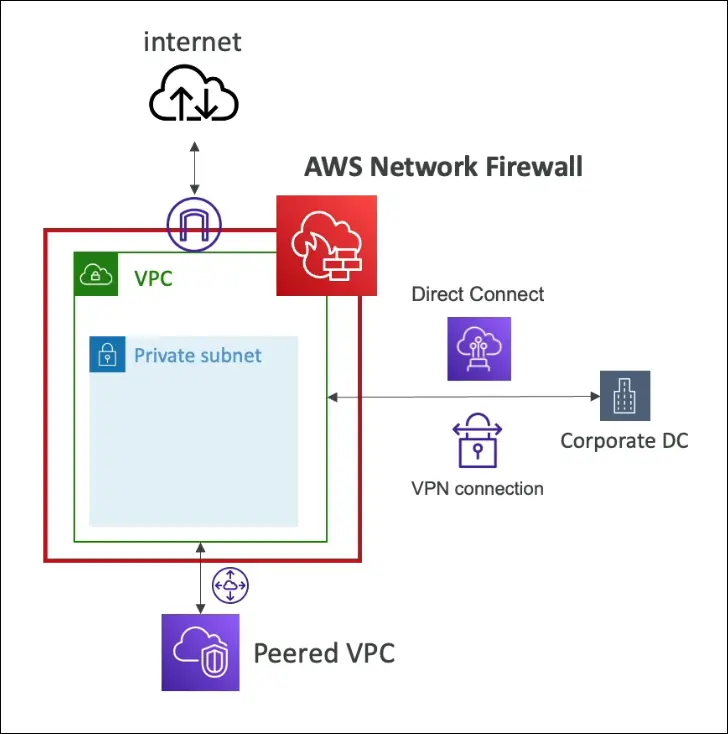
| Traffic Inspection | Can inspect inbound, outbound, and VPC-to-VPC traffic. |
| Direction of Protection | - Internet inbound/outbound- Direct Connect traffic- Site-to-Site VPN- Peered VPCs |
| Automation | Fully managed by AWS, scales automatically. |
| Integration | Works with VPC routing, AWS Firewall Manager, and CloudWatch Logs for monitoring. |
Compared to Other AWS Network Security Tools
| Service | Scope | Layer | Purpose |
|---|---|---|---|
| Network ACLs (NACLs) | Subnet level | Layer 3 & 4 | Basic stateless packet filtering. |
| Security Groups | Instance level | Layer 3 & 4 | Stateful firewall for EC2 and ENIs. |
| AWS Network Firewall | VPC level | Layers 3–7 | Advanced protection for all VPC traffic (bidirectional). |
🧠 Exam Tip:
If the question says “protect your entire VPC” or “filter all traffic going in/out of VPC” → Answer: AWS Network Firewall
Example Use Cases
Inspect and filter traffic between:
- VPC ↔ Internet (both inbound and outbound)
- VPC ↔ On-premises (via Direct Connect or VPN)
- VPC ↔ VPC Peering connections
Apply custom rules to detect and block:
- Malicious domains or IPs
- Specific protocols or ports
- Application-level signatures (like HTTP headers or payloads)
Summary Table
| Feature | AWS Network Firewall |
|---|---|
| Scope | VPC-wide |
| Managed By | AWS |
| Protection Layers | 3 to 7 |
| Traffic Types | Inbound, outbound, internal |
| Better Than | NACLs (subnet-level firewalls) |
| Use Case | Enterprise-grade VPC-level protection |
| Integrated With | AWS Firewall Manager, CloudWatch, CloudFormation |
Exam Quick Notes
- Protects entire VPC, not just subnet (✅ key phrase).
- Supports L3–L7 inspection (✅ multi-layer protection).
- Handles inbound, outbound, VPN, Direct Connect, and VPC peering traffic.
- NACLs operate at subnet level (❌ not full VPC).
- Network Firewall is managed and scalable by AWS.
AWS Firewall Manager
What is AWS Firewall Manager?
Definition:
A centralized security management service that lets you configure and manage firewall rules across multiple AWS accounts within your AWS Organization.
Purpose:
Ensure consistent security policies across all accounts and resources — current and future — in your organization.
Key Capabilities
| Feature | Description |
|---|---|
| Centralized Security Management | Manage and enforce security rules from one account across the entire organization. |
| Multi-Account Coverage | Applies policies to all existing and new accounts in AWS Organizations. |
| Automatic Policy Propagation | New resources automatically receive the configured security rules. |
| Unified Management | Supports multiple AWS security services. |
AWS Services Managed by Firewall Manager
AWS Firewall Manager can centrally manage rules and policies for:
| Service / Resource Type | Managed Policy Example |
|---|---|
| VPC Security Groups | Control inbound/outbound traffic rules across all accounts. |
| AWS WAF | Apply web ACLs globally across accounts and resources. |
| AWS Shield Advanced | Manage DDoS protection policies. |
| AWS Network Firewall | Control VPC-wide traffic inspection policies. |
| Amazon Route 53 Resolver DNS Firewall | Apply DNS filtering rules. |
🧠 Exam Tip:
The most common exam question mentions “managing Security Groups across multiple accounts” → correct answer is AWS Firewall Manager.
How It Works
- You must enable AWS Organizations.
Firewall Manager uses your organization’s master account to deploy rules. - Define security policies once (for Security Groups, WAF, etc.).
- Firewall Manager enforces policies across:
- All current accounts.
- All future accounts automatically added to the organization.
- All newly created resources (like EC2 instances, load balancers, etc.).
- Continuous enforcement ensures that every resource follows your security baseline.
Benefits
Centralized Management — single dashboard for all accounts.
Consistent Security — automatic rule propagation.
Reduced Misconfiguration Risk — no need to manually set up firewalls per account.
Integration with AWS Security Hub — combined visibility and compliance checks.
AWS Firewall Manager vs Similar Services
| Feature | Firewall Manager | WAF | Shield Advanced | Security Groups |
|---|---|---|---|---|
| Scope | Multi-account (organization-wide) | Per application/resource | Per account/service | Per instance/VPC |
| Central Management | ✅ Yes | ❌ No | ❌ No | ❌ No |
| Auto Policy Application | ✅ Yes (new accounts/resources) | ❌ No | ❌ No | ❌ No |
Exam Key Phrases & Answers
| Exam Clue | AWS Service |
|---|---|
| Manage Security Groups across multiple accounts | AWS Firewall Manager |
| Apply WAF rules across accounts | Firewall Manager |
| Automatically apply firewall rules to new accounts/resources | Firewall Manager |
| Enforce organization-wide Shield Advanced protection | Firewall Manager |
Summary
| Feature | AWS Firewall Manager |
|---|---|
| Type | Centralized Security Policy Manager |
| Manages | WAF, Shield Advanced, Network Firewall, Security Groups |
| Scope | Organization-wide |
| Requirement | AWS Organizations must be enabled |
| Exam Focus | Multi-account Security Group management |
Penetration Testing on AWS Cloud
What is Penetration Testing?
Penetration testing (pen testing) means attacking your own infrastructure to identify and fix security vulnerabilities before real attackers exploit them.
AWS Penetration Testing Policy
AWS allows customers to perform security assessments and penetration tests without prior approval on eight specific services.
Authorized AWS Services (No Approval Needed):
- Amazon EC2 instances
- NAT Gateways and Elastic Load Balancers
- Amazon RDS
- Amazon CloudFront
- Amazon Aurora
- AWS API Gateway
- AWS Lambda and Lambda@Edge functions
- Amazon Lightsail and Elastic Beanstalk environments
(The list may expand over time, but this is not typically tested in exams.)
Prohibited / Restricted Activities
You cannot perform activities that simulate attacks on AWS infrastructure.
Disallowed Actions:
- DNS zone walking via Amazon Route 53 Hosted Zone
- DoS, DDoS, or Simulated DoS/DDoS attacks
- Port flooding, protocol flooding, or request flooding
These are seen as real attacks by AWS and can lead to suspension or investigation.
When to Contact AWS Security
For any penetration test or security activity not listed among the eight authorized services, you must contact AWS Security for prior approval.
Exam Tip
For the AWS exam:
- Remember: Pen testing = allowed on 8 services only.
- DoS, DDoS, DNS walking, and flooding = NOT allowed.
- Anything suspicious to AWS = prohibited.
AWS Encryption Overview
What is Encryption?
Encryption is the process of converting data into a secure format so that only authorized parties can access it.
In AWS, encryption ensures data confidentiality and protection at all times.
Two Types of Encryption in AWS
Encryption at Rest
- Protects data stored on physical media (not moving).
- Examples:
- EBS volumes
- RDS databases
- S3 buckets / Glacier
- EFS network drives
- Data is encrypted where it’s stored (hard disk, storage service, etc.).
Encryption in Transit
- Protects data being transferred over a network (data in motion).
- Examples:
- From on-premises to AWS
- Between EC2 and DynamoDB
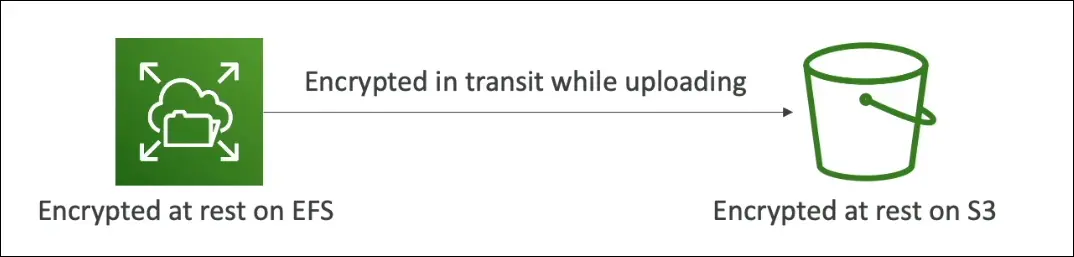
- Between EFS and S3
- Usually uses TLS (Transport Layer Security) to protect data.
👉 Best Practice:
Encrypt data both at rest and in transit for end-to-end protection.
Encryption Keys
- Encryption uses keys to encode/decode data.
- Without access to the key, the data cannot be decrypted.
- AWS uses KMS (Key Management Service) to handle keys.
AWS Key Management Service (KMS)
What it does
- Manages encryption keys securely.
- Allows you to control who can use or manage keys.
- AWS handles most of the backend key management.
Where KMS is used
- EBS: Encrypt volumes
- S3: Server-side encryption of objects
- RDS / Redshift / EFS: Encrypt databases and files
- CloudTrail logs, S3 Glacier, and Storage Gateway are encrypted by default.
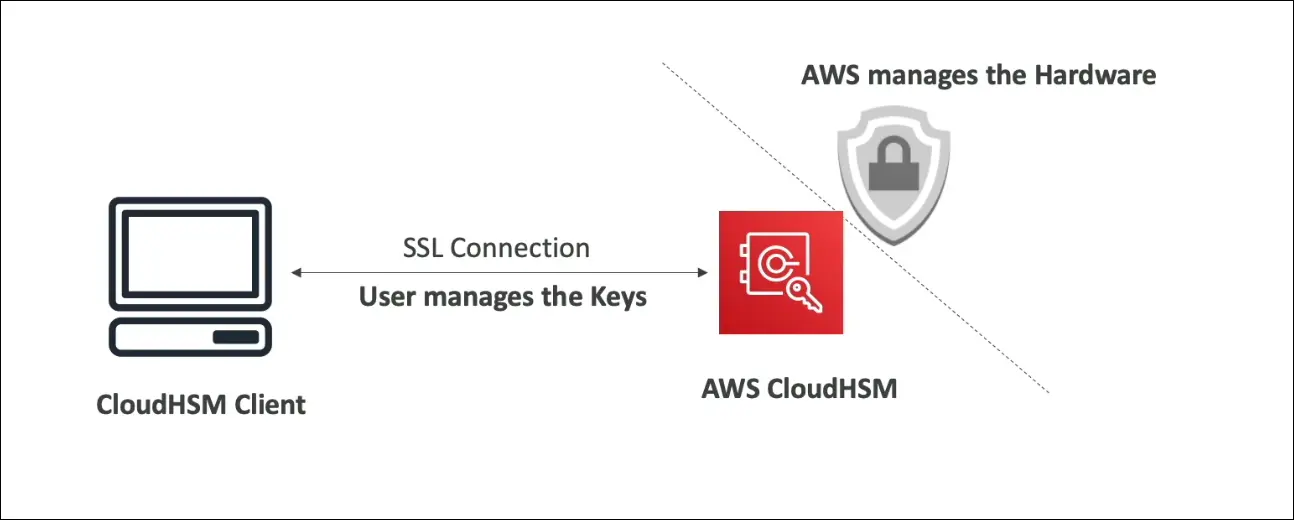
AWS CloudHSM (Hardware Security Module)
| Feature | KMS | CloudHSM |
|---|---|---|
| Key Management | Managed by AWS | Managed by Customer |
| Type | Software-based | Hardware-based |
| Access to Keys | AWS controls | Customer controls |
| Hardware Ownership | Shared | Dedicated (HSM device) |
| Compliance | General encryption | FIPS 140-2 Level 3 compliant |
| Use Case | General use | High-security / regulatory use |
- CloudHSM = AWS provides hardware, but you manage your own keys.
- HSM device is tamper-resistant, and all cryptographic operations happen inside it.
Types of KMS Keys
| Key Type | Description | Managed By | Example / Notes |
|---|---|---|---|
| Customer Managed Keys (CMK) | Created and managed by you. You can enable/disable keys and rotate them yearly. | Customer | Most control (can bring your own key). |
| AWS Managed Keys | Created and managed by AWS on your behalf. | AWS | Named like aws/s3, aws/ebs. |
| AWS Owned Keys | Managed entirely by AWS, used across accounts. You can’t view or control them. | AWS | For AWS-internal encryption needs. |
| CloudHSM Keys / Custom Key Store | Keys generated and managed in your own CloudHSM hardware. | Customer | Highest control and isolation. |
Summary Chart
| Concept | Purpose | Example Services |
|---|---|---|
| Encryption at Rest | Protects stored data | S3, EBS, RDS, EFS |
| Encryption in Transit | Protects data in motion | EC2 → S3, On-prem → AWS |
| KMS | Software-based key management | S3, EBS, RDS |
| CloudHSM | Hardware-based key management | Financial or government workloads |
| Default Encryption | Always on | CloudTrail, Glacier, Storage Gateway |
Exam Tips
- Encryption at rest: Data stored (S3, EBS, RDS).
- Encryption in transit: Data moving (TLS/SSL).
- KMS: AWS manages keys.
- CloudHSM: You manage keys on dedicated hardware.
- aws/ prefix = AWS-managed key.
- Bring Your Own Key (BYOK) = Customer-managed.
- FIPS 140-2 Level 3 = CloudHSM compliance standard.
AWS Certificate Manager (ACM)
What is ACM?
AWS Certificate Manager (ACM) is a service that helps you provision, manage, and deploy SSL/TLS certificates easily.
Purpose of SSL/TLS Certificates
- Used to provide in-flight encryption (data encrypted during transmission).
- Allows websites to serve traffic over HTTPS instead of HTTP.
- Protects data between client and server.
Example Scenario
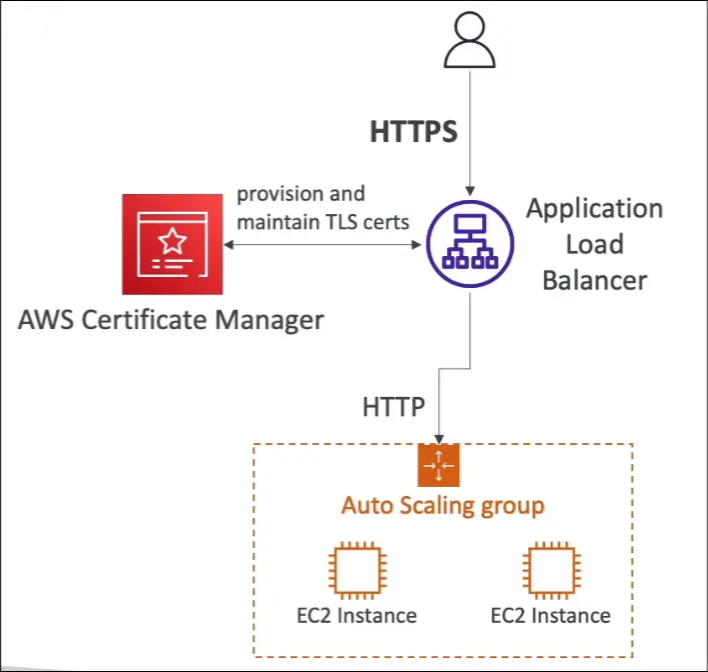
- You have an Application Load Balancer (ALB) connected to EC2 instances via HTTP.
- You want users to connect securely using HTTPS.
- Solution: Use ACM to:
- Provision a TLS certificate for your domain.
- Attach it to your ALB.
- The ALB then serves HTTPS endpoints for clients.
Features of ACM
| Feature | Description |
|---|---|
| Automatic Renewal | ACM renews certificates automatically before they expire. |
| Integration | Works seamlessly with ALB, CloudFront, and API Gateway. |
| Public & Private Certificates | Supports both types for different use cases. |
| Free for Public Certificates | AWS does not charge for public TLS certificates. |
| Ease of Deployment | No need to manually handle private keys or certificate files. |
Common Integrations
- Elastic Load Balancers (ALB/NLB)
- Amazon CloudFront
- Amazon API Gateway
Key Term
In-Flight Encryption: Encryption of data while it is being transferred between systems (for example, from client browser to server).
Quick Summary
ACM lets you create and manage SSL/TLS certificates easily for AWS services. It provides HTTPS endpoints for secure communication, supports automatic renewal, integrates with major AWS services, and is free for public certificates.
AWS Artifact – Security & Compliance
Purpose
AWS Artifact is a self-service portal that provides on-demand access to:
- AWS compliance reports
- AWS agreements
It is not a service like EC2 or S3, but a portal for downloading and managing compliance-related documents.
Key Features
- Compliance Reports (Artifact Reports)
- These are security and compliance documents from third-party auditors.
- Help verify that AWS services meet various global compliance standards.
- Common reports include:
- ISO certifications
- PCI (Payment Card Industry) reports
- SOC (System and Organization Controls) reports
- Agreements (Artifact Agreements)
- Allows users to review, accept, and track AWS legal/compliance agreements.
- Examples:
- BAA (Business Associate Addendum) for healthcare compliance
- HIPAA (Health Insurance Portability and Accountability Act) agreements
- Can be applied to individual accounts or entire AWS Organizations.
- Use in Compliance & Audits
- Helps companies support internal audits and demonstrate compliance when using AWS Cloud.
- Documents can be downloaded after accepting the NDA (Non-Disclosure Agreement).
- Access
- Global service (accessible in all regions).
- Available through the AWS Management Console → AWS Artifact.
How It Works
- Open AWS Artifact in the Console.
- Choose:
- View Reports to download audit/compliance reports.
- View Agreements to review or accept compliance agreements.
- Accept NDA or agreement if prompted.
- Download and use documents for internal compliance or external verification.
Use Case Example
A company undergoing an internal audit needs proof of AWS’s PCI and SOC compliance.
→ The compliance officer logs into AWS Artifact, downloads the PCI and SOC reports, and includes them in the company’s audit documentation.
Exam Tips
- AWS Artifact is not a security service but a portal for compliance documents.
- Use it when the question mentions:
- Accessing AWS compliance reports.
- Managing legal or compliance agreements (like BAA or HIPAA).
- It supports audits and regulatory compliance needs.
- It’s free to access.
Summary
| Feature | Description |
|---|---|
| Purpose | Portal for AWS compliance and audit documents |
| Main Components | Compliance Reports, Agreements |
| Common Reports | ISO, PCI, SOC |
| Common Agreements | BAA, HIPAA |
| Use Case | Internal/external audit, compliance verification |
| Cost | Free |
| Global Availability | Yes |
Amazon GuardDuty – Threat Detection & Security Monitoring
Purpose
Amazon GuardDuty is a managed intelligent threat detection service that continuously monitors AWS accounts and workloads for malicious or unauthorized activity.
It uses machine learning, anomaly detection, and integrated threat intelligence to identify potential security risks.
Key Features
Threat Detection
- Detects unusual or unauthorized behavior in AWS environments.
- Uses machine learning and third-party threat intelligence feeds.
No Infrastructure Setup
- Fully managed service — no software installation or agents required.
- Can be enabled in one click with a 30-day free trial.
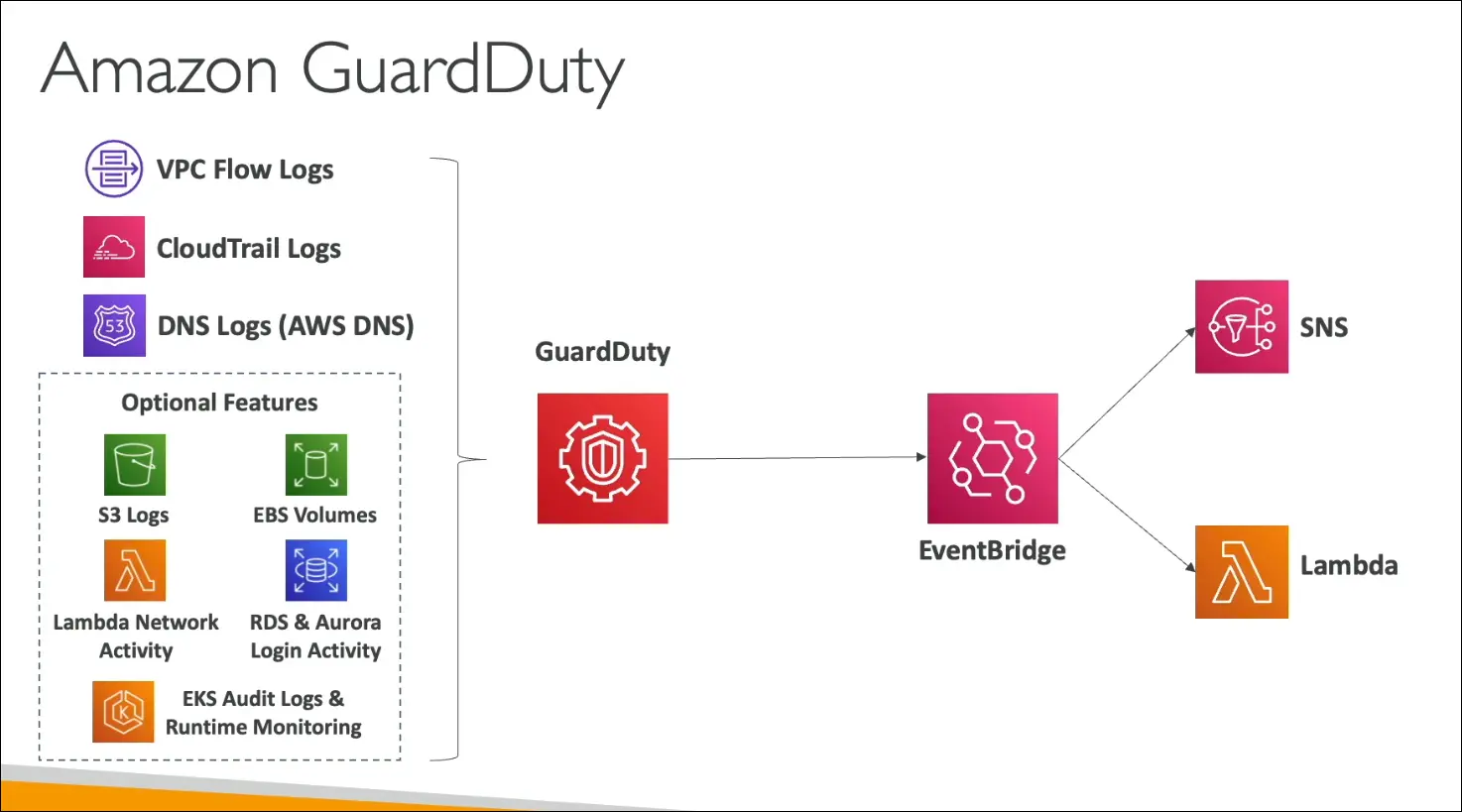
Data Sources (Inputs)
- Mandatory sources:
- VPC Flow Logs – Detects suspicious network traffic or IPs.
- CloudTrail Logs – Detects unusual API calls or unauthorized deployments.
- DNS Logs – Identifies DNS exfiltration or encoded data transfers (e.g., compromised EC2 sending data through DNS).
- Optional sources:
- S3 Data Events
- EBS Volume Monitoring
- Lambda Network Activity
- RDS / Aurora Login Activity
- EKS Audit & Runtime Logs
- Mandatory sources:
Integration & Automation
- GuardDuty generates findings when it detects threats.
- Findings trigger Amazon EventBridge events, which can:
- Invoke AWS Lambda for automated response.
- Send alerts via SNS.
- Allows real-time threat response and security automation.
Cryptocurrency Attack Detection
- Has dedicated detection for cryptocurrency mining (crypto-jacking) activities.
How It Works
- GuardDuty continuously analyzes input data sources.
- Uses ML and threat intelligence to detect suspicious activity.
- Generates security findings when a potential threat is detected.
- Sends findings to Amazon EventBridge.
- EventBridge rules can:
- Trigger Lambda functions (automated remediation),
- Or send SNS notifications (alerting security teams).
Use Case Example
- A company enables GuardDuty to monitor AWS activity.
- GuardDuty detects repeated failed login attempts from an unknown IP.
- It creates a finding, triggers EventBridge, and automatically calls a Lambda function to disable the affected IAM user.
Exam Tips
- Purpose: Detect security threats in AWS environments automatically.
- Key Data Sources: CloudTrail, VPC Flow Logs, DNS Logs.
- No Agents or Setup: Fully managed and easy to enable.
- Integrates with: EventBridge, Lambda, SNS for automation.
- Detects Crypto Attacks: Recognizes cryptocurrency mining activities.
- Region Scope: GuardDuty operates regionally, but can be enabled across all accounts via AWS Organizations.
Summary Table
| Feature / Concept | Description |
|---|---|
| Service Type | Managed threat detection service |
| Main Goal | Identify and alert on malicious or unauthorized behavior |
| Input Data Sources | VPC Flow Logs, CloudTrail, DNS Logs, (optional) S3, EBS, RDS, Lambda, EKS |
| Detection Method | Machine learning, anomaly detection, threat intelligence |
| Integrations | EventBridge (for findings), Lambda, SNS |
| Use Case | Detect compromised instances, crypto-mining, or unauthorized API access |
| Cost | Pay-per-use (30-day free trial available) |
| Setup | One-click enablement, no software required |
Amazon Inspector – Automated Security Assessment
Purpose
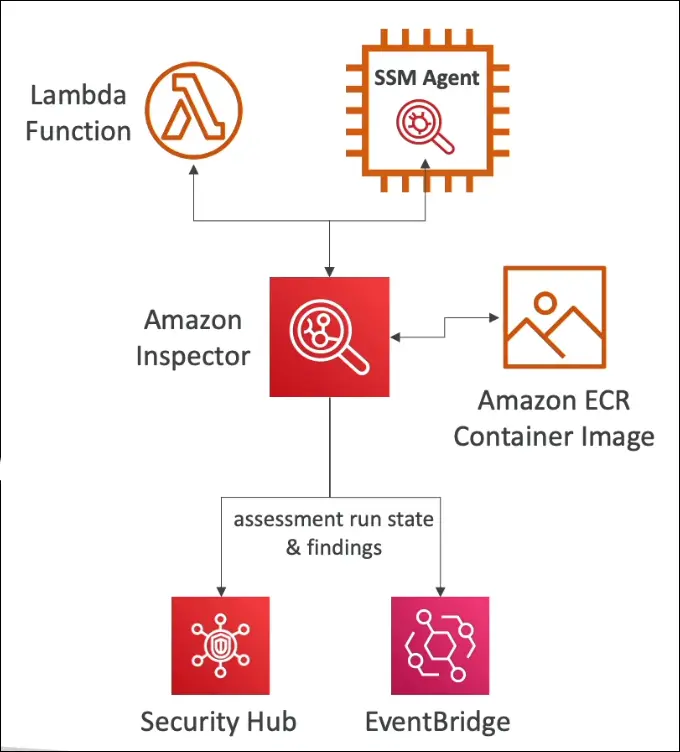
Amazon Inspector is an automated vulnerability management service that continuously scans AWS resources for security issues and known vulnerabilities.
Key Use Cases
Inspector automatically assesses the following:
- Amazon EC2 Instances
- Uses Systems Manager (SSM) Agent to scan instances.
- Checks for:
- Unintended network accessibility
- Known OS and package vulnerabilities (CVEs)
- Continuous scanning, no manual trigger needed.
- Amazon ECR (Elastic Container Registry)
- Scans container images as they are pushed to ECR.
- Detects vulnerabilities in base images and dependencies.
- Continuous re-evaluation when CVE database updates.
- AWS Lambda Functions
- Scans function code and package dependencies for vulnerabilities.
- Automatically runs assessments during deployment.
Key Features
| Feature | Description |
|---|---|
| Automated | No manual scans, runs continuously |
| CVE Database | Uses Common Vulnerabilities and Exposures database |
| Risk Scoring | Assigns severity to findings for prioritization |
| Integration | Findings sent to AWS Security Hub and EventBridge |
| EventBridge Support | Automate responses with Lambda, or send notifications via SNS |
| Continuous Monitoring | Automatically rescans resources when new CVEs are added |
How It Works
- Inspector analyzes EC2, ECR, and Lambda resources.
- It compares software components to the CVE vulnerability database.
- It assigns risk scores to each finding.
- Results are sent to:
- AWS Security Hub for centralized visibility.
- Amazon EventBridge for automated remediation workflows.
Example Use Case
When a new CVE (vulnerability) is released:
- Inspector automatically rescans EC2, ECR, and Lambda.
- Finds affected resources and sends findings to Security Hub.
- EventBridge triggers a Lambda function to notify or patch affected systems.
Exam Tips
Focus Points:
- Inspector = Vulnerability management, not threat detection.
- Scans EC2, ECR, Lambda — nothing else.
- Uses SSM Agent for EC2 scanning.
- Continuous, automated, and CVE-based.
- Integrates with Security Hub and EventBridge for central visibility and automation.
Not for:
- Monitoring network traffic (that’s GuardDuty)
- Data classification (that’s Macie)
Quick Summary Table
| Aspect | Amazon Inspector |
|---|---|
| Purpose | Automated vulnerability assessment |
| Scans | EC2 (with SSM), ECR (containers), Lambda |
| Detects | Known software vulnerabilities (CVEs), network reachability |
| Continuous | Yes |
| Integrations | Security Hub, EventBridge |
| Output | Findings with severity/risk score |
| Use Case | Identify and prioritize vulnerabilities |
Summary
Amazon Inspector automatically scans your EC2 instances, container images, and Lambda functions for known vulnerabilities using the CVE database, integrates with Security Hub and EventBridge, and helps you prioritize and remediate risks.
AWS Config – Security & Compliance
Purpose
AWS Config is a compliance and auditing service that continuously monitors, records, and evaluates the configuration of AWS resources to ensure they comply with organizational security and governance rules.
Key Functions
- Configuration Recording
- Tracks and records changes made to AWS resources.
- Maintains a history of configurations for each resource.
- Compliance Evaluation
- Uses Config Rules to check if resources comply with security standards or policies.
- Example rules:
restricted-ssh(checks for open SSH ports)s3-bucket-public-read-prohibitedrds-instance-public-access-check
- Storage & Analysis
- Configuration data is stored in Amazon S3.
- Can be analyzed using Athena or other tools.
- Change Notifications
- Sends alerts via Amazon SNS when resource configurations change or become noncompliant.
- Visibility & Accountability
- Integrates with AWS CloudTrail to identify who made specific configuration changes.
- Displays compliance timelines and history for each resource.
How AWS Config Works
- Enable Config from the AWS Management Console.
- Select resources to record (specific or all resources).
- Config creates:
- An S3 bucket for storing configuration data.
- A service-linked IAM role for Config.
- Set Config Rules (e.g., restricted SSH access).
- Config continuously:
- Monitors and records configurations.
- Evaluates compliance against rules.
- Sends notifications for any violations.
Compliance Example
Scenario:
A security group allows unrestricted SSH access (0.0.0.0/0).
Steps:
- Config marks it as noncompliant under the
restricted-sshrule. - The admin removes the open SSH rule.
- Config re-evaluates and marks it compliant (green).
- The configuration timeline shows:
- Initial noncompliance
- Rule change
- Compliance restored
- CloudTrail logs confirm the change was made by the root user.
Aggregation & Scope
- Regional service, but results can be aggregated across multiple accounts and regions.
- Useful for enterprise-level compliance visibility.
Pricing & Access
- Not free — charges per configuration item recorded and evaluated.
- Access via AWS Management Console → AWS Config.
Common Use Cases
- Detect unrestricted SSH access.
- Identify publicly accessible S3 buckets.
- Track ALB or EC2 configuration changes.
- Support audits and compliance reports.
- Maintain a configuration inventory of all AWS resources.
Integration Summary
| Service | Purpose |
|---|---|
| Amazon S3 | Stores configuration history and snapshots |
| Amazon SNS | Sends notifications for changes or noncompliance |
| AWS CloudTrail | Tracks who made changes and when |
| AWS Config Aggregator | Combines compliance results across accounts/regions |
Summary Table
| Feature | Description |
|---|---|
| Service Type | Auditing and compliance service |
| Monitors | Resource configurations and changes |
| Compliance Check | Uses AWS Config Rules |
| Storage | Amazon S3 |
| Notifications | Amazon SNS |
| Integration | CloudTrail (user tracking) |
| Scope | Regional (can aggregate globally) |
| Pricing | Paid per configuration item |
Amazon Macie – Data Security & Privacy
Purpose
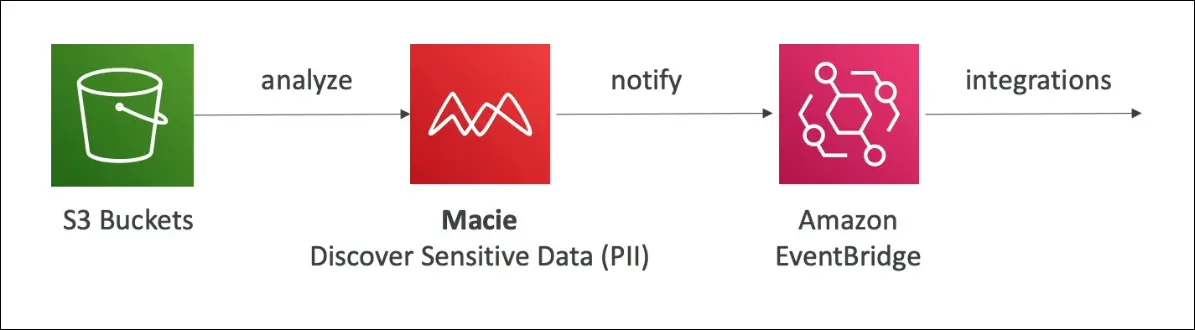
Amazon Macie is a fully managed data security and data privacy service that uses machine learning and pattern matching to automatically discover, classify, and protect sensitive data stored in Amazon S3.
Key Features
| Feature | Description |
|---|---|
| Machine Learning (ML) + Pattern Matching | Detects and classifies sensitive information automatically. |
| Sensitive Data Types | Identifies PII (Personally Identifiable Information) like names, addresses, credit card numbers, and more. |
| Integration with EventBridge | Sends findings and alerts about sensitive data discoveries. |
| Automation Support | Can trigger SNS notifications, Lambda functions, or custom workflows via EventBridge. |
| Fully Managed | No infrastructure to manage, just enable and select S3 buckets. |
| S3 Focused | Only works with Amazon S3 (analyzes bucket contents and objects). |
How It Works
- Enable Amazon Macie (one-click setup).
- Select S3 buckets to analyze.
- Macie uses ML and pattern matching to scan objects.
- Findings are generated when sensitive data (e.g., PII) is detected.
- Findings are sent to Amazon EventBridge, which can trigger:
- SNS notifications (alerts)
- Lambda functions (automated responses)
Use Cases
- Detecting sensitive data exposure in S3.
- Ensuring data privacy compliance (GDPR, HIPAA, etc.).
- Auditing and monitoring sensitive data storage.
Integration Summary
| Service | Purpose |
|---|---|
| Amazon S3 | Data source for analysis |
| Amazon EventBridge | Receives and routes Macie findings |
| Amazon SNS / AWS Lambda | Automated alerting or remediation |
Exam Tip
Macie = S3 + Sensitive Data + Machine Learning (PII detection)
If you see keywords like “PII in S3”, “discover sensitive data”, or “data privacy”, the correct AWS service is Macie.
AWS Security Hub – Centralized Security Management
Purpose
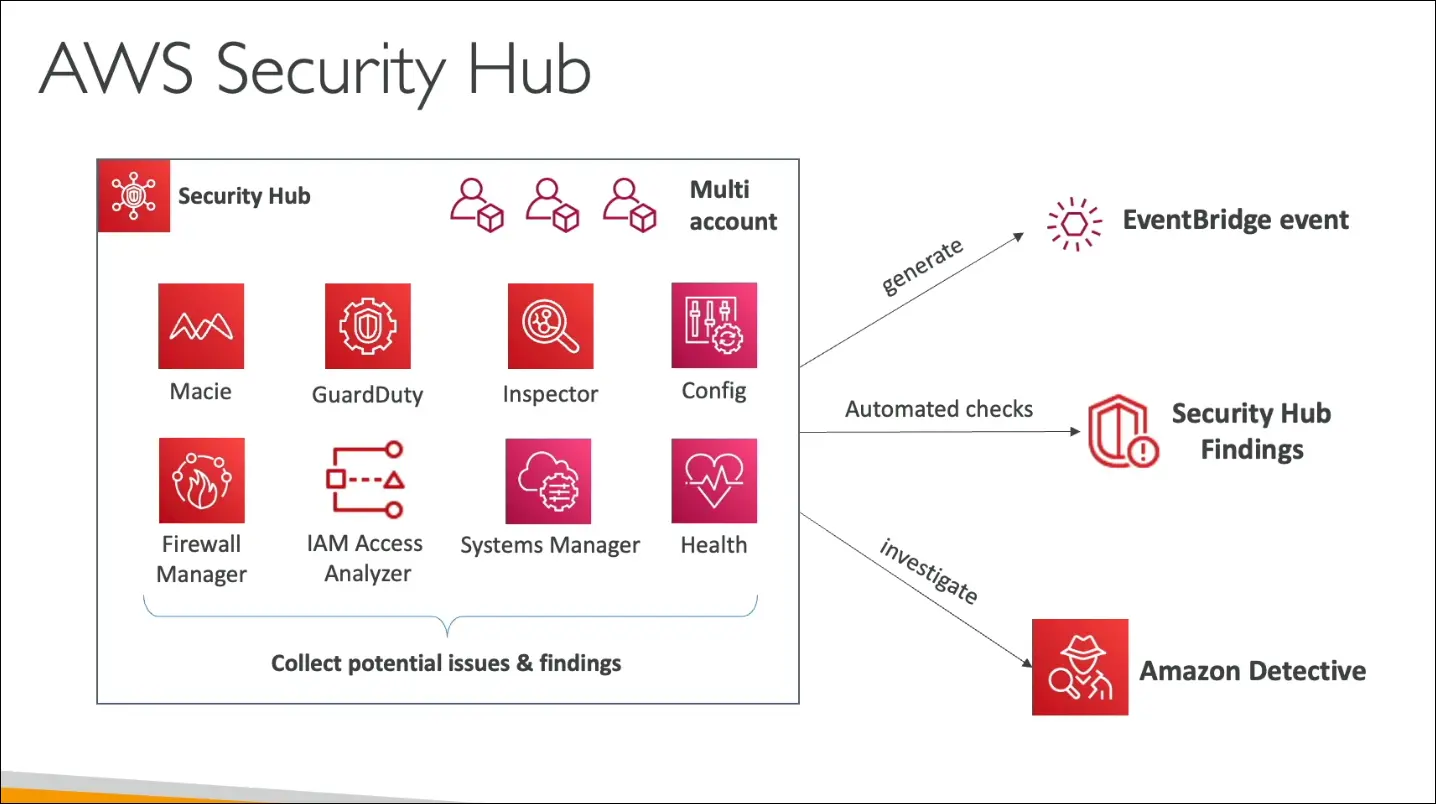
AWS Security Hub is a central security service that helps you manage, visualize, and automate security checks across multiple AWS accounts and regions.
It provides a single dashboard to view your security posture and compliance status.
Key Features
| Feature | Description |
|---|---|
| Centralized Dashboard | Aggregates and displays security findings from multiple AWS services and partner tools. |
| Automated Security Checks | Continuously evaluates your AWS environment using predefined security standards. |
| Multi-Account Support | Collects and consolidates findings across several AWS accounts. |
| Integration with EventBridge | Automatically sends findings to EventBridge for notifications or automation. |
| Integration with AWS Config | Config must be enabled for Security Hub to work. |
| Integration with Detective | Use Amazon Detective to investigate the root cause of findings. |
| Compliance Standards | Supports frameworks like CIS AWS Foundations, PCI DSS, and AWS Foundational Security Best Practices. |
Integrated AWS Services
Security Hub aggregates findings from:
- Amazon GuardDuty (threat detection)
- Amazon Inspector (vulnerability scanning)
- Amazon Macie (sensitive data discovery)
- AWS Config (resource compliance)
- IAM Access Analyzer (identity access insights)
- AWS Firewall Manager
- AWS Systems Manager
- AWS Health
- AWS Partner Security Tools
How It Works
- Enable Security Hub (Config required first).
- Choose security standards to follow (e.g., CIS, PCI DSS, AWS Best Practices).
- Security Hub continuously collects findings from supported services.
- Results are shown in a unified dashboard.
- Findings can trigger Amazon EventBridge rules to automate actions.
- Investigate issues with Amazon Detective.
Pricing Overview
- Per Security Check: Billed per 1,000 checks performed.
- Per Finding Ingested: The first 10,000 findings per month are free, then pay per finding.
- 30-Day Free Trial is available.
Integration Flow Example
Macie / GuardDuty / Inspector → Security Hub → EventBridge → Lambda or SNS → Notification or Automation
Exam Tip
Security Hub = Centralized dashboard for security & compliance findings
Requires AWS Config, integrates with GuardDuty, Inspector, Macie, and others.
If you see “aggregate findings” or “single pane of glass for security,” the correct answer is Security Hub.
Amazon Detective
Purpose
- Helps analyze, investigate, and find the root cause of security issues or suspicious activities in AWS.
- Works after services like GuardDuty, Macie, and Security Hub detect potential threats.
Problem It Solves
- Security findings often need deeper analysis to understand how and why they happened.
- This analysis can be complex, time-consuming, and involve correlating data from multiple sources.
How It Works
- Uses Machine Learning (ML) and graph-based analysis to:
- Connect related events and entities automatically.
- Show visual relationships to quickly pinpoint the root cause.
Data Sources
Amazon Detective automatically collects and processes data from:
- VPC Flow Logs (network traffic)
- AWS CloudTrail (API calls)
- Amazon GuardDuty (threat detection)
Output
- Provides visualizations and context for incidents.
- Gives a unified view of security-related data.
- Helps you understand who did what, when, and from where.
Key Idea
Amazon Detective doesn’t detect issues; it helps you investigate and understand them.
AWS Abuse Reporting
Purpose
- To report abusive or illegal activities happening through AWS resources.
When to Report
You should contact the AWS Abuse Team if you notice:
- Spam emails coming from AWS-owned IPs
- Spam on websites or forums using AWS resources
- Port scanning activity from AWS servers
- DDoS (Distributed Denial of Service) attacks
- Intrusion attempts on your systems from AWS IPs
- Hosting of illegal or copyrighted content on AWS
- Distribution of malware from AWS infrastructure
How to Report
You can report abuse in two ways:
- Online form (available on AWS Abuse page)
- Email: 📧 abuse@amazonaws.com
Exam Tip
For the AWS exam, just remember:
If you suspect abuse or illegal activity from AWS resources, email the AWS Abuse Team at
➡️ abuse@amazonaws.com
AWS Root User Privileges
What is the Root User?
- The Root User is the original account owner created when an AWS account is first made.
- It has full, unrestricted access to all AWS services and resources.
Best Practice
- Never use the root account for daily or administrative tasks.
- Create an IAM user with admin privileges instead.
- Secure the root account credentials (especially the secret access keys).
- Enable MFA (Multi-Factor Authentication) on the root account.
Actions Only the Root User Can Perform
These are exclusive to the root user and may appear on the exam:
- Account Management
- Change account name, root email, root password, or root access keys.
- View certain tax invoices.
- Close the AWS account.
- IAM and Permissions
- Restore IAM user permissions if permissions are accidentally removed.
- Support Plans
- Change or cancel your AWS Support plan.
- Reserved Instance Marketplace
- Register as a seller in the Reserved Instance Marketplace.
(Example: If you bought a 3-year Reserved Instance but don’t need it after 2 years, you can resell it — only the root user can register as a seller.)
- Register as a seller in the Reserved Instance Marketplace.
- Amazon S3
- Enable MFA Delete on an S3 bucket.
- Edit or delete bucket policies that contain invalid VPC IDs or endpoint IDs.
- AWS GovCloud
- Sign up for AWS GovCloud.
Exam Tip
Remember: Root user = full control, but should only be used for rare, account-level operations like closing the account or changing billing details.
IAM Access Analyzer (AWS)
Purpose
- Helps identify AWS resources shared externally (outside your AWS account or organization).
- Detects potential unintended access to your resources.
- Built into the IAM console and free to use.
Resources it Analyzes
IAM Access Analyzer checks these for external sharing:
- S3 Buckets
- IAM Roles
- KMS Keys
- Lambda Functions and Layers
- SQS Queues
- Secrets Manager Secrets
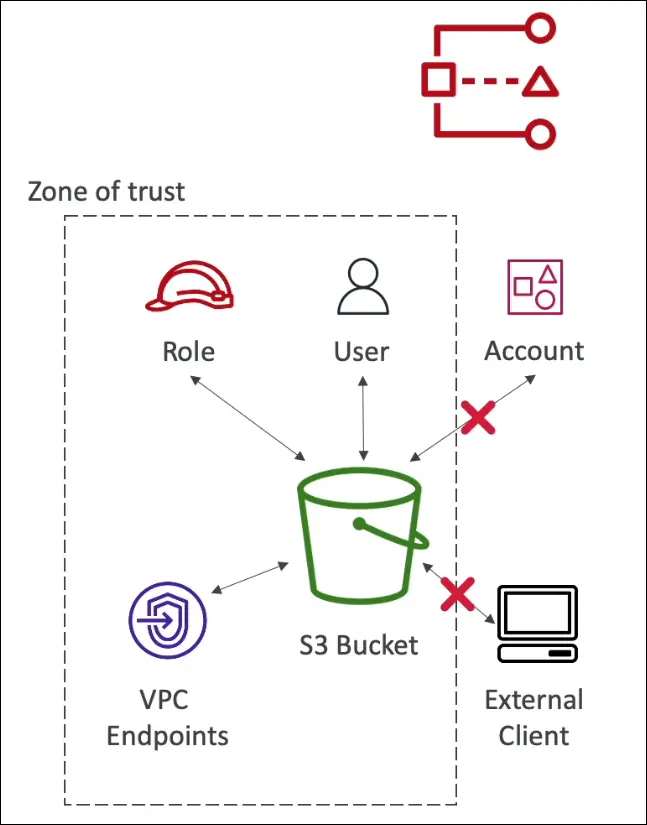
Concept of Zone of Trust
- Defines what’s considered “internal” or trusted.
- Can be:
- Your AWS account, or
- Your AWS Organization (all accounts under it).
- Anything outside this zone is flagged as a finding.
How It Works
- You create an analyzer in the IAM console.
- Example name:
console-analyzer. - Choose zone of trust (usually current account).
- Optionally, add tags.
- Example name:
- It creates a service-linked role to scan your resources.
- Findings show resources shared externally.
Example
Suppose you have an S3 bucket or SQS queue shared:
- With another AWS account,
- With an external client,
- With all principals (
*), - Or through an open bucket policy.
If it’s outside your zone of trust, Access Analyzer reports it.
Managing Findings
Findings can have different statuses:
- Active – Currently shared externally.
- Resolved – Fixed (no longer shared).
- Archived – Intended sharing; ignored in future scans.
Example Workflow
- Analyzer finds 3 findings:
- 1 SQS queue
- 2 S3 buckets
- You check the SQS policy, see that it allows
SendMessagefrom anyone (*). - You edit or remove that policy.
- Rescan → Status becomes Resolved.
- For intended public buckets, you archive them.
Automation
- You can create Archive Rules to automatically mark specific types of findings (e.g., public S3 buckets) as archived.
Key Benefits
- Improves security visibility
- Reduces misconfigurations
- Helps ensure least privilege access
Exam Tip / Interview Notes
- IAM Access Analyzer uses resource-based policies to identify external access.
- Zone of Trust = trusted boundary (account or organization).
- Findings are based on policy analysis, not actual usage.
- It’s free, automated, and available in IAM console.
AWS Security & Compliance — Summary Notes
Shared Responsibility Model
- AWS is responsible for security of the cloud (infrastructure, hardware, global network).
- You (the customer) are responsible for security in the cloud (data, configuration, identity management).
AWS Shield
- Automatic DDoS protection service.
- Shield Standard: Free, automatic protection.
- Shield Advanced: Paid version with
- 24/7 DDoS response team (DRT) access
- Additional analytics and cost protection.
AWS WAF (Web Application Firewall)
- Protects web applications from common attacks like SQL injection and XSS.
- Filters incoming HTTP(S) requests based on custom rules.
AWS KMS (Key Management Service)
- Manages encryption keys for your AWS resources.
- AWS manages the hardware & keys (customer controls usage and permissions).
AWS CloudHSM (Hardware Security Module)
- Provides hardware-based encryption.
- Customer manages the keys, AWS only manages the physical device.
- Used for compliance or regulatory needs requiring full control over keys.
AWS Certificate Manager (ACM)
- Provisions, manages, and deploys SSL/TLS certificates.
- Used for in-flight encryption (data encrypted while being transmitted).
AWS Artifact
- Central location for AWS compliance reports and agreements (PCI DSS, ISO, SOC reports, etc.).
- Useful for audits and documentation.
AWS GuardDuty
- Threat detection service that identifies malicious or unauthorized activity.
- Analyzes:
- VPC Flow Logs
- DNS Logs
- CloudTrail Logs
AWS Inspector
- Vulnerability scanning service for:
- EC2 instances
- ECR container images
- Lambda functions
- Detects software vulnerabilities and network exposures.
AWS Network Firewall
- Protects VPCs from network-level attacks.
- Allows configuration of stateful and stateless rule groups.
AWS Config
- Tracks configuration changes over time.
- Helps with auditing and compliance by defining config rules to evaluate resource compliance.
AWS Macie
- Uses machine learning to discover and protect sensitive data in S3 (like PII, credit card info, etc.).
AWS CloudTrail
- Logs all API calls and user activity in your account.
- Essential for auditing and security investigation.
AWS Security Hub
- Centralizes security findings from multiple AWS services (GuardDuty, Inspector, Macie, etc.) across multiple accounts.
- Provides security score and recommended remediations.
AWS Detective
- Helps analyze and investigate security incidents to find the root cause.
- Correlates logs and findings from multiple services (like GuardDuty and CloudTrail).
AWS Abuse Team
- Report abusive or illegal activity using AWS resources.
- Contact via form or email.
Root User Privileges
A root user can:
- Change account settings.
- Close AWS account.
- Change or cancel support plan.
- Register as a seller in the Reserved Instances Marketplace.
(Always secure the root account with MFA and avoid daily use.)
IAM Access Analyzer
- Identifies resources shared externally (outside your “zone of trust”).
- Analyzes resource-based policies to detect public or cross-account access.
AWS Firewall Manager
- Centralized security management for your organization.
- Manages:
- Security Groups
- WAF
- Shield Advanced policies
- Ensures consistent rules across multiple accounts.
Key Takeaways
- AWS provides many security tools, but you must configure them correctly.
- Focus on monitoring (GuardDuty, CloudTrail), protection (Shield, WAF, Network Firewall), and compliance (Config, Artifact).
- Security Hub is your central dashboard for all findings.