VPC & Networking (Overview)
What is a VPC?
- VPC (Virtual Private Cloud) is a private, isolated section of the AWS cloud where you can launch and manage your AWS resources (like EC2, RDS, etc.).
- It provides control over networking, including IP addressing, subnets, routing, and security.
- Think of it as your own virtual data center in AWS.
Why VPC Matters
- VPC concepts are essential for networking-related AWS services.
- In-depth knowledge is required for advanced certifications such as:
- AWS Certified Solutions Architect – Associate
- AWS Certified SysOps Administrator – Associate
- For CCP, understanding high-level concepts and their purpose is sufficient.
Key Components to Know (for CCP)
| Component | Purpose / Function |
|---|---|
| VPC | The virtual private network environment in AWS. |
| Subnets | Divide a VPC into smaller networks; can be public (internet-accessible) or private. |
| Internet Gateway (IGW) | Allows communication between resources in a public subnet and the internet. |
| NAT Gateway | Enables outbound internet access for private subnets without exposing them publicly. |
| Security Groups | Act as stateful firewalls controlling inbound and outbound traffic at the instance level. |
| Network ACLs (NACLs) | Stateless firewalls controlling traffic at the subnet level. |
| VPC Flow Logs | Capture network traffic information for monitoring and troubleshooting. |
| VPC Peering | Connects two VPCs privately using AWS’s internal network. |
| VPC Endpoints | Enable private connectivity to AWS services (like S3, DynamoDB) without using the internet. |
| Site-to-Site VPN | Connects an on-premises network to a VPC over the internet securely. |
| Direct Connect | Establishes a dedicated physical connection between on-premises and AWS for low latency. |
| Transit Gateway | Central hub to connect multiple VPCs and on-premises networks efficiently. |
CCP Exam Relevance
- The VPC topic accounts for less than 1–2 questions on the exam.
- Focus on definitions, purposes, and relationships between components.
- Hands-on familiarity with the default VPC (created automatically by AWS) is helpful.
Key Takeaways
- Understand what each component does and why it’s used.
- No need to configure or design a VPC for the CCP level.
- Exam tests conceptual clarity, not technical implementation.
IP Addresses in AWS
IPv4 Overview
- IPv4 (Internet Protocol version 4) provides around 4.3 billion unique addresses.
- Common format:
192.0.2.1(four octets). - Used for most existing networks and devices.
Public IPv4
- Public IPs are reachable over the internet.
- Assigned automatically when creating EC2 instances (if enabled).
- Behavior:
- Released when instance is stopped.
- A new public IP is assigned when instance is started again.
- Pricing:
- AWS charges $0.005/hour per public IPv4 address (including Elastic IPs).
- Free Tier: 750 hours of public IPv4 usage per month.
Private IPv4
- Used for internal communication within private networks (e.g., inside a VPC).
- Example range:
192.168.0.0/16. - Not accessible from the internet.
- Remains the same for an EC2 instance’s entire lifetime, even after stop/start.
Elastic IP (EIP)
- A static public IPv4 address that remains the same even if an instance is stopped and restarted.
- Useful for consistent IP mapping (e.g., DNS records).
- Charged if allocated but not associated with a running instance.
IPv6 Overview
- IPv6 (Internet Protocol version 6) is the newer protocol with 3.4 × 10³⁸ addresses (virtually unlimited).
- Example format:
2600:1f18:abcd:1234::1. - All IPv6 addresses are public (no private range).
- Free to use in AWS (no hourly charge).
IPv4 vs IPv6 (Quick Comparison)
| Feature | IPv4 | IPv6 |
|---|---|---|
| Address Space | 4.3 billion | 3.4 × 10³⁸ |
| Format | 4 decimal octets (e.g., 192.168.0.1) | Hexadecimal blocks (e.g., 2600:1f18::1) |
| Private Range | Yes | No |
| Internet Reachability | Optional | Always Public |
| AWS Cost | $0.005/hour | Free |
| Example Usage | Legacy systems, internal networking | New apps, scalable internet exposure |
Exam Tip
- Know the difference between public, private, and elastic IPs.
- Remember: IPv6 = free + public-only + huge address space.
- For CCP, focus on behavior and cost, not configuration details.
VPC (Virtual Private Cloud) Overview
Definition
- VPC (Virtual Private Cloud) is a private, isolated network in AWS used to deploy cloud resources like EC2 instances, databases, etc.
- Each VPC is region-specific.
- If you use multiple AWS Regions, you have separate VPCs in each region.
VPC Structure
- A VPC contains subnets, which are partitions of the VPC network.
- Each subnet is associated with one Availability Zone (AZ).
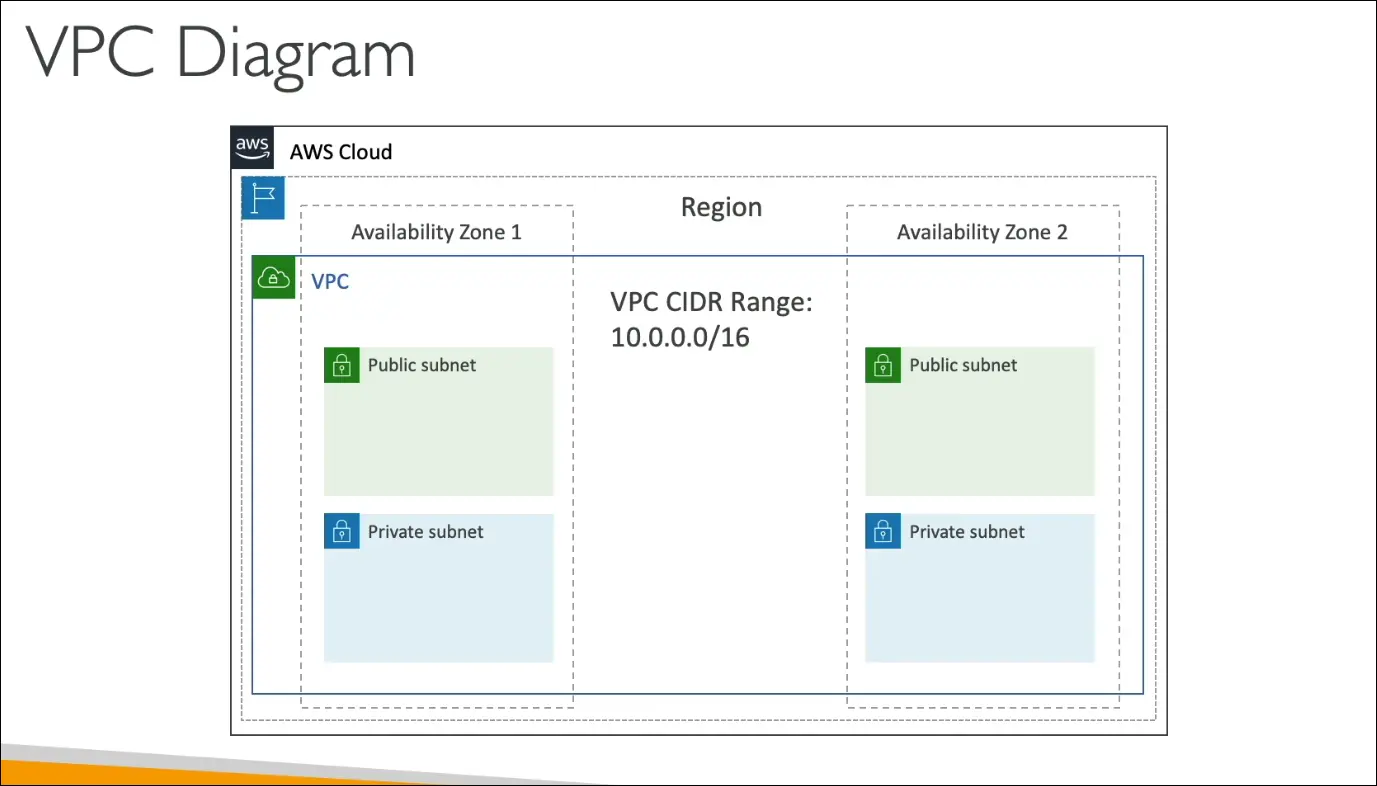
- CIDR Range (Classless Inter-Domain Routing) defines the IP address range of a VPC. Example:
10.0.0.0/16.
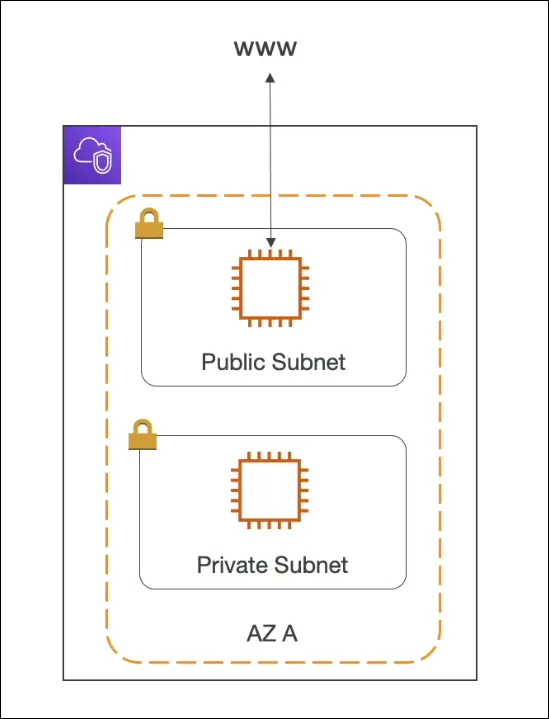
Subnets
| Type | Description | Typical Use |
|---|---|---|
| Public Subnet | Has direct access to the internet through an Internet Gateway (IGW). | EC2 instances that need to be reachable from the internet, Load Balancers. |
| Private Subnet | No direct access from the internet. Can still access the internet indirectly (via NAT). | Databases, backend servers, internal applications. |
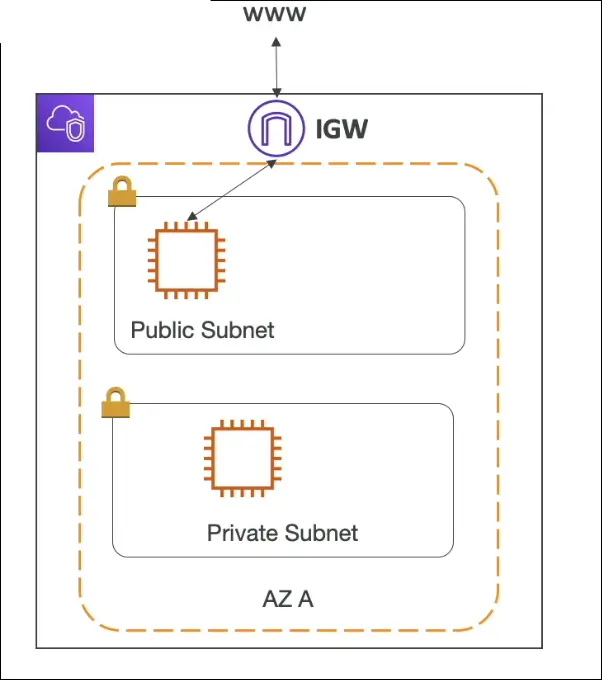
- Subnets are made public when their route tables include a route to an Internet Gateway.
Route Tables
- Route Tables define how traffic flows between subnets and to external networks.
- Public subnet route → Internet Gateway (IGW).
- Private subnet route → NAT Gateway or NAT Instance (for outbound internet access).
Internet Gateway (IGW)
- A managed AWS component that allows communication between VPC and the internet.
- Must be attached to a VPC.
- Used by public subnets for inbound/outbound internet access.
NAT Gateway / NAT Instance
| Feature | NAT Gateway (Managed) | NAT Instance (Self-managed) |
|---|---|---|
| Purpose | Allows private subnet instances to access the internet outbound only. | Same purpose, but requires user maintenance. |
| Location | Must be in a public subnet. | Must be in a public subnet. |
| Inbound Access | Not allowed from the internet. | Not allowed (by default). |
| Use Case | Update servers, download patches, access external APIs. | Custom configurations. |
Flow Example:
Private subnet → NAT Gateway → Internet Gateway → Internet
Multi-AZ VPC Example
- Example layout:
- Region → contains one VPC
- VPC → spans two AZs
- Each AZ → has one public and one private subnet
- Total: 1 VPC, 2 AZs, 4 Subnets (2 public + 2 private)
- EC2 instances can be deployed in any subnet.
Key Exam Tips
- VPC = isolated private network in AWS.
- Public subnet = has route to Internet Gateway.
- Private subnet = no direct internet route.
- NAT Gateway = outbound internet for private subnets only.
- Internet Gateway = inbound/outbound internet access for public subnets.
- VPCs are region-scoped, subnets are AZ-scoped.
Network Security in VPC
Two Main Security Layers
- Network ACL (NACL) — subnet-level firewall
- Security Group (SG) — instance-level firewall
These work together to secure traffic to and from your EC2 instances inside a VPC.
Network ACL (NACL)
Definition
- A firewall that operates at the subnet level.
- Controls inbound and outbound traffic for subnets.
- Rules are evaluated in order, starting from the lowest rule number.
Characteristics
| Feature | Description |
|---|---|
| Scope | Subnet-level |
| Rules | Can ALLOW or DENY traffic |
| Direction | Separate inbound and outbound rules |
| Statefulness | Stateless — return traffic must be explicitly allowed |
| Default NACL | Allows all inbound and outbound traffic |
| Custom NACLs | Start with DENY ALL rules (must explicitly allow) |
| Rules use | Only IP addresses (no SG references) |
Example
- A subnet has a NACL allowing only HTTPS (443) inbound and outbound.
- All other ports/traffic are denied by default.
Exam Tip
- NACL = stateless, subnet-level, can ALLOW or DENY.
Security Groups (SG)
Definition
- A firewall that operates at the instance level (ENI level).
- Controls traffic to and from EC2 instances.
Characteristics
| Feature | Description |
|---|---|
| Scope | Instance-level |
| Rules | ALLOW only (no DENY rules) |
| Direction | Separate inbound and outbound rules |
| Statefulness | Stateful — return traffic automatically allowed |
| References | Can reference IP addresses or other security groups |
| Default SG | Allows no inbound, but all outbound traffic |
Example
- Allow inbound SSH (22) from your IP.
- Allow inbound HTTP (80) from anywhere.
- Automatically allows responses (stateful).
Exam Tip
- Security Group = stateful, instance-level, ALLOW-only.
NACL vs Security Group (Comparison)
| Feature | Network ACL (NACL) | Security Group (SG) |
|---|---|---|
| Scope | Subnet-level | Instance-level |
| Rules | ALLOW & DENY | ALLOW only |
| Statefulness | Stateless | Stateful |
| Return Traffic | Must be explicitly allowed | Automatically allowed |
| References | IP addresses only | IPs or other SGs |
| Default Behavior | Allows all | Denies all inbound, allows all outbound |
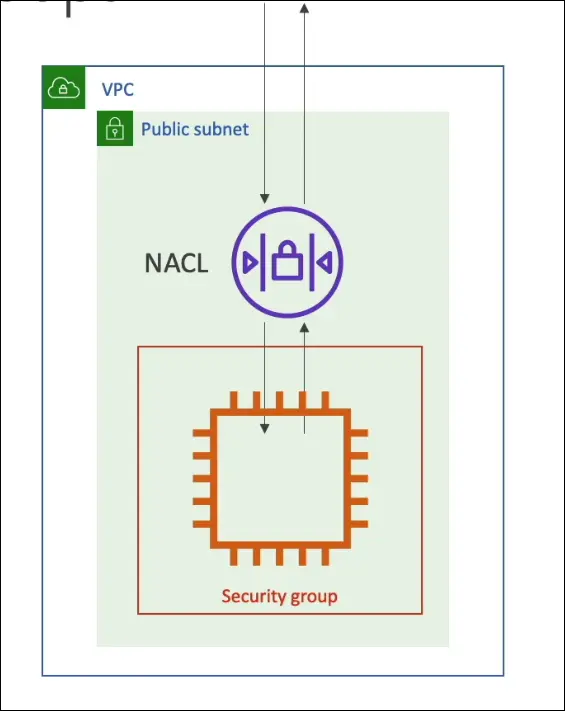
Default Behavior in AWS
- Every VPC automatically comes with a default NACL and default SG.
- Default NACL → allows all inbound/outbound traffic.
- Default SG → allows all outbound, no inbound unless specified.
Practical Example (from AWS Console)
- Navigate to VPC > Security > Security Groups to view existing groups.
- Each SG shows its inbound and outbound rules.
- Navigate to VPC > Security > Network ACLs to view subnet-level ACLs.
- Each NACL is associated with one or more subnets.
Summary for Exam
NACL → subnet-level, ALLOW/DENY, stateless, IP-based
Security Group → instance-level, ALLOW-only, stateful, can reference SGs
Return traffic → automatic for SG, manual for NACL
Default NACL → allows all, Default SG → allows outbound only
VPC Flow Logs
Definition:
VPC Flow Logs capture information about IP traffic going to and from network interfaces in your VPC.
Levels of Flow Logs:
- VPC Flow Log (entire VPC)
- Subnet Flow Log (specific subnet)
- ENI Flow Log (specific Elastic Network Interface, e.g., EC2)
Purpose:
- Monitor and troubleshoot connectivity issues:
- Subnet not connecting to the Internet
- Subnet-to-subnet connectivity problems
- Internet unable to reach a subnet
- Analyze traffic for EC2, Load Balancers, RDS, Aurora, ElastiCache, etc.
Destinations (where logs are sent):
- Amazon CloudWatch Logs
- Amazon S3
- Amazon Kinesis Data Firehose
Configuration Options:
- Filter:
- All traffic
- Accepted traffic
- Rejected traffic
- Aggregation Interval:
- 1 minute or 10 minutes
- Log Format Fields:
Version, Account ID, Interface ID, Source & Destination IPs, Ports, Protocol, Packets, Bytes, Start/End time, Action, Log status
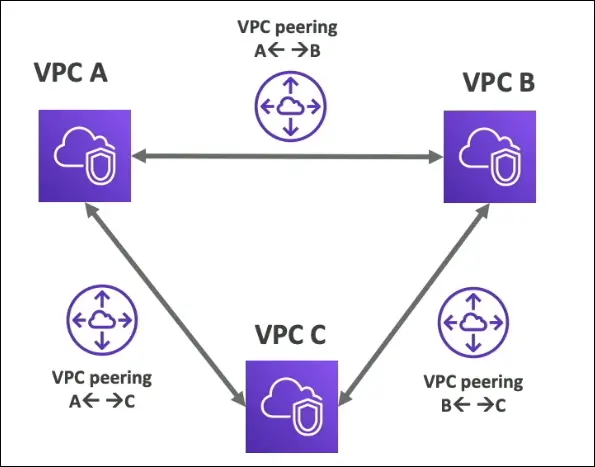
VPC Peering
Definition:
VPC Peering allows two VPCs to communicate privately using AWS’s internal network.
Behavior:
- The two VPCs behave as if they are part of the same network.
- Useful for interconnecting workloads across different VPCs, accounts, or regions.
Key Rules:
- No overlapping CIDR blocks allowed between the VPCs.
- Not transitive:
- If A↔B and A↔C are connected, B and C cannot talk unless you also create B↔C peering.
- Traffic routing:
- Update route tables in both VPCs to allow communication.
Cross-region / cross-account peering:
Possible between VPCs in the same or different regions/accounts (requires acceptance by the other VPC owner).
Exam Tips
- Flow Logs = Monitor traffic, find connectivity issues.
- Peering = Private connection between non-overlapping VPCs, not transitive.
- Flow Logs destinations = S3, CloudWatch, Firehose.
- Flow Logs levels = VPC, Subnet, ENI.
VPC Endpoints (Private Access to AWS Services)
Concept
- Normally, AWS services are accessed publicly via the internet.
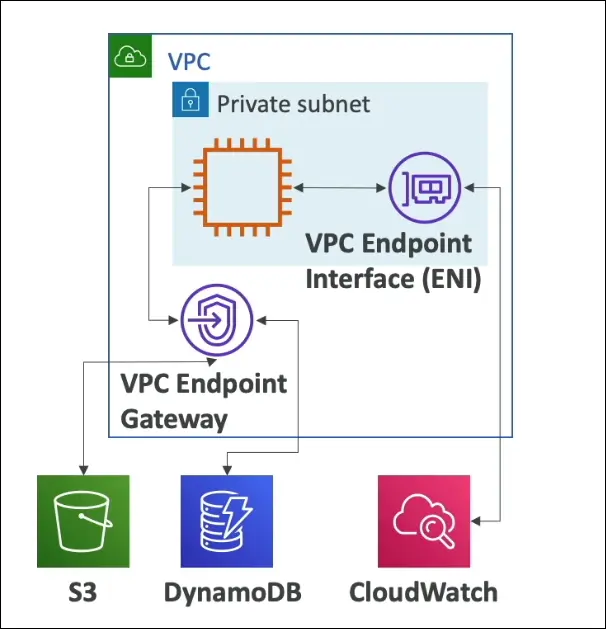
- VPC Endpoints allow private access to AWS services within the AWS network, avoiding the public internet.
Benefits
- Better Security – no public internet exposure.
- Lower Latency – traffic stays within the AWS backbone.
Types of VPC Endpoints
Gateway Endpoint
- Used only for:
- Amazon S3
- Amazon DynamoDB
- Traffic to these services flows privately through the gateway.
- Configured at the route table level of your VPC/subnet.
🗝️ Remember:
👉 Gateway Endpoint = S3 + DynamoDB only
Interface Endpoint (PrivateLink)
- Used for most other AWS services, for example:
- CloudWatch
- EC2
- SSM
- SNS, SQS, etc.
- Creates an Elastic Network Interface (ENI) in your subnet that connects privately to the service.
🗝️ Remember:
👉 Interface Endpoint = For all other services (via PrivateLink)
Configuration Overview
- Go to VPC Console → Endpoints → Create Endpoint
- Choose:
- Service Type: AWS services
- Service Name: e.g., S3, CloudWatch
- Select:
- VPC
- Subnet(s) (for interface endpoint)
- Route Table(s) (for gateway endpoint)
- Define policy, security groups, and DNS settings if needed.
Exam Tips
- Only S3 and DynamoDB support Gateway Endpoints.
- All other services use Interface Endpoints (PrivateLink).
- VPC endpoints improve security and performance.
- No need for Internet Gateway (IGW), NAT Gateway, or VPN to access AWS services privately.
AWS PrivateLink
Definition
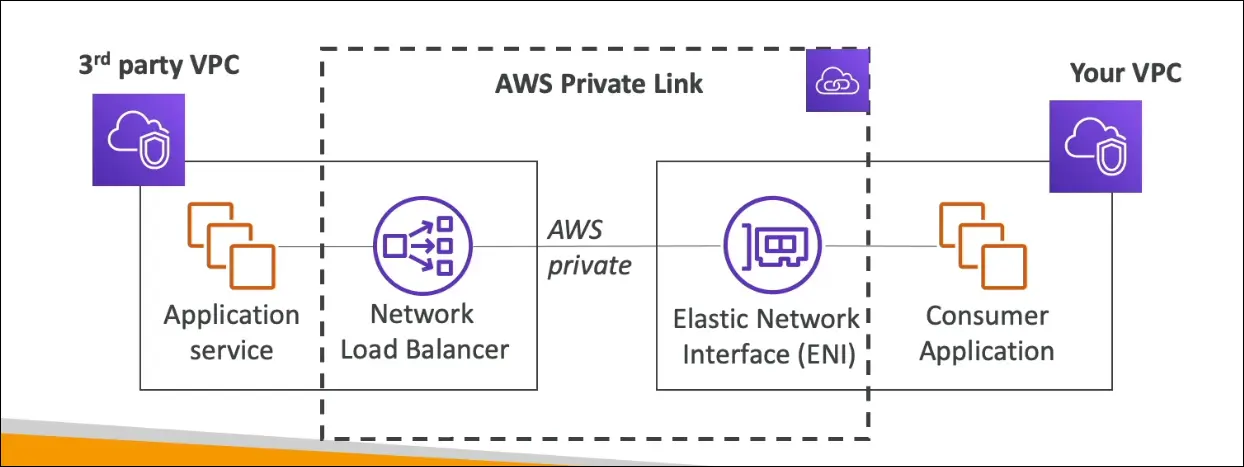
AWS PrivateLink enables private connectivity between VPCs, AWS services, or third-party services without using the public internet.
It is part of the VPC Endpoint Services family.
Purpose
- Provides secure, private communication over the AWS internal network.
- Replaces VPC peering for scalable, secure, and simple service sharing.
- Commonly used by vendors (SaaS providers) or marketplace services to expose applications privately to customers.
How It Works
- Service Provider (Vendor side)
- Hosts a service in their own VPC.
- Creates a Network Load Balancer (NLB) to expose the service.
- Enables it as a VPC Endpoint Service.
- Service Consumer (Customer side)
- Creates an Interface Endpoint (Elastic Network Interface) in their own VPC.
- Connects privately to the vendor’s service through PrivateLink.
- Traffic Path:
- Communication stays within AWS’s private network (no public internet, NAT, or VPN).
Key Benefits
No exposure to the public internet
Simplified network management
Highly scalable (each new customer just creates a new endpoint)
Reduced complexity compared to VPC peering
Exam Tips
- PrivateLink connects VPCs privately via Network Load Balancers.
- VPC Peering connects entire VPCs (non-scalable and not private by default).
- PrivateLink = secure, private access to a service across VPCs/accounts/regions.
- Traffic never leaves the AWS internal network.
Hybrid Cloud Connectivity
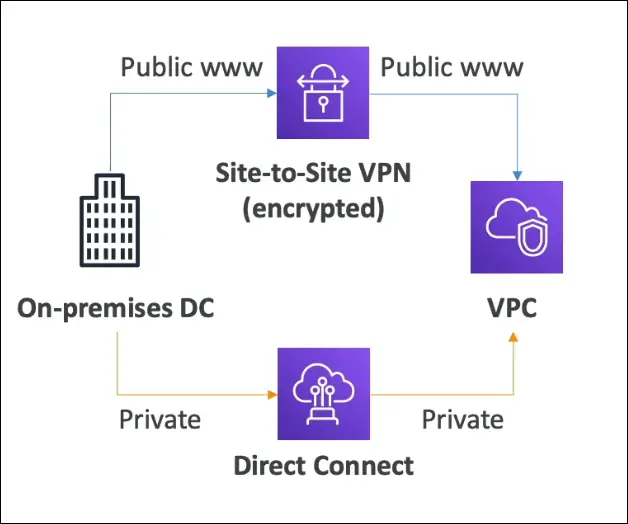
Hybrid Cloud = Connecting on-premises data center with AWS Cloud (VPC). There are two main options for hybrid connectivity:
- Site-to-Site VPN
- AWS Direct Connect (DX)
Site-to-Site VPN
Definition:
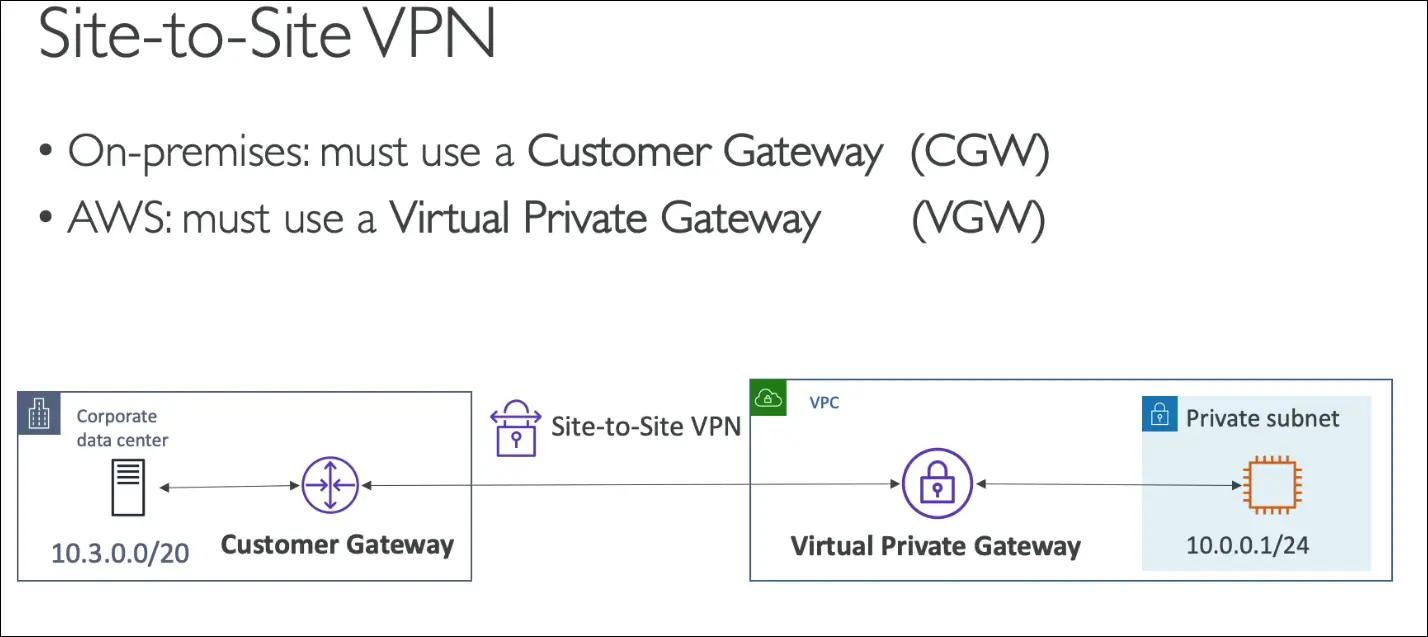
Encrypted connection between on-premises data center and AWS VPC over the public internet.
Features:
- Encrypted IPsec tunnel
- Uses public internet
- Quick to set up (~5 minutes)
- Lower cost, but less reliable and limited bandwidth
Use Case:
Temporary or quick connection setup between on-premises and AWS.
Components:
- Customer Gateway (CGW): On-premises side
- Virtual Private Gateway (VGW): AWS side
Exam Tip:
🧠 To establish Site-to-Site VPN, you need CGW (customer) + VGW (AWS).
AWS Direct Connect (DX)
Definition:
A dedicated private physical connection between on-premises and AWS.
Features:
- Traffic flows over private AWS network (not public internet)
- High bandwidth, low latency, secure, reliable
- More expensive and takes weeks (≈1 month) to set up
- Requires connection through Direct Connect partner
Use Case:
When you need consistent performance, high data transfer, or private link.
Comparison: Site-to-Site VPN vs Direct Connect
| Feature | Site-to-Site VPN | Direct Connect |
|---|---|---|
| Connection Type | Encrypted over Public Internet | Private Physical Connection |
| Setup Time | Minutes | Weeks |
| Cost | Low | High |
| Speed/Bandwidth | Limited | High |
| Reliability | Medium | Very High |
| Security | Encrypted but public | Private and secure |
| Use Case | Quick setup, backup | Long-term, high performance |
🧾 Exam Summary
- Hybrid cloud = On-premises + AWS VPC
- Site-to-Site VPN → Fast, cheap, encrypted, public internet
- Direct Connect (DX) → Slow to set up, private, fast, reliable
- VPN needs: CGW + VGW
- Choose VPN for quick setup or temporary use
- Choose DX for secure, high-performance, private connections
AWS Client VPN
Definition
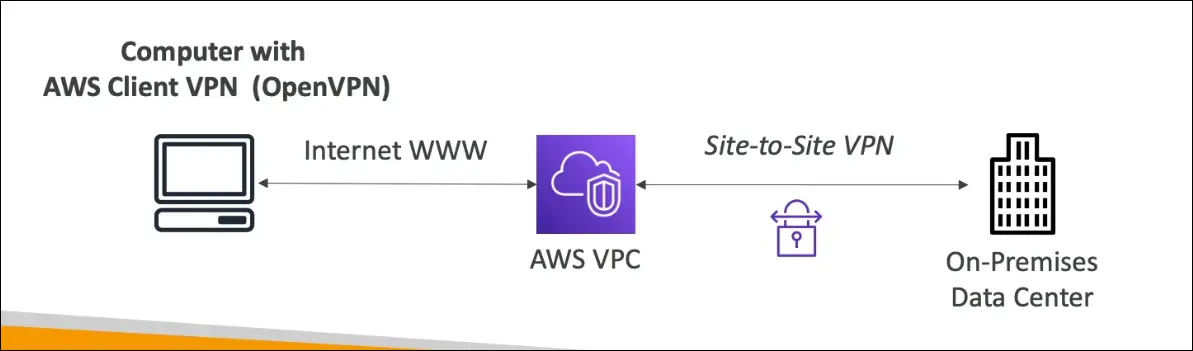
AWS Client VPN is a managed, scalable VPN service that allows individual users (clients) to securely connect from their computers to AWS VPC or on-premises networks using OpenVPN protocol.
Purpose / Use Case
- Allows a user’s computer to securely connect to a private VPC over the public internet.
- Enables access to private resources (like EC2 instances in private subnets) using private IPs.
- Useful for developers, admins, or remote employees who need secure access to internal AWS networks.
How It Works
- The Client VPN software (OpenVPN-based) is installed on the user’s computer.
- The connection is established over the public internet to AWS Client VPN endpoint.
- Once connected, the user’s machine behaves as if it is inside the VPC.
- The user can access EC2 instances or other private resources using private IPs.
- If the VPC is also connected to on-premises data center (via Site-to-Site VPN),
→ the user can securely access on-prem servers as well.
Key Points for Exam
| Concept | Explanation |
|---|---|
| Protocol Used | OpenVPN |
| Connection Type | Over public internet (encrypted) |
| Access Level | Individual user-level (client) |
| Main Benefit | Secure remote access to private AWS or on-prem networks |
| Integrates With | VPC and optionally Site-to-Site VPN for hybrid access |
Summary
- Site-to-Site VPN → Connects networks (on-prem to AWS).
- Client VPN → Connects individual users (laptops/desktops) to AWS.
- Enables private access without exposing resources to the public internet.
AWS Transit Gateway (TGW)
Definition
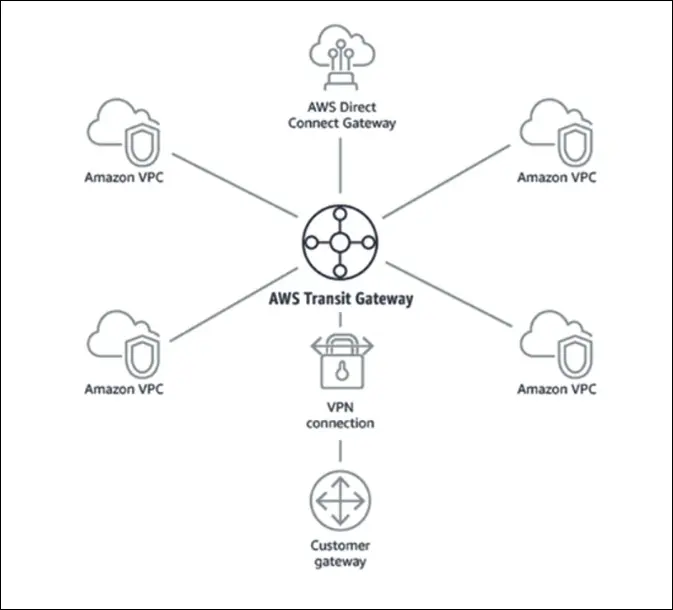
AWS Transit Gateway is a central hub that allows you to connect multiple VPCs, on-premises networks, and VPNs together in a hub-and-spoke model.
It simplifies complex network topologies and replaces the need for multiple VPC peering connections.
Why It Exists
- When you have many VPCs and on-premises connections, managing individual peering links and routing tables becomes messy.
- Transit Gateway provides a single, centralized gateway to manage and route traffic between all networks.
How It Works
- All VPCs, Direct Connect Gateways, and Site-to-Site VPNs connect to one Transit Gateway.
- The TGW acts as a hub, and each VPC acts as a spoke in the topology.
- No need for VPC peering between every pair of VPCs.
- Simplifies routing and scales to thousands of VPCs.
Supports
Amazon VPCs
VPN connections
AWS Direct Connect Gateways
On-premises networks
Exam Tip
| Scenario | AWS Service |
|---|---|
| Connect 2 VPCs directly | VPC Peering |
| Connect On-premises to AWS over internet | Site-to-Site VPN |
| Connect On-premises to AWS privately | Direct Connect |
| Connect many VPCs and on-prem together (hub-and-spoke) | Transit Gateway |
Key Benefits
- Centralized network management
- Scalable and simplified routing
- Integration with hybrid architectures
- Works across multiple AWS accounts
Summary
Transit Gateway = “Network Hub” for multi-VPC and hybrid connections
If you see hundreds or thousands of VPCs + on-premises systems, the correct answer is Transit Gateway.
Amazon VPC (Virtual Private Cloud) Summary
Core Concepts
- VPC stands for Virtual Private Cloud — your isolated private network within AWS.
- Subnet: a subdivision of your VPC, tied to a specific Availability Zone.
Internet Connectivity
- To allow internet access → attach an Internet Gateway (IGW) to your VPC.
- Private instances (in private subnets) need a NAT Gateway or NAT Instance for outbound internet traffic.
Firewalls
- Network ACL (NACL):
- Operates at subnet level.
- Stateless (each request and response is evaluated separately).
- Controls inbound and outbound traffic rules.
- Security Groups (SGs):
- Operate at instance (EC2/ENI) level.
- Stateful (responses are automatically allowed).
- Control inbound/outbound rules for individual instances.
Elastic IPs
- Static public IPv4 addresses.
- Incurs cost if not attached to a running instance.
Connecting VPCs
- VPC Peering: Connects two VPCs privately if they have non-overlapping CIDR blocks.
- Non-transitive (A↔B and B↔C doesn’t mean A↔C).
Private Connectivity to AWS Services
- VPC Endpoints:
- Allow private access to AWS services (e.g., S3, DynamoDB) without internet.
- AWS PrivateLink:
- Enables private connection to third-party or other VPC services through Network Load Balancer.
Network Monitoring
- VPC Flow Logs: capture network traffic metadata for analysis and troubleshooting.
Hybrid Connectivity (On-Prem ↔ AWS)
- Site-to-Site VPN:
- Secure IPsec connection over the public internet between on-premises data center and AWS.
- Client VPN:
- Lets individual users connect securely from their local computers using OpenVPN.
- AWS Direct Connect:
- Provides dedicated private fiber connection from on-premises to AWS, bypassing the internet.
Large-Scale Connectivity
- Transit Gateway (TGW):
- Central hub for connecting multiple VPCs, VPNs, and Direct Connect links.
- Simplifies management of thousands of connections.
Exam Focus
- Know when to use IGW, NAT, NACL, SG, Peering, PrivateLink, VPN, Direct Connect, and TGW.
- Understand stateful vs stateless firewalls.
- Recognize private vs public access scenarios.
- Be clear on VPC Peering vs Transit Gateway and PrivateLink vs VPC Endpoint.